10
5
MEMORY PROGRAMMING
■ Memory names
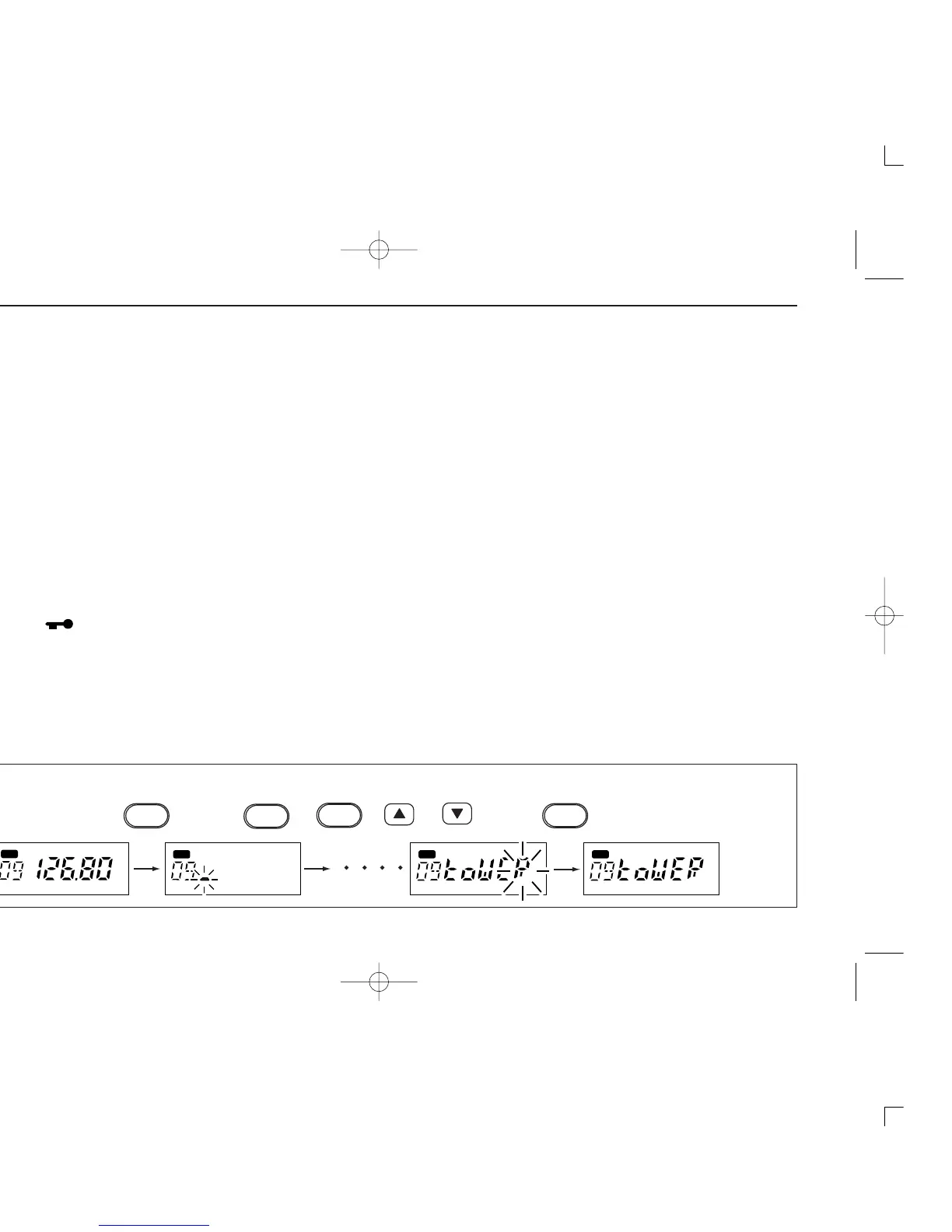
ï Programming memory names
q Select the memory channel to be programmed:
➥ Push [V/M] to select memory mode.
➥ Push [Y] or [Z] to select the memory channel.
w Push [M/W] for 5 sec. to enter memory name writing mode.
• The first character of the name flashes.
e Push [SCAN] or [SQL] as many times as necessary to
enter the desired name.
• To erase a character, overwritet with a space (displayed as _).
•To move the cursor forwards or backwards, use [Y] or [Z].
• Push [
] for 2 sec. to erase all characters.
r Push [M/W] to input the set name.
• Flashing stops.
•Memory channels can be programmed with names of up to 5
characters in length.
•When no name is programmed, the display shows the operating
frequency.
• The following characters can be used in names:
➥ 0 to 9, A to Z (capitals), (space), “-”, #, $, &, (, ), “,”, •, /,
<, >, =, “, ‘, ?, ! and @.


 To Next Page