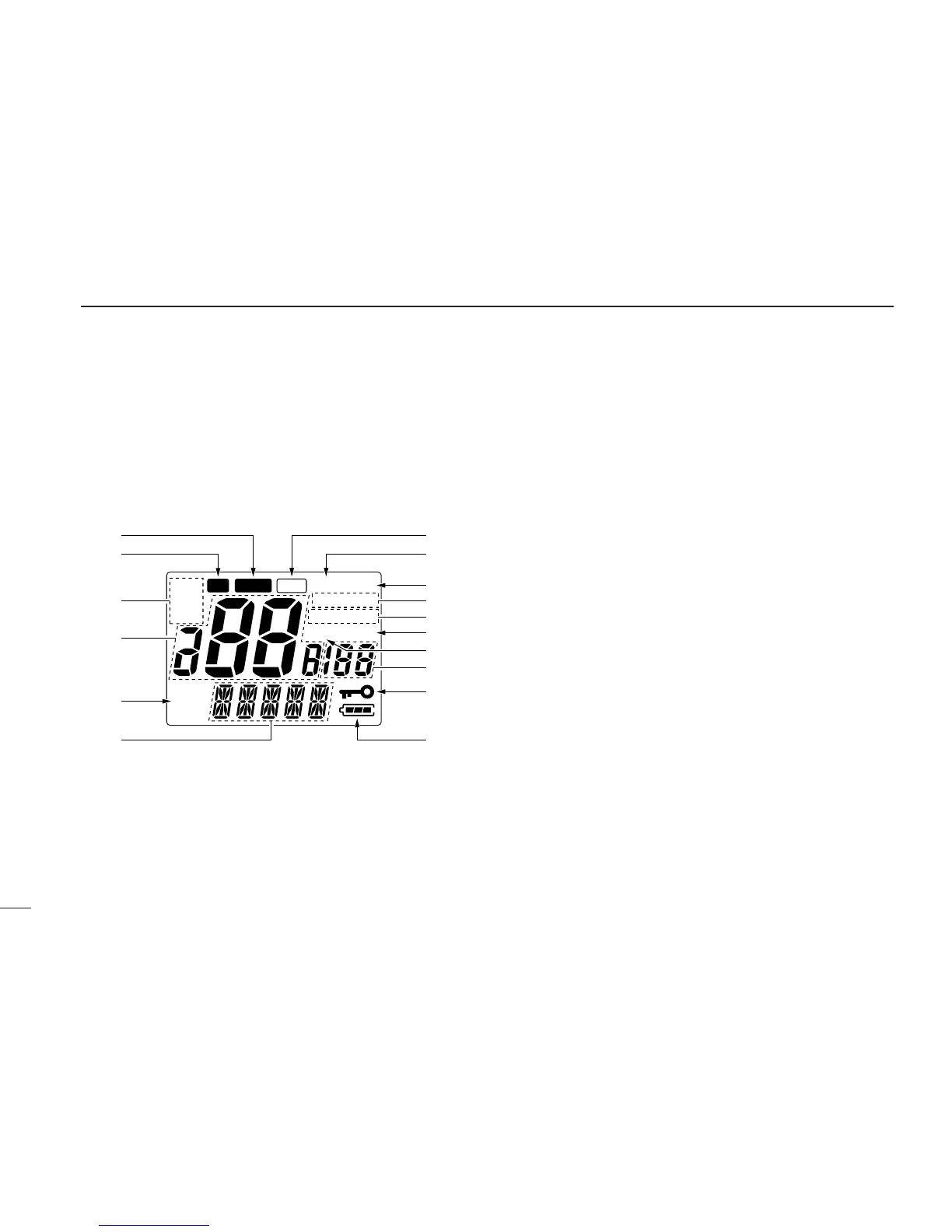
■ Function display
q BUSY INDICATOR (p. 9)
Appears while receiving a signal or while the squelch is
open.
w TRANSMIT INDICATOR (p. 9)
Appears while transmitting.
e CHANNEL GROUP INDICATORS (p. 8)
Appears “USA” when U.S.A.; “INT” when International;
“CAN” when Canadian channel group is selected.
r CHANNEL NUMBER READOUT
•Indicates the selected operating channel number.
(pgs. 7, 8)
•In SET mode, indicates the selected condition.
(pgs. 16–19)
t ATIS INDICATOR
Appears while ATIS function is activated. (German version
only)
y COMMENT INDICATOR
•Indicates or scrolls operating channel comment, etc.
(pgs. 7, 13, 15)
•In SET mode, indicates or scrolls the selected item.
(pgs. 16–19)
PANEL DESCRIPTION
4
2


 To Next Page