25
7
DSC OPERATION
1
2
3
4
5
6
7
8
9
10
11
12
13
14
15
16
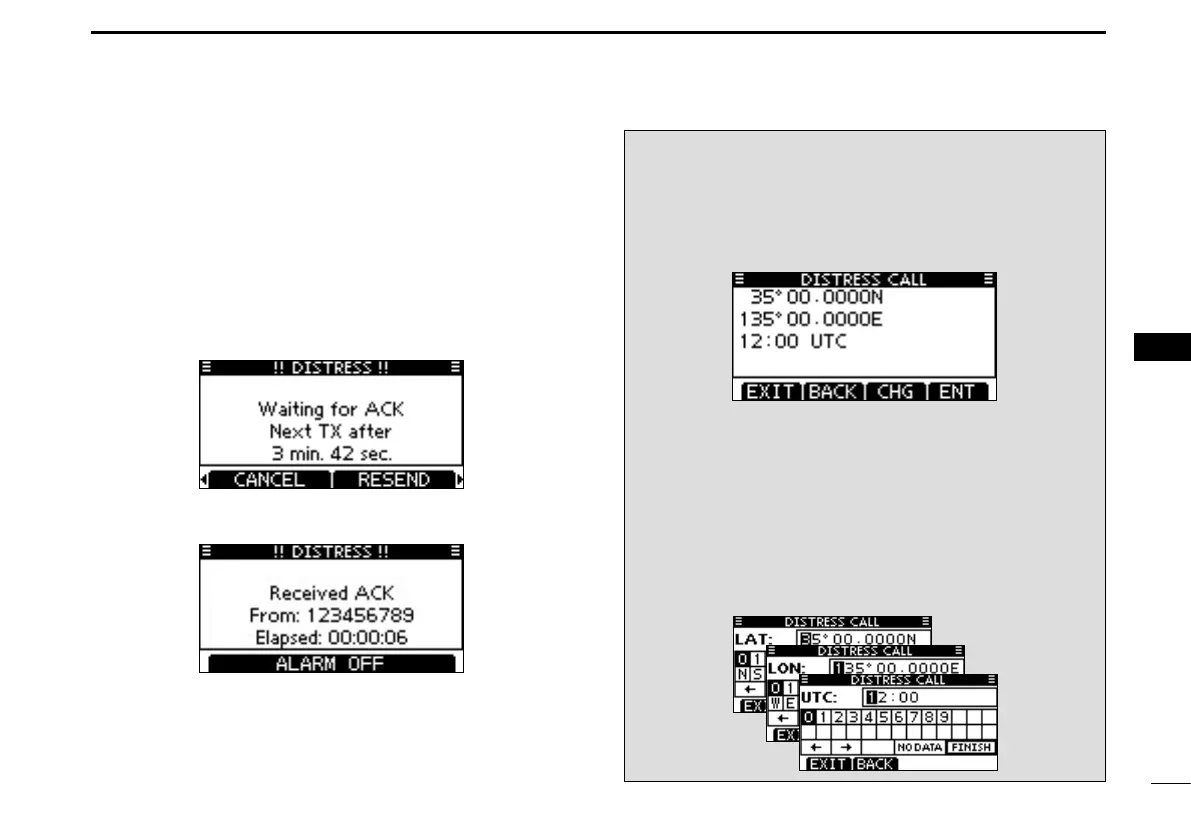
After transmitting the call, the transceiver waits for an ac- t
knowledgment call.
•The Distress call is automatically transmittedevery 3.5 to 4.5
minutes, until an acknowledgement is received (‘Call repeat’
mode), or DSC cancel call is made (p. 26).
•Push[RESEND]tomanuallytransmittheDistressrepeatcall.
•Push [Ω]/[≈] then push [INFO] to display the transmitted Dis-
tress call information.
•Push[Ω]/[≈] then push [PAUSE] to pause the ‘Call repeat’ mode,
push [RESUME] to resume it.
After receiving an acknowledgment call, push [ALARM y
OFF] then reply using the microphone.
A distress alert contains: ➥
•Natureofdistress: Selectedinstepw.
•Positioninformation: The latest GPS or manually entered
position is held for 23.5 hours, or until
the power is turned OFF.
When no GPS receiver is connected and built-in GPS re-
ceiver* is not receiving valid position data, and both posi-
tion and time have been manually entered, the screen as
shown below is displayed. Edit your latitude and longitude
position and UTC time as follows:
*For only IC-M323G and IC-M324G.
Push [CHG], then edit your latitude and longitude posi- ➥
tion and UTC time.
•SelectadesirednumberusingDial,or[Y]/[Z]/[Ω]/[≈].
•Push[ENT]orDialtosetit.
•Tomovethecursor,selecteitherarrow,“←” or “→,” then push
[ENT] or Dial.
•SelectN(Northlatitude)orS(Southlatitude)whenthecursor
is on the ‘N’ or ‘S’ position.
•SelectW(Westlongitude)orE(Eastlongitude)whenthecur-
sor is on the ‘W’ or ‘E’ position.



 To Next Page