11
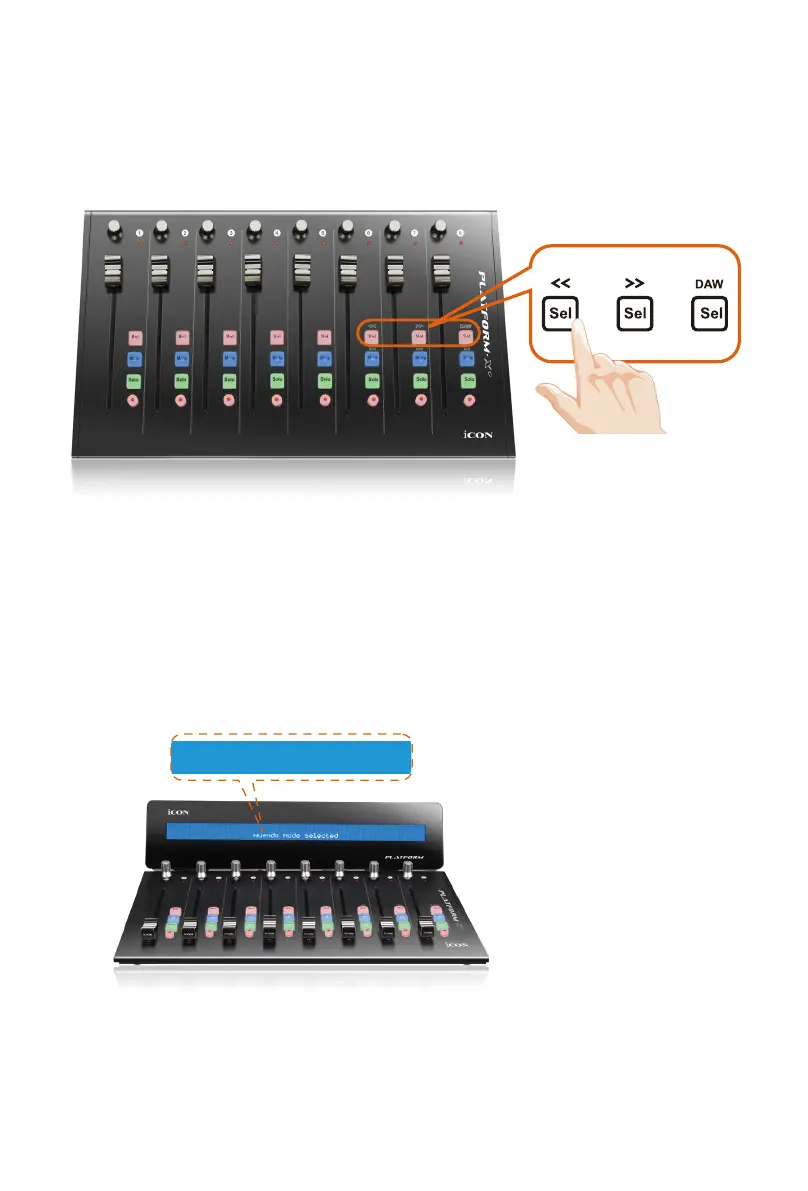
2. Select the DAW.
Press << (channel 6’s “Sel” button)/>> (channel 7’s “Sel” button) to scroll through
the DAW list, and then press the “DAW” (channel 8’s “Sel” button) button to
make the selection.
Cubase Mode Selected
Platform X+
& Platform D / Platform D2
The DAW name will display on the LCD while you are scrolling through the
list to make the selection if Platform D / Platform D2 (optional) is installed.
Otherwise, the 9 channel’s LED indicator lights located on the top will indicate
the DAW. The sequence is as follows:
Channel 1 LED: MCP (Nuendo / Cubase / Samplitude / Ableton Live / Reaper /
Studio One / Reason / Bitwig / Sonar / Audition / FL Studio / Digital Performer)
Channel 2 LED: Logic Pro
Channel 3 LED: HUI (Pro Tools)
Channel 4 LED: User dene
Tip: Platform X+ will memorise your last selected DAW mode and re-enter the
same mode a few seconds after it has been switched on. (i.e. DAW mode
selection is not needed if the last mode is being used.)



 To Next Page