7
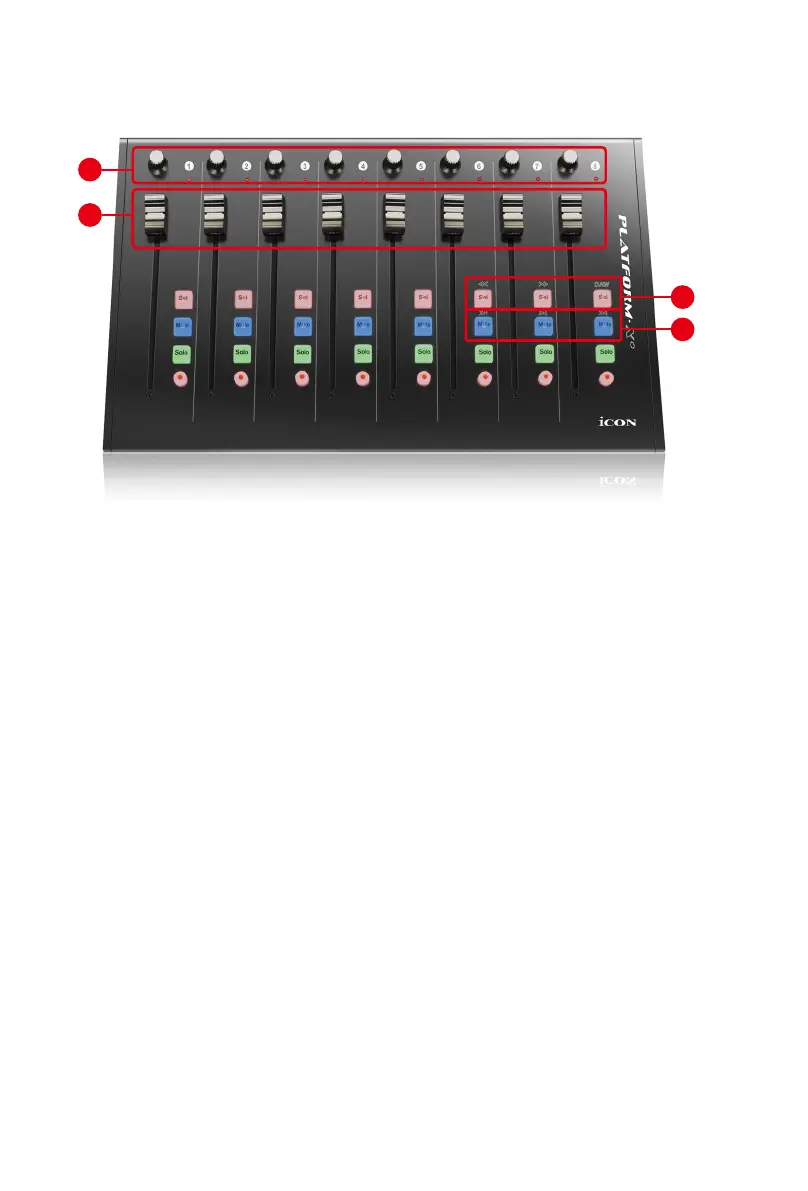
Front Panel Layout
1. Channel faders
The eight 100mm motorized faders are generally used for controlling the track
volume of your DAW. They are all touch sensitive to allow override automation
the moment you touch a fader. Also, they are motorized; they will automatically
move to reect the current level of the selected channels in your DAW
application. Any automation recorded in a project will be reected by the fader
positions.
2. Knobs
The eight rotary encoder knobs are generally used for controlling the track pan
position, aux send levels and EQ of your DAW. You may also preset them to
adjust specic parameters within plug-ins and virtual instruments.
(Note: Due to the sofwtare issue, some of these functions such as “Plug-ins”
is not able to use on the Platform X+ when it is connect as a extender unit with
Platform M+ on ProTools.)
3. DAW Selector section
Platform X+ has built-in Mackie Control protocols & HUI for different DAW such as
Cubase
TM
, Samplitude
TM
, Ableton Live
TM
, Logic Pro
TM
and ProTools
TM
By selecting
the correct DAW and Mackie control (HUI) protocol, Platform X+ has automatically
mapped the major functions and work seamlessly with that DAW.
Note: Function operates slightly difference between DAWs. Please refer to your
DAW manual for each function. The following description is based on the functions
that operate in Apple Logic Pro.
3
4
2
1



 To Next Page