24
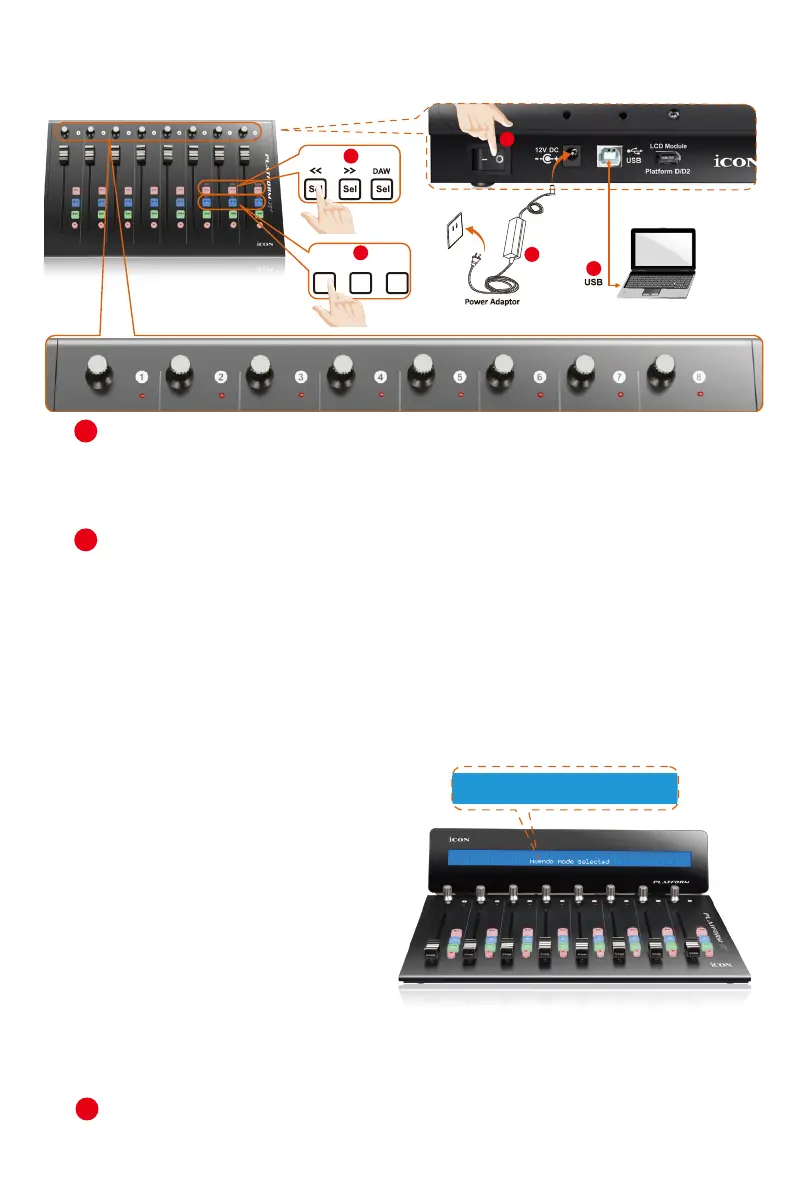
1. Connect the Platform X+ to your Mac/PC via the USB port
Choose a USB port on your Mac/PC and insert the wide (at) end of the USB
cable. Connect the cable’s other end to the Platform X+. Your Mac/PC should
automatically “detect” the new hardware and notify you that it is ready to use.
2. Select the DAW at Platform X+.
Press << (channel 6’s “Sel” button)/>> (channel 7’s “Sel” button) to scroll through
the DAW list, and then press the “DAW” (channel 8’s “Sel” button) button to
make the selection.
The DAW name will display on the LCD while you are scrolling through the
list to make the selection if Platform D / Platform D2 (optional) is installed.
Otherwise, the 9 channel’s LED indicator lights located on the top will indicate the
DAW. The sequence is as follows:
Channel 1 LED: MCP (Nuendo / Cubase / Samplitude / Ableton Live / Reaper /
Studio One / Reason / Bitwig / Sonar / Audition / FL Studio / Digital Performer)
Channel 2 LED: Logic Pro
Channel 3 LED: HUI (Pro Tools)
Channel 4 LED: User dene
Tip: Platform X+ will memorise your last selected DAW mode and re-enter the
same mode a few seconds after it has been switched on. (i.e. DAW mode
selection is not needed if the last mode is being used.)
3. Select unit number
Select “unit number 1”.
Esc
F1
F2
F3
F4
F5
F6
F7
F8
F9
F10
F11
F12
Prtsc
sysrq
pause
Break
Lns
Del
Home
Pgup
PgDN
End
$
~
`
!
1
··
2
3
4
5
6
7
78
9
0
)
)
*
—
-
+
=
#
¥
%
*
#
#
Q
W
E
R
T
Y
U
I
O
P
{
}
|
A
S
D
F
G
H
J
K
L
:
;
Z
X
C
V
B
N
M
<
>
?
Tab
CapsLook
Shift
Ctrl
Alt AltGr
Ctrl
Backspace
[
]
|
Enter
Shift
intel
3
2
1
MuteMute
X+1 X+2 X+3
Mute
4
5
LED① = MCP (Nuendo / Cubase / Samplitude / Ableton Live / Reaper / Studio One / Reason / Bitwig / Sonar / Audition / FL Studio / Digital Performer)
LED② = Logic Pro
LED③ = HUI (Pro Tools)
LED④ = User define
2
4
Connecting Your Platform X+ Controller
(Standalone device)
5
Cubase Mode Selected
Platform X+
& Platform D / Platform D2



 To Next Page