BIA-DPC1 rev 4 Page 37
5.0 OPERATION
5.1 BEFORE YOU START – Parameter calibration and erasing.
To achieve best level of protection of the pump, it is essential that parameter calibration be done immediately
after successful pump installation or pump maintenance.
Setting the parameter calibration.
Pump/s must be able to pump water to enable correct calibration. If pumps are calibrated without water,
overload and pump stalled errors may occur later.
If calibration is required without water, please contact White International for advice.
Press the MODE key to switch to manual state. If the control panel is locked press MODE and STORE keys at
the same time to unlock and go into manual mode. Make sure that the pump is not running and LCD screen is
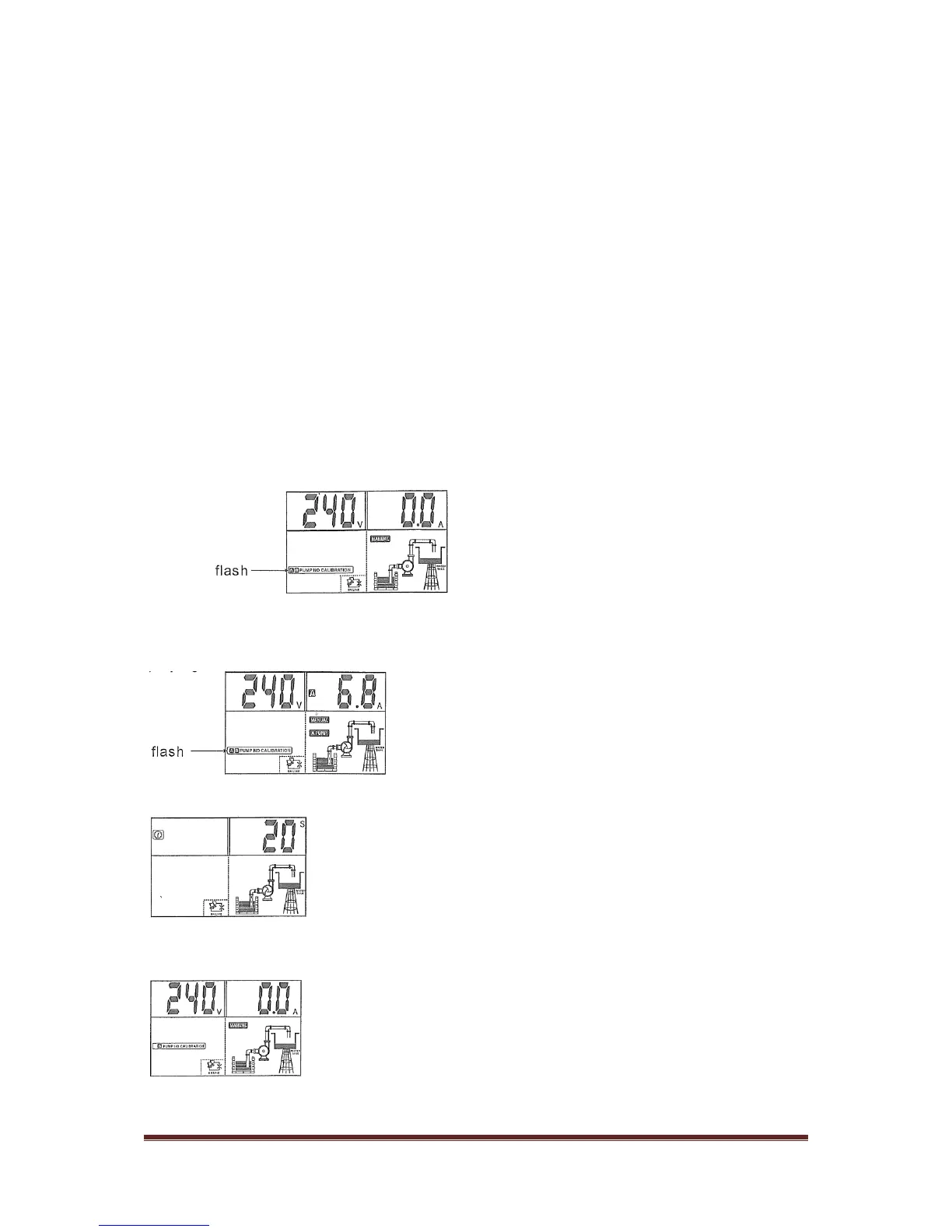
displaying:
Press the A START key to run pump A, confirm the pump and all pipe network is in normal working state
(including voltage, amps etc) with LCD screen displaying:
Press the STORE button. The control panel makes a “beep” and a countdown starts with the LCD displaying:
Control now counts down from 5 seconds.
The pump stops running and parameter calibration is completed with LCD displaying:
Press the B START key to repeat calibration for pump B.


 To Next Page