10
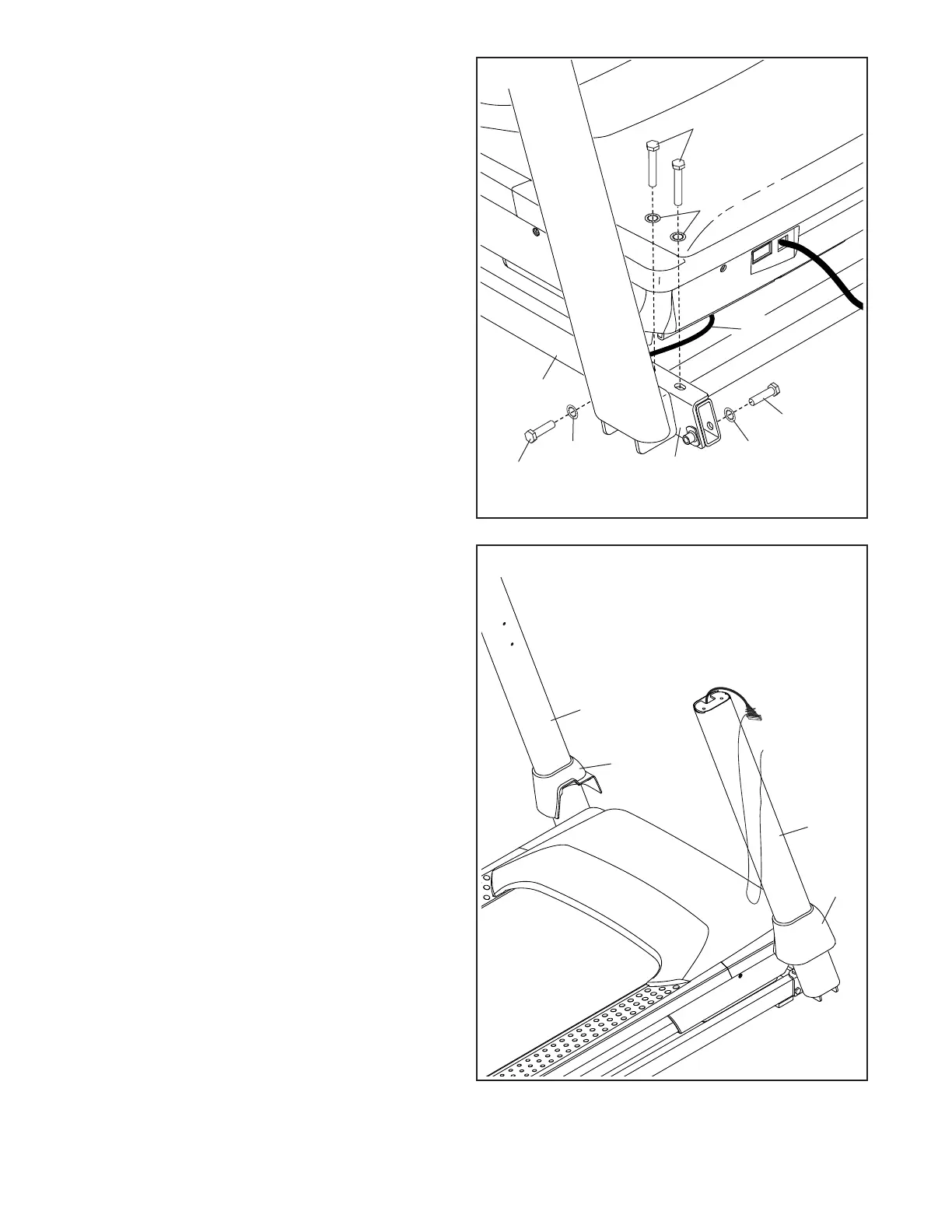
5. Identify the Left and Right Base Covers (82, 83).
Slide the Left and Right Base Covers onto the
Left and Right Uprights (89, 90) as shown.
83
90
82
89
5
4
63
62
13
94
13
90
7
13
81
4. Hold the Right Upright (90) against the Base
(94). Make sure not to pinch the Upright Wire
(81).
Next, attach a 3/8" x 1 3/4" Screw (62) with a
3/8" Star Washer (13) as shown; do not fully
tighten the Screw yet.
Then, insert two 3/8" x 2 1/4" Screws (7) with
two 3/8" Star Washers (13) and a 3/8" x 1 1/4"
Screw (63) with a 3/8" Star Washer into the
bracket at the bottom of the Right Upright (90),
and partially tighten the three Screws into the
Base (94); do not fully tighten the Screws yet.
Attach the Left Upright (not shown) in the
same way. Note: There are no wires on the left
side.










 To Next Page