18
How to Allocate DAWs to the DAW buttons in the iMAP
This is covered in more detail in the iMAP section of this manual, but here's a
general introduction.
Just so we understand the general principle, we are going to allocate button 1, 2
and 3 on the V1-M, to Bitwig, Cubase and Logic Pro respectively.
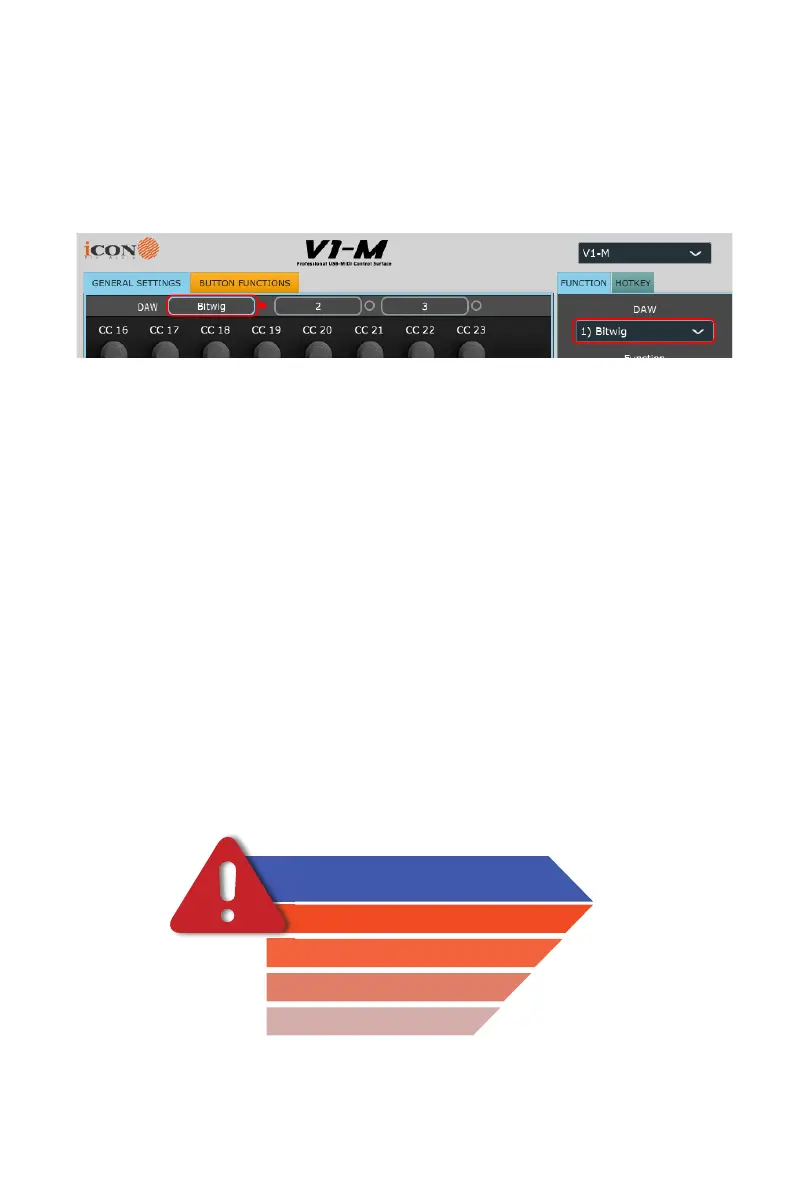
So, you've downloaded, installed and opened the iMAP. You will see the
three DAW buttons on top of the iMAP. These correspond to the three
DAW buttons on the V1-M.
Simply select the corresponding button of choice and select a DAW from
the drop down list.
The DAW will be automatically allocated. There is no need to send data,
or perform any special function.
You may do this for all three buttons on the iMAP/V1-M.
Please go to the iMAP section for further details on this .
Remember that, in everyday use, YOU MUST ENSURE YOU LAUNCH
THE IMAP FIRST, then the V1-M, before launching the DAWs you wish to
work with;
(You may wish to associate a phrase that will make this easy to remember
i.e. “I Can Do (It)!”)
Remember
Step 1:iMAP
Step 2:Controller
Step 3:DAW
Every time you launch the V1-M


 To Next Page