50
Hot Keys
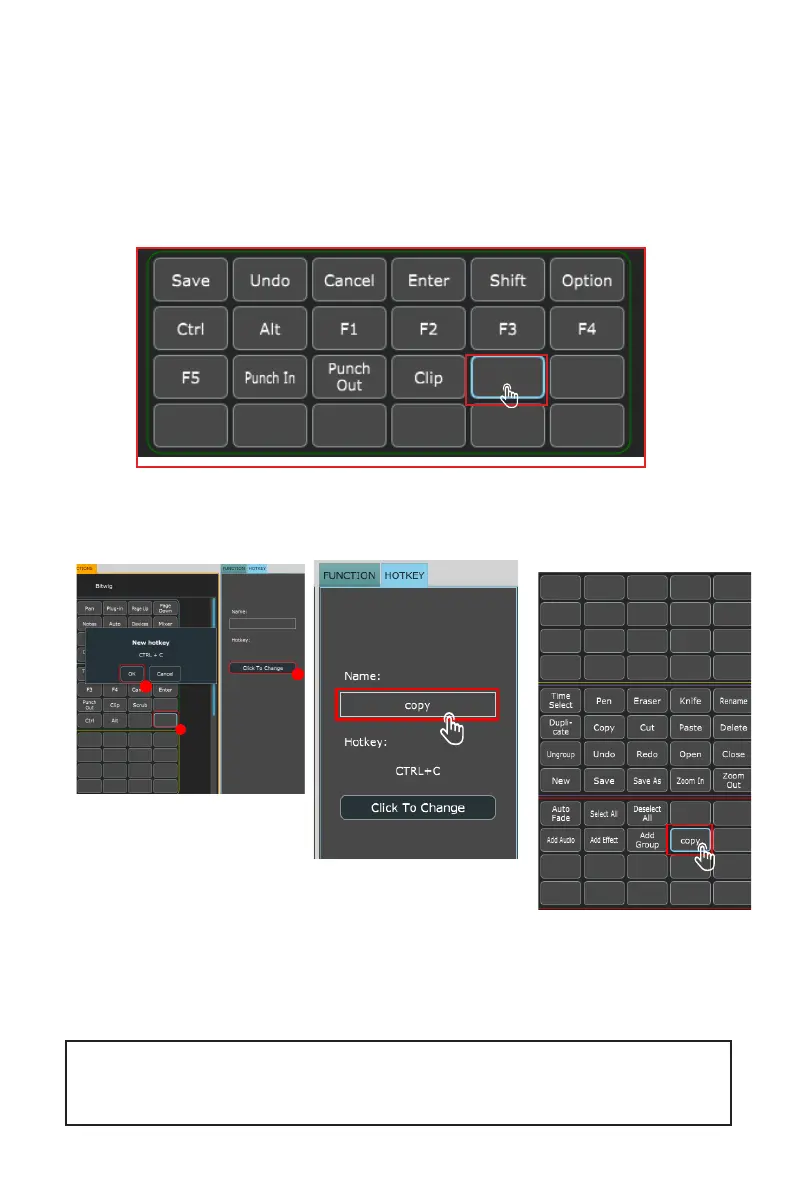
You can assign QWERTY keyboard 'hot keys' to the iMAP.
First, lets select where we'd like our command to go. Click the button with
your mouse so it is highlighted.
Select 'HOTKEY' in the menu on the right side of the iMAP.
Click to change the
contents of a button.
Type in the hot key
you would like to use
on your QWERTY
keyboard. Click Enter.
Re-name the hot key to
something more memorable
if you wish!
1
2
3
Note: For organizational reasons, as default, hotkeys are organized within red and purple modes,
and MIDI functions are organized within blue, green, and orange modes. You can, however, program
hotkeys and MIDI functions to appear in whichever mode you’d like. See page 13 ('Color Coded Function
Buttons'), for further details.


 To Next Page