51
The results will appear in the iMAP and be transmitted to the V1-M
instantaneously!
Sending your own MIDI messages
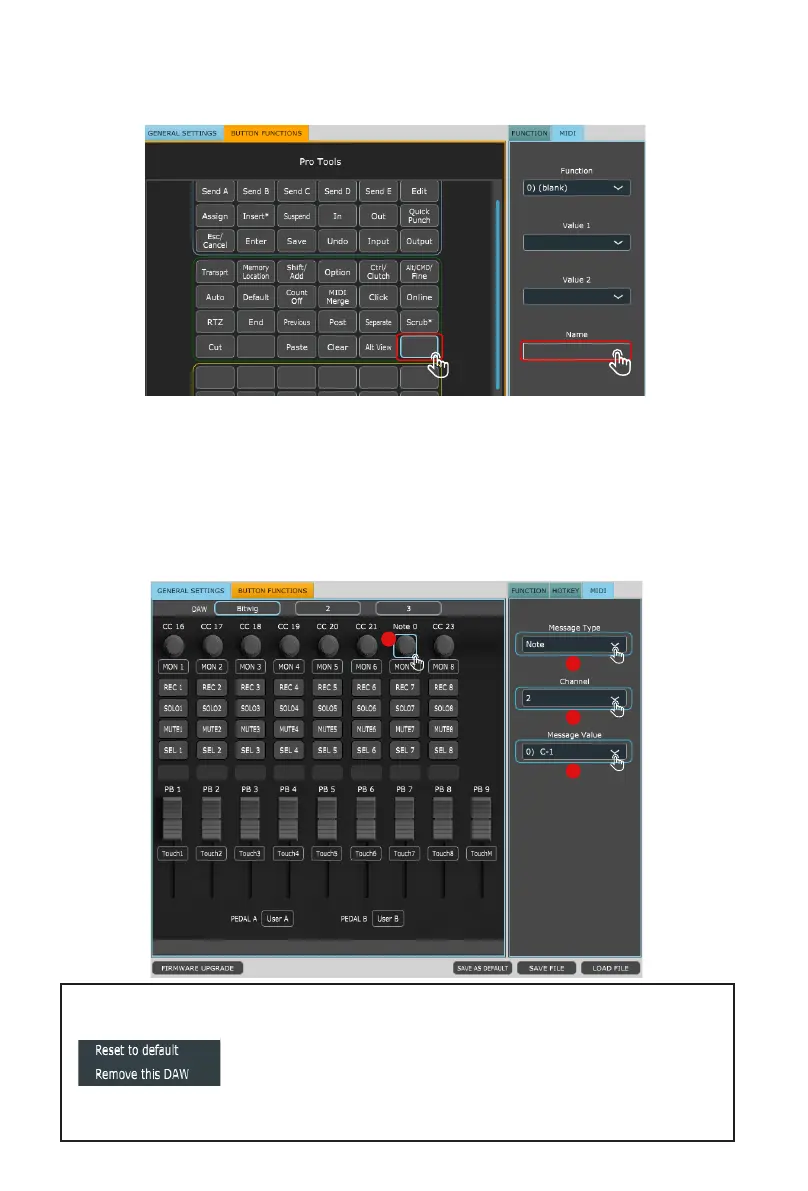
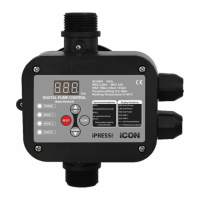
You may set up the touchscreen to display your own MIDI messages. The fader/s
and rotary encoder knobs on the device can also be mapped in this way, (buttons
such as ‘solo’, and ‘mute’ cannot – there are more than enough buttons on the
touchscreen for anyone’s MIDI mapping needs!).
You may adjust "Pitch”, “Note”, “CC”, “Channel” and “Message” values for MCP and
“Value 1”, “Value 2” and “Function” for HUI, depending on the control element.
Copy
Copy
Note: ‘On the iMAP, right-click the switchgear to ‘Reset to default’ values (i.e. the initial value of the current DAW mode
you are in), if you decide you no longer wish to retain your MIDI mapping choices. The touchscreen can similarly be
reset in this way.
Please note that when using ‘Bitwig,’ right-clicking on any encoder and selecting ‘restore to default’ will result in all
switchgear, (and the touchscreen) reverting to their initial values. Equally, selecting an alternative DAW (DAW buttons 1-3)
will ‘overwrite’ any user programming to that of the selected DAW.


 To Next Page