10
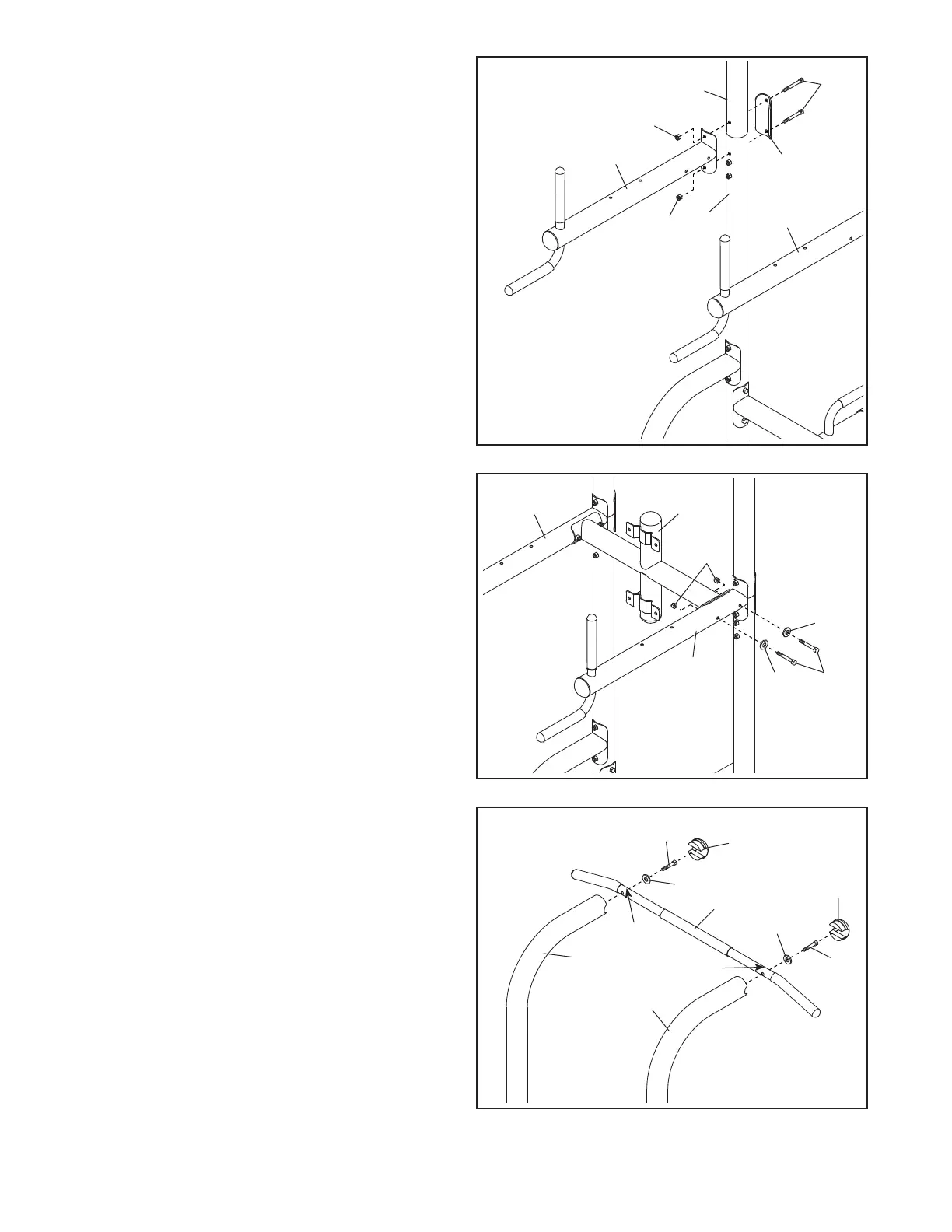
8. Attach the Top Crossbar (7) to one of the Dip
Arms (5) with two M8 x 75mm Bolts (17), two
M8 Curved Washers (23), and two M8 Locknuts
(22); do not tighten the Locknuts yet.
Attach the Top Crossbar (7) to the other Dip
Arm (5) in the same way.
8
5
17
22
7
5
23
23
7. Attach a Dip Arm (5) to one of the Pull-up
Frames (3) and one of the Uprights (2) with two
M8 x 77mm Bolts (28), a Support Plate (13),
and two M8 Locknuts (22); do not tighten the
Locknuts yet.
Repeat this step with the other Dip Arm (5).
13
5
3
22
5
2
28
22
9
26
26
12
12
9
D
D
19
3
3
19
9. Attach the Pull-up Bar (9) to the Pull-up Frames
(3) with two M10 x 50mm Screws (19) and two
M10 Curved Washers (26). Make sure that the
indented holes (D) in the Pull-up Bar are on
the side shown. Then, press the two Rubber
Caps (12) into the ends of the Pull-up Frames.
See steps 3–8. Tighten all of the M8
Locknuts (22).
7



 To Next Page