8
22
22
20
1
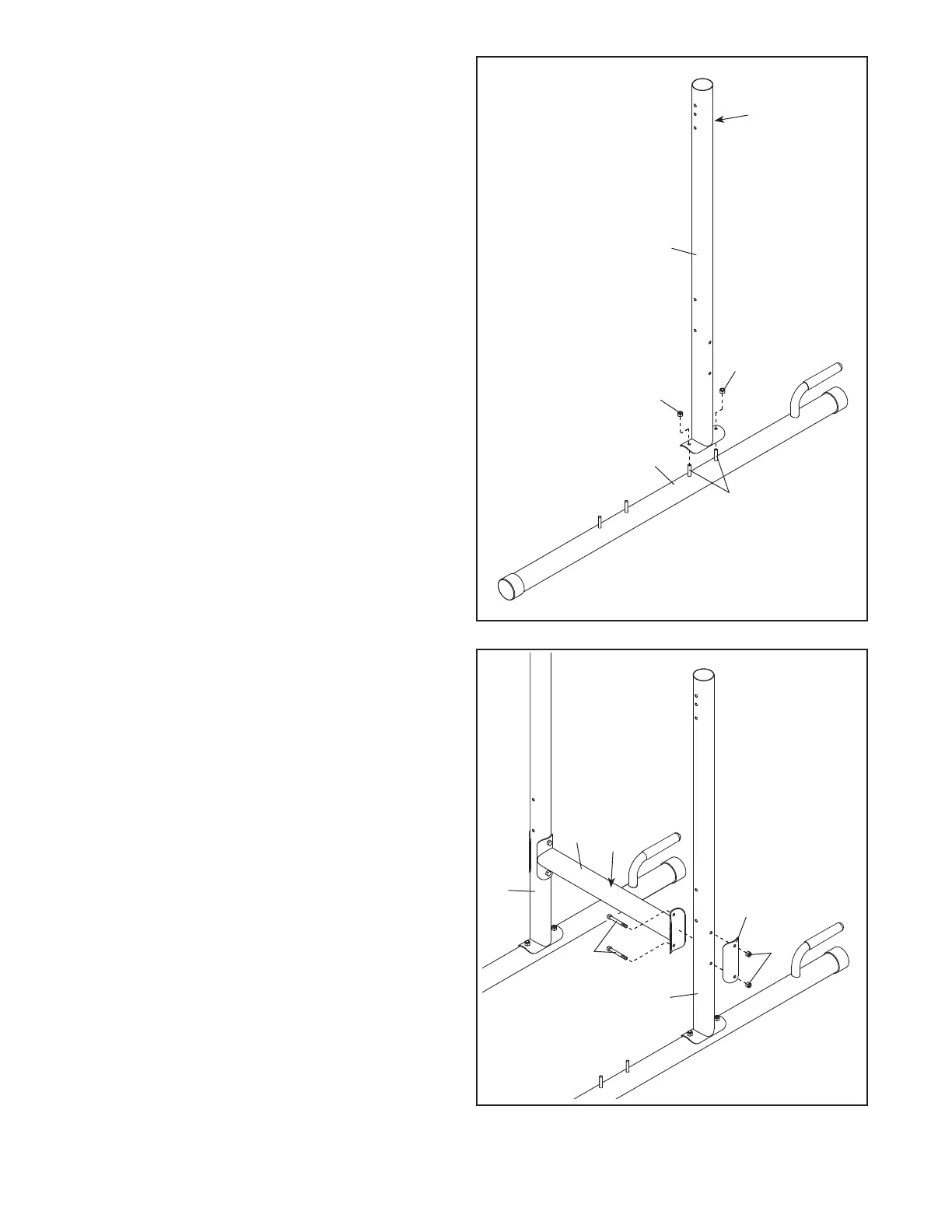
4. Orient the Bottom Crossbar (10) so that the
warning decal (B) is on top.
Attach the Bottom Crossbar (10) to one of the
Uprights (2) with two M8 x 77mm Bolts (28), a
Support Plate (13), and two M8 Locknuts (22);
do not tighten the Locknuts yet.
Attach the Bottom Crossbar (10) to the other
Upright (2) in the same way.
3
2
A
3. Orient one of the Uprights (2) and one of the
Bases (1) as shown; make sure that the
hexagonal holes (A) are on the indicated side
of the Upright.
Attach the Upright (2) to the Base (1) with the
two indicated M8 x 68mm Carriage Bolts (20)
and two M8 Locknuts (22); do not tighten the
Locknuts yet.
Attach the other Upright (not shown) to the
other Base (not shown) in the same way.
28
2
10
2
13
22
B
4



 To Next Page