Two- Stage Multi Position Furnace
Service
Manual
18
440 08 2002 02
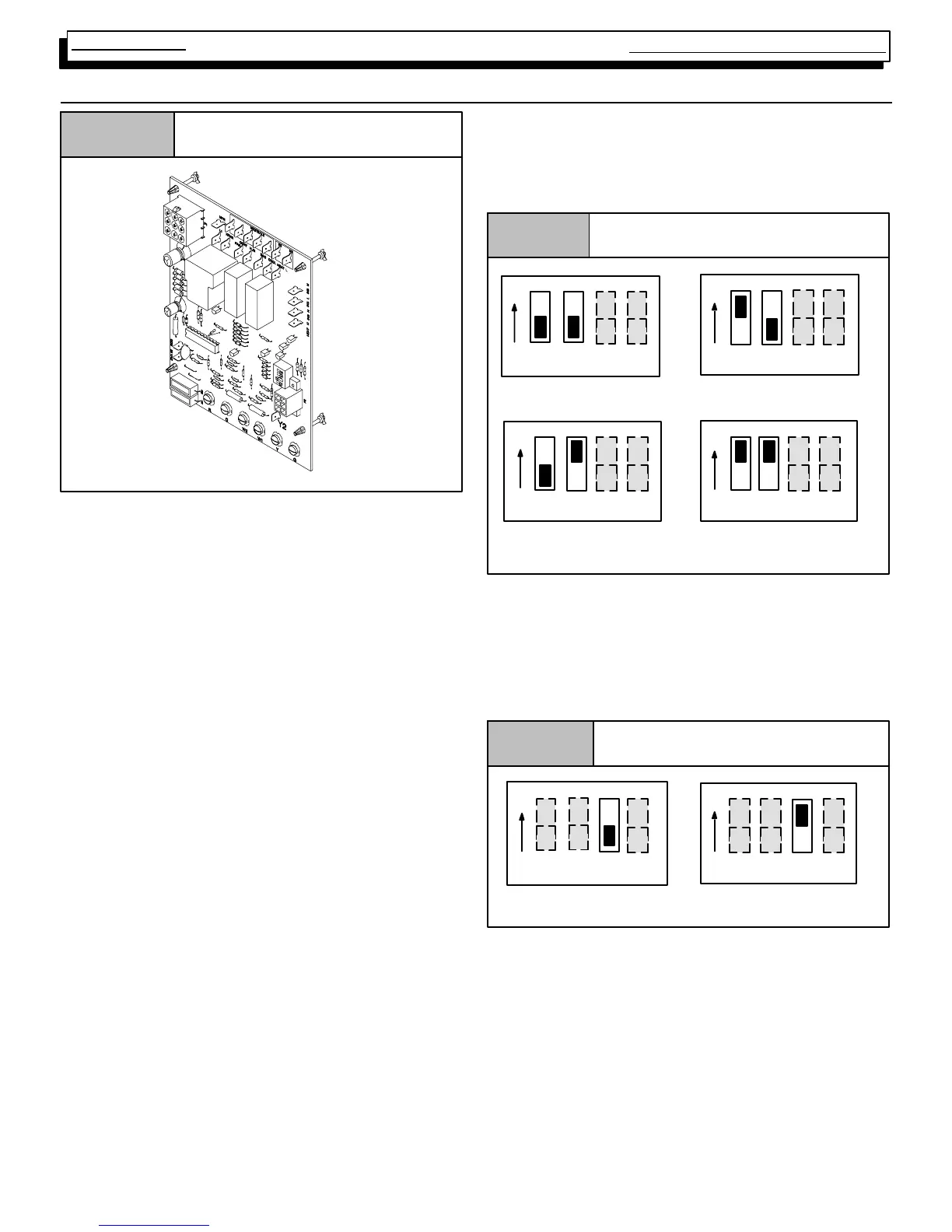
20. HONEYWELL ST9162A Series FAN TIMER/FURNACE CONTROL
Honeywell ST9162A
Figure 27
The HONEYW E LL S T 9162A Electr onic Fan Timer/ F ur-
nace Control is an integrated electronic control, which con-
tains NO USER SER VICEABLE COMPONENTS. In addi-
tion to controlling the fan operation for heating, it also takes
the place of the blower relay, combustion air relay and/or
system relay.
The ST 9162A is us ed in conjunct ion wit h t he SV9541Q
GAS VALVE/IGNITION CONTROL. It provides the power
source to begin the ignition sequence through a monitored
safety circuit. It serves as a low voltage terminal strip, and
provides accessory terminals for a Humidifier, Electronic
Air cleaner and a “Continuous” terminal which can be used
on m odels equipped with a P ermeate Split Capacitor
(P.S.C.) motor (ONLY) to provide continuous fan operation
at a speed other than either the heating or cooling speed.
The cont r ol provides a f ixed ( non --adjustable) 5 s econd
“ON” and 60 second“OFF” delay for the circulating blower
in CO OLING and an adjus table 30 or 60 s econd “O N”
delay for the circulating blower in HEATING.
The ST9162A control also provides an adjustable HEAT-
ING “O F F ” delay f or the c irc ulat ing blower which can be
field adjusted to 60, 100, 140, or 180 seconds.
Setting “OFF” and “ON” delays
Setting The ST9162A Heating Fan “ON” & “OFF” Delay is
accomplished by the positioning of “DIP” switches. The il-
lustrations Figure 28, & Figure 29, indicate how to position
these switches to obtain the desired setting.
The ST9162A Heating Fan“OFF” delay can be set to ei-
ther 60,100,140, or 180 seconds. The control was shipped
out in the 140 second position. This may be satisfactory for
some installations, but not for others.
Heating OFF Delay DIP switch Settings
Figure 28
12 34
1234
1234
1234
60 Sec.
100 Sec.
140 Sec.
180 Sec.
ON
ON
ON
ON
The ST9162A Heating Fan“ON” delay may be set to ei-
ther 30 or 60 seconds. The control is shipped out at 30 se-
conds. As with the “OFF” delay, this may be satisfactory
for some installations, but not for others.
Heating ON Delay DIP switch Settings
Figure 29
1234
1234
60 Sec.
30 Sec.
ON
ON
The “OFF” delay should be set as long as possible without
creating “COLD AIR” complaints at the end of the cycle.
The “ON” delay should be set as short as possible without
creat ing “CO LD A I R” com plaint s at the beginning of the
cycle.
The COOLING “ON” and “OFF” delays of the ST9162A
are fixed at 5 seconds and 60 seconds respectively,
and are not adjustable.



 To Next Page