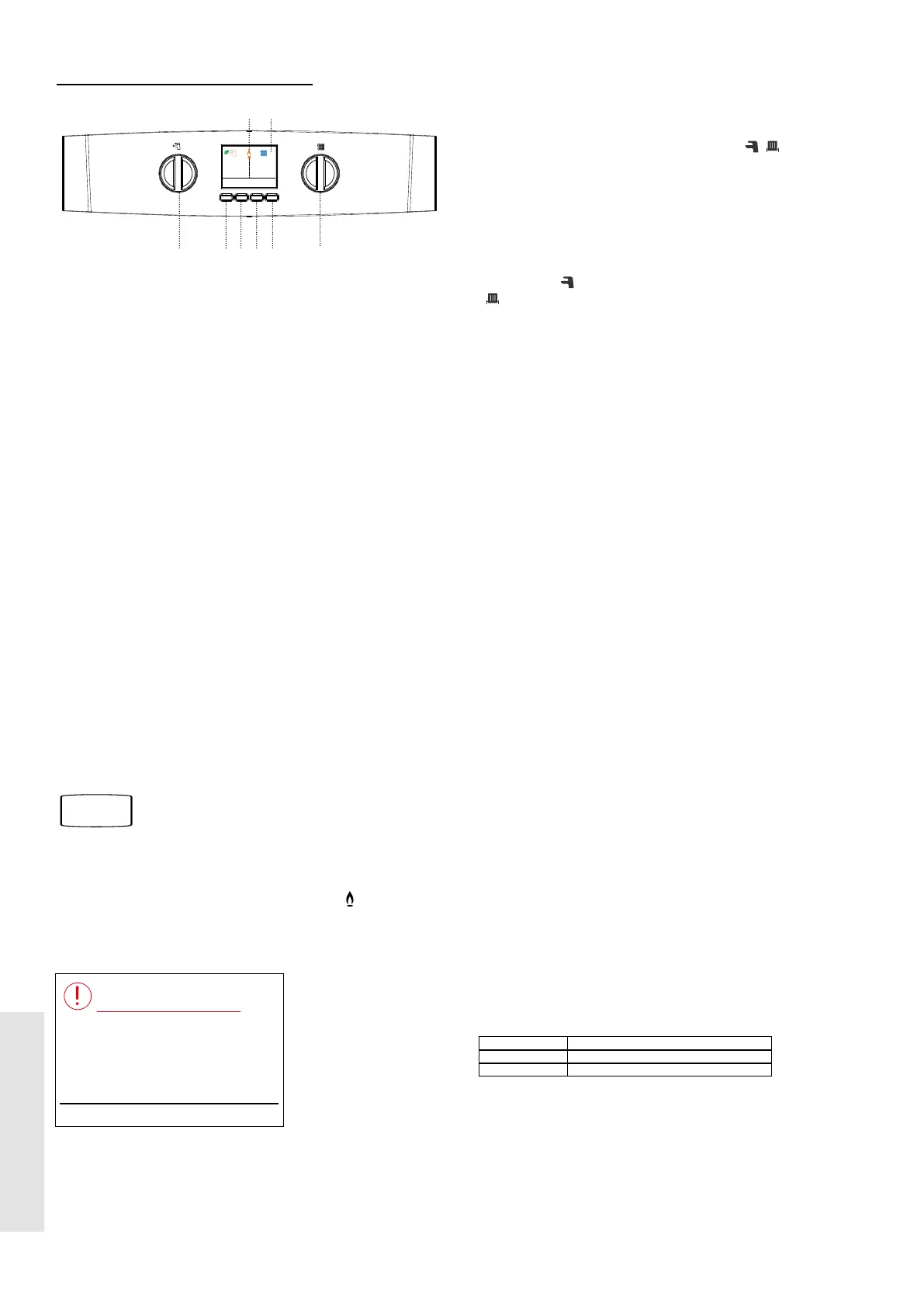
1.2 BOILER OPERATION
Legend
A. Domestic Hot Water
Temperature Knob
B. Central Heating Temperature Knob
C. Hot Keys
D. Boiler Status Display
E. Burner On Indicator
F. Mode Button
TO START THE BOILER
Start the boiler as follows:
1. Ensure that all hot water taps are turned o.
2.
Switch on electricity to the boiler and check that all external
controls, e.g. programmer and room thermostat, are on.
3. Press the Mode Button until Ready or On is shown
underneath both the Tap and Radiator symbols.
4. Turn the Domestic Hot water temperature knob (A)
clockwise until a 65°C target temperature is shown. Turn
the Central Heating temperature Knob (B) clockwise until
an 80°C target temperature is shown.
The boiler will commence ignition sequence, supplying heat to
the central heating, if required.
Note. In normal operation the boiler status display (D) will
display messages.
Boiler frost protection - boiler will re if temperature is below
5ºC.
During normal operation the burner on symbol
(E) will
remain illuminated when the burner is lit.
If the boiler fails to light after ve attempts the following fault
messages will be displayed:
1 Check other gas appliances work.
2 Restart boiler.
3 If fault persists, contact installer.
Restart Menu
Ignition Lockout
To restart the boiler, press ‘Restart’. The boiler will repeat
the ignition sequence. If the boiler still fails to light consult a
Registered Gas Installer.
A
D
B
C F
E
Target 60°C
Preheat Menu Mode
Ready
On
Radiator Target 60°C
Room Thermostat or
Timer O
On at 60°C
OPERATION MODES
Winter Conditions - (Central Heating and Domestic Hot Water
required)
Press the Mode Button until either Ready or On is shown
under both the Tap and Radiator symbols [
].
The boiler will re and supply heat to the radiators.
The domestic hot water preheat will operate with the preheat
button set to ‘Preheat On’.
Summer Conditions - (Domestic Hot Water only required)
Press the Mode button until Ready or On is shown under the
Tap symbol [
] and O is shown under the Radiator symbol
[ ].
OR
Set the central heating demand on the external controls to
OFF.
The domestic hot water preheat will operate with the preheat
button set to ‘Hot Water On’.
Boiler O
Set the mode button (C) to ‘BOILER OFF’. The boiler mains
power supply must be left on to enable frost protection (see
Frost Protection).
PREHEAT - DOMESTIC HOT WATER
The domestic hot water heat exchanger within the boiler can
be preheated to provide faster delivery of hot water at the tap.
The boiler is factory set with the preheat turned o to give
standard hot water delivery and reduce gas usage.
If required, the preheat can be switched on for faster domestic
hot water delivery. It can be turned to either ‘On’ or ‘Timed’.
With preheat turned On, the boiler will operate periodically to
maintain the domestic hot water heat exchanger in a preheated
condition at all times.
If ‘Timed’ is selected then the intelligent preheat function is
active which learns the usage patten for domestic hot water
over 7 days. It then res the boiler to maintain the temperature
of the domestic hot water heat in the boiler, as required to meet
the predicted hot water draw-o. This improves the speed of
response for DHW whilst minimising the use of gas.
CONTROL OF WATER TEMPERATURE
Domestic Hot Water
The domestic hot water temperature is limited by the boiler
controls to a maximum temperature of 65
º
C, adjustable via the
domestic hot water temperature knob (A). At low DHW draw
o rates the maximum temperature may exceed 65ºC.
Approximate temperatures for domestic hot water:
Knob Setting Hot Water Temperature (approx.)
Minimum 40ºC
Maximum 65ºC
Due to system variations and seasonal temperature
uctuations, domestic hot water ow rates/temperature rise will
vary, requiring adjustment at the tap : the lower the ow rate
the higher the temperature, and vice versa.
Refer to Section
1.8
4
User Guide
USER





 To Next Page