User's
7
User Guide
Creating a Space Heating Demand:
The Space Heating function will be controlled via the use of a
Logic Halo Air or equivalent Programmable Room Thermostat
(PRT). ON/OFF Room Thermostats are not recommended to be
used in conjunction with this appliance as they may negatively
aect the system performance and provide no optimisation
potential.
Increase the room temperature setpoint until the space heating
system switches ON.
Decrease the room temperature setpoint until the space heating
system switches OFF.
Domestic Hot Water Heat Demand:
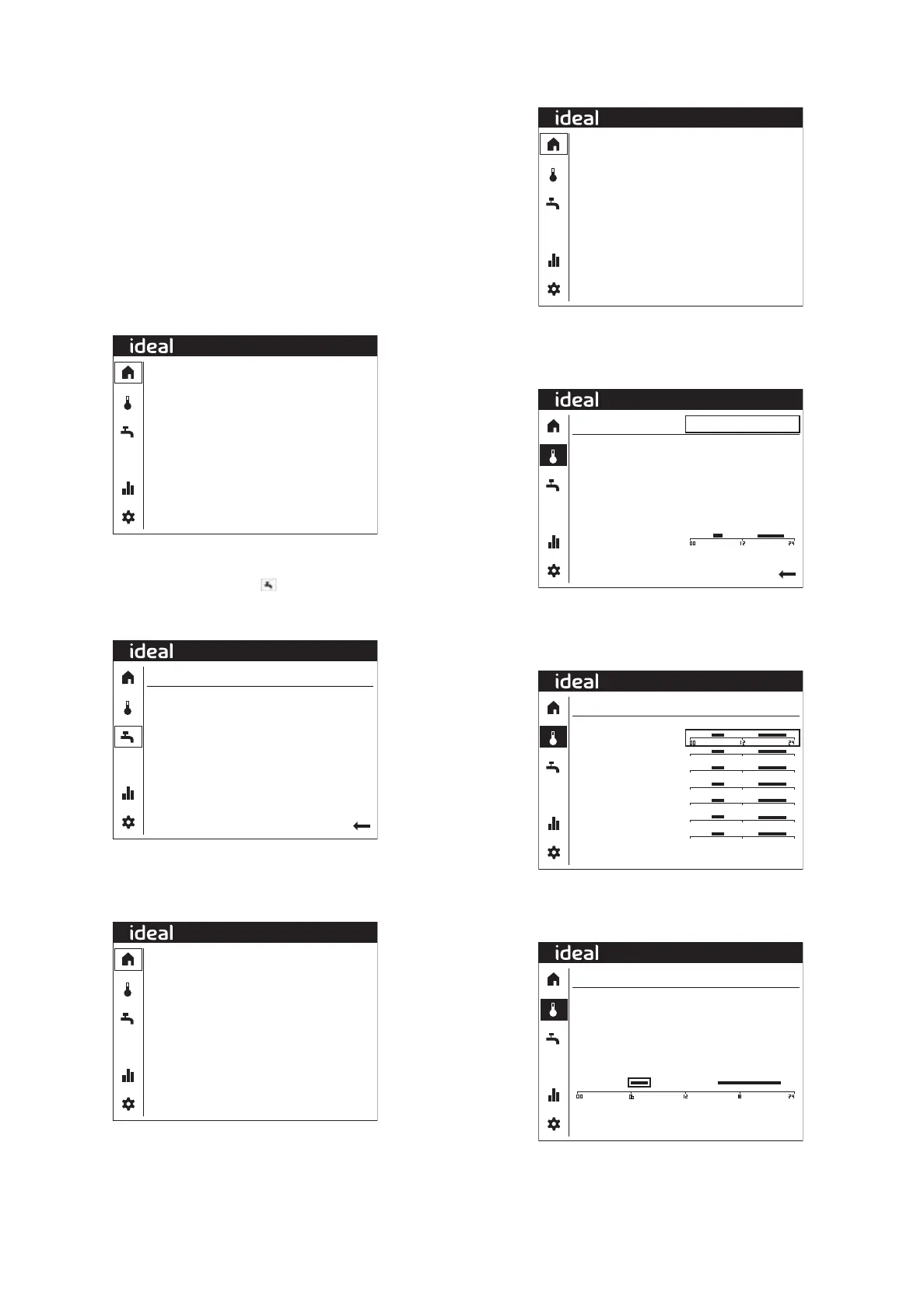
The below gure is the main menu screen and displays the
heating system information and status.
20.0ºC
20.0ºC
3.1ºC
0l/min
0%
Off
Off
CH
Off
Primary flow temp
Hot water temp
Outside temp
Primary water flow
Compressor
CH1 Pump
CH2 Pump
Diverter valve
Immersion heater
08:32
Rotate the dial to highlight functions and change values, press
the dial to select the function and conrm changes. To create
a hot water demand, select the tap icon in the left-hand
column.
The following screen will be shown:
25.3ºC
50ºC
Enabled (1 h/week)
Domestic hot water
Hot water temp
Hot water setpoint
Legionella Protect
08:32
To change the setpoint, select the setpoint function and increase
the value to 65°C. Next return to the home screen by selecting
the back arrow and then the home symbol. The display will
change to the following:
20.0ºC
20.0ºC
3.1ºC
10l/min
100%
Off
Off
DHW
Off
Primary flow temp
Hot water temp
Outside temp
Primary water flow
Compressor
CH1 Pump
CH2 Pump
Diverter valve
Immersion heater
08:32
SETTING THE CENTRAL HEATING TIME PROGRAM
On/O non-programmable room stats only
20.0ºC
20.0ºC
3.1ºC
0l/min
0%
Off
Off
CH
Off
Primary flow temp
Hot water temp
Outside temp
Primary water flow
Compressor
CH1 Pump
CH2 Pump
Diverter valve
Immersion heater
08:32
Starting from the Home Screen (see above), to set a central
heating programme, rotate the dial until the thermometer icon
in the left-hand column is highlighted and press the dial. The
following screen will be shown:-
Heating zone 1
40.0ºC
40.0ºC
--ºC
Heating
Primary flow temp
Flow temp setpoint
Room temperature
Time program
08:32
Press the dial and then rotate the dial until the desired central
heating zone is shown then press the dial again, rotate the dial
until the Time program is highlighted and then press the dial
again. The following screen will be shown:-
Zone 1Heating
Monday
Tuesday
Wednesday
Thursday
Friday
Saturday
Sunday
Back
08:32
Rotate the dial until the desire day for setting is shown and then
press the dial.
The following screen will be shown:
Back
Zone 1Monday
Set time program
06:00 to 08:00
Copy
08:32
Move the highlighted area to the time you wish to change using
the dial and press the dial, then rotate the dial to change the time
and press the dial to save.



 To Next Page