16
2. Control your Air Conditioner through Amazon Echo
2a. Discover your IG9901WIFI device
• Echo needs to discover your smart devices before it controls them.
• You can say “Alexa, discover devices” to Echo. Then Echo will discover devices that have already been
added in the Igenix app.
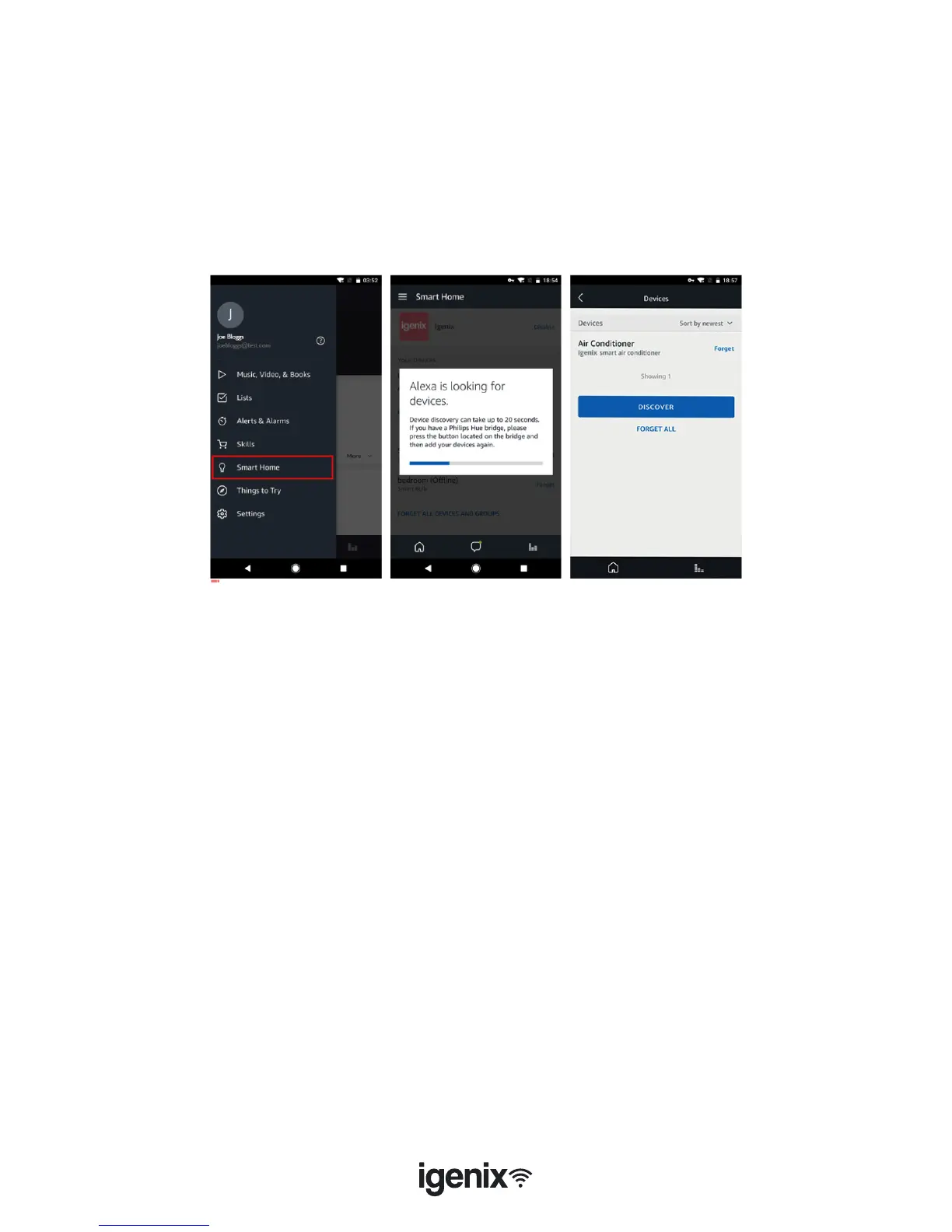
• Alternatively, you can select in the “Menu” option “Smart Home” (g.20) and then tap “DISCOVER” to
discover the smart devices (g.21). Discovered devices will be shown in the list (g.22).
Note: Every time you change the device’s name in the Igenix app, Echo must
rediscover before you can control them.
g.20 g.21 g.22
2b. Control your Air Conditioner by Voice Commands
• Now you can control your IG9901WIFI device through Echo. You can use the following commands to
control your air conditioner:
• “Alexa, turn on air conditioner”
• “Alexa, set air conditioner to 18°C”
• “Alexa, increase temperature by 2°C in the air conditioner”
• “Alexa, decrease temperature by 4°C in the air conditioner”
• “Alexa, set air conditioner to 23°C”
• “Alexa, turn off air conditioner”
Note: The temperature can only be set between 15-31°C.



 To Next Page