9
Adjust Temperature
The temperature can be set (Auto and Cooling mode only) between 15°C to 31°C by increments of 1°C
• Press the “ ” or “ ” button once to increase or decrease the temperature by 1°C
• The LED display on the front panel and control panel will show the target temperature for 5 seconds,
and will then revert back to the ambient room temperature until the target temperature is reached.
OPERATING INSTRUCTIONS
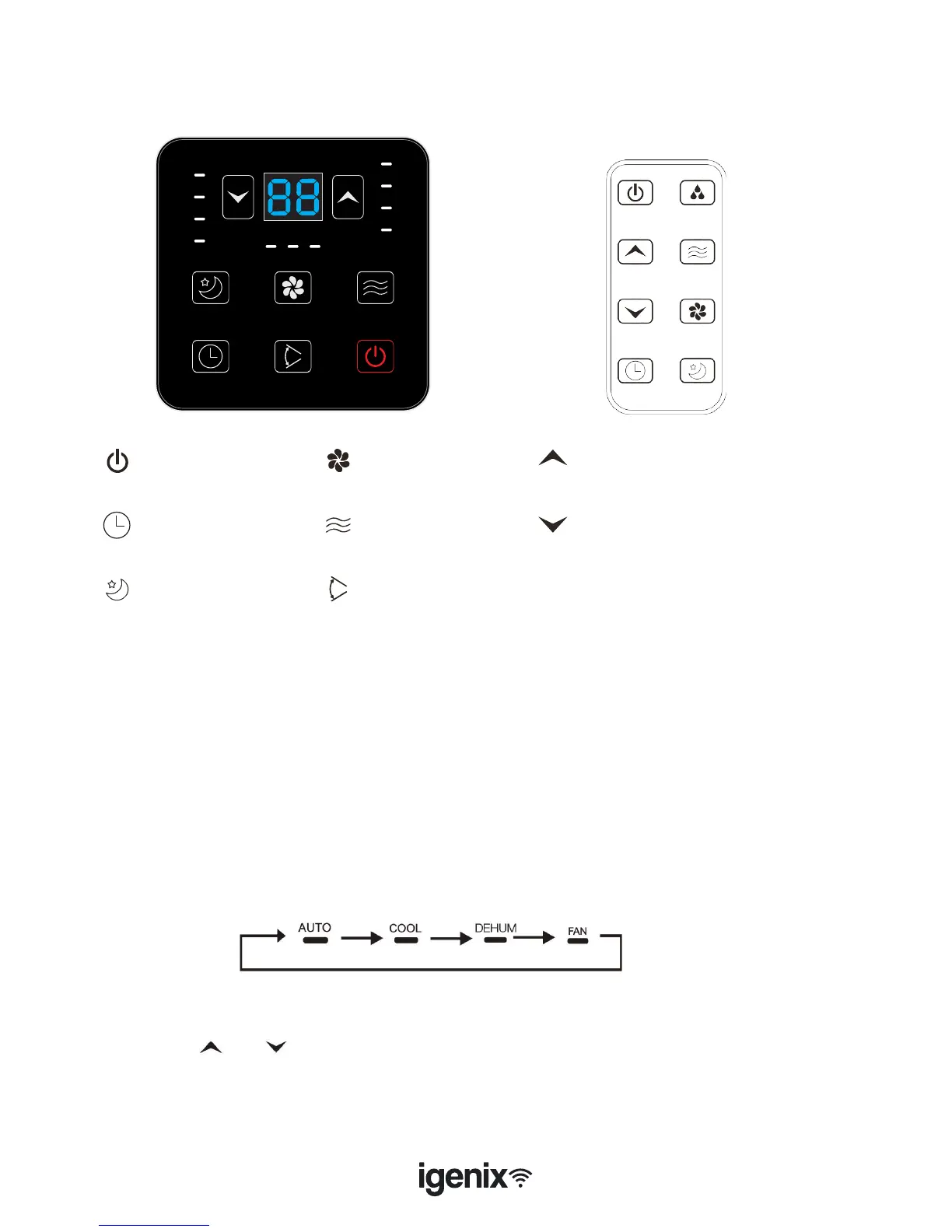
Control Panel
Important: The compressor will start approximately 3 minutes after the unit is
turned on (this will help prolong the life of the compressor). After switching the
unit off, please wait at least 3 minutes before turning the unit back on.
Turning On
• Once the appliance has been installed correctly, plug into a wall socket - the appliance will beep once
• Press the “POWER” button to switch on the appliance. The LED Display will illuminate showing the
ambient room temperature, the louvres will open and it will operate in Automatic mode
Select Operating Mode
• The IG9901WIFI features 3 main modes: Cooling, Fan and Dehumidier as well as an Automatic
mode.
• Press the “Mode” button to select the desired mode shown below:
Power Button
Timer Button
Sleep Button
Speed Button
Mode Button
Oscillation Button
Time/Temperature Up Button
Time/Temperature Down Button



 To Next Page