6
Installation of the carbon lter
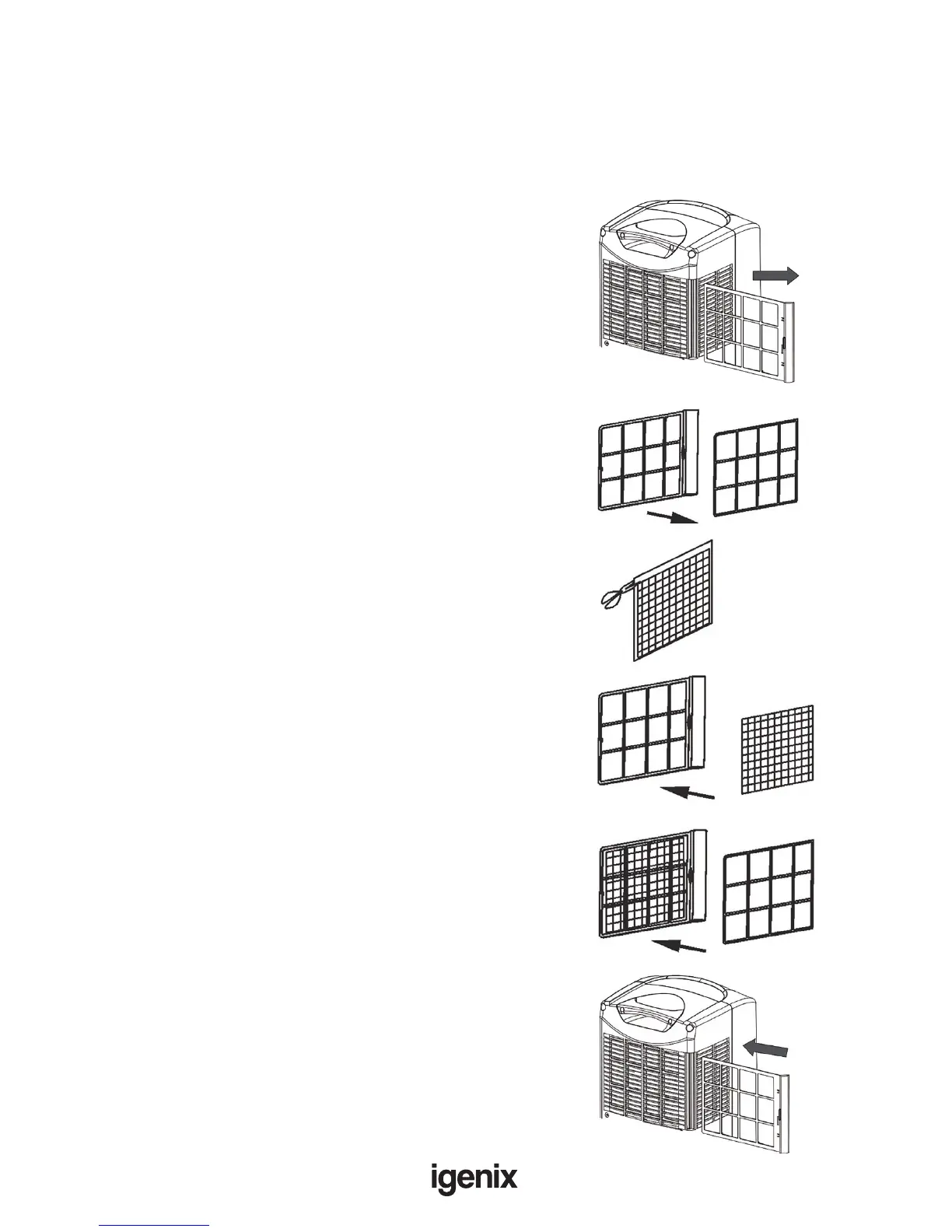
The unit is supplied with an Active Carbon Filter (Fig 3 [13]). The Active Carbon Filter is used to remove
unwanted odours (smoke, fumes and animal odours).
Important: The Active Carbon Filter is not washable and its life span depends on the conditions
where the unit is used. It is recommended to replace the Active Carbon Filter every 6 months.
1. Remove the top Filter Frame (Fig 2 [6]) from the
unit (Fig 7)
2. Remove the Filter Fixer from the Filter Frame (Fig 8).
3. Remove the Active Carbon Filter (Fig 3 [13]) from
thesealedbagensuringnottocutthelter(Fig9).
4. Attach the Active Carbon Filter to the Filter Frame
(Fig 10) by inserting the Active Carbon Filter into the
slots on the Filter Frame.
5. Secure in place with Filter Fixer using the same
slots (Fig 11).
6. Thecompletedlterset(FilterFrame,ActiveCarbon
Filter and Filter Fixer) can now be re-inserted back
intotheunit,ensuretoinsertltersetintheinternal
clips (Fig 12).
Fig7.
Fig8.
Fig9.
Fig10.
Fig11.
Fig12.



 To Next Page