EasyManua.ls Logo

iHome iH8 - Quick Start Guide; Power Connection; Antenna Setup; Time Zone Setting

iHome iH8
13 pages
Print Icon
To Next Page IconTo Next Page
To Previous Page IconTo Previous Page
Loading...
quick
start
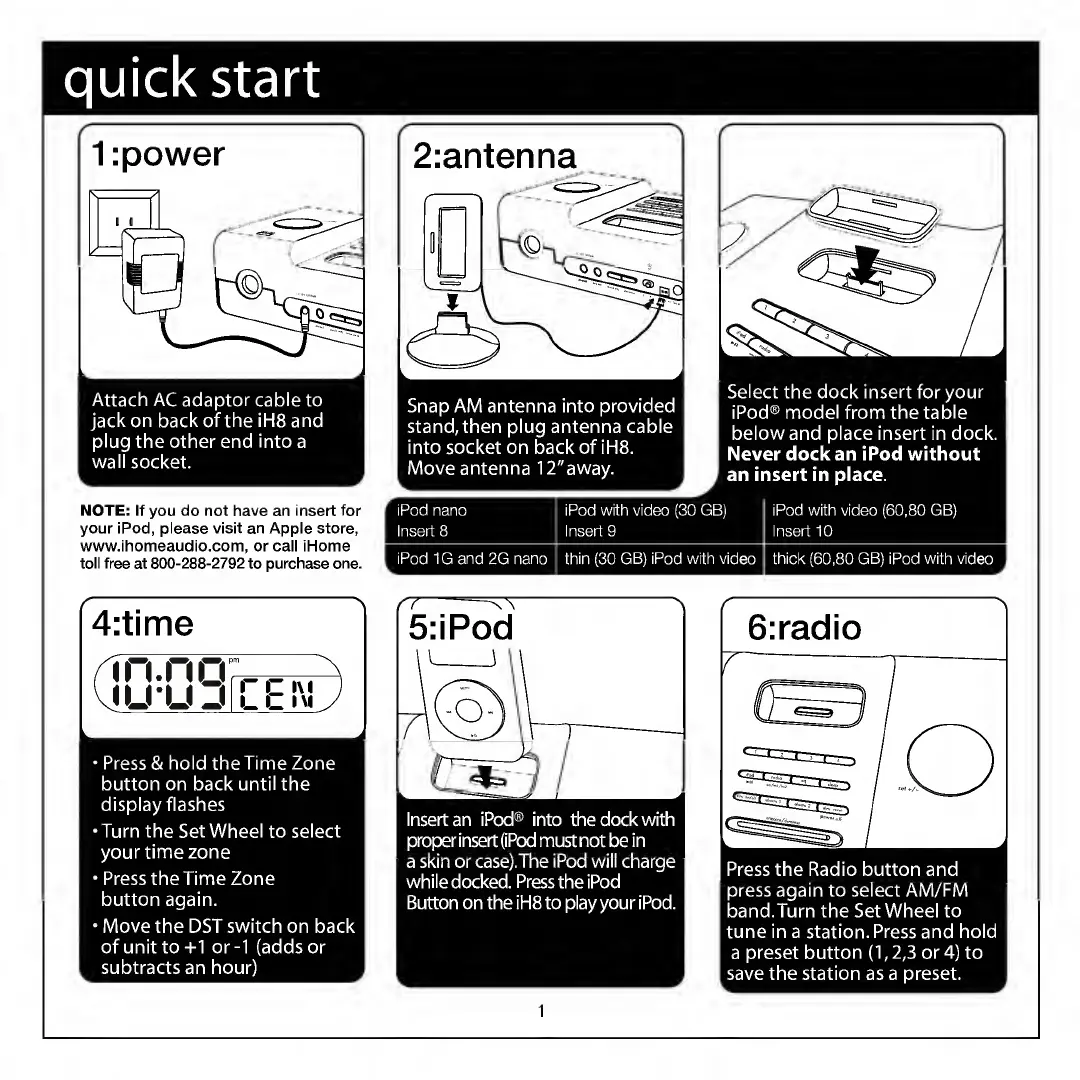
Attach
AC
adaptor
cable
to
jack
on
back
of
the
iH8
and
plug
the
other
end
into
a
wall
socket.
NOTE:
If
you
do
not
have
an
insert
for
your
iPod,
please
visit
an
Apple
store,
www.ihomeaudio.com,
or
call
iHome
toll
free
at
800-288-2792
to
purchase
one.
Snap
AM
antenna
into
provided
stand,
then
plug
antenna
cable
into
socket
on
back
of
iH8.
Move
antenna
12"away.
Select
the
dock
insert
for
your
iPod®
model
from
the
table
below
and
place
insert
in
dock.
Never
dock
an
iPod
without
an
insert
in
place.
r
iPod
nano
iPod
with
video
(30
GB)
iPod
with
video
(60,80
GB)
Insert
8
Insert
9
Insert
10
iPod
1G
and
2G
nano
k.
thin
(30
GB)
iPod
with
video
thick
(60,80
GB)
iPod
with
video
A
4:time
in.no
nj*
*
u
j
I
c
>\
I
l
l
I
\l
Press
&
hold
the
Time
Zone
button
on
back
until
the
display
flashes
•Turn
the
Set
Wheel
to
select
your
time
zone
Press
the
Time
Zone
button
again.
Move
the
DST
switch
on
back
of
unit
to+1
or-1
(adds
or
subtracts
an
hour)
Insert
an
iPod®
into
the
dock
with
proper
insert
(iPod
must
not
be
in
a
skin
or
case).The
iPod
will
charge
while
docked.
Press
the
iPod
Button
on
the
iH8
to
play
your
iPod.
1
Press
the
Radio
button
and
press
again
to
select
AM/FM
band.Turn
the
Set
Wheel
to
tune
in
a
station.
Press
and
hold
a
preset
button
(1,2,3
or
4)
to
save
the
station
as
a
preset.

Other manuals for iHome iH8

Related product manuals