EasyManua.ls Logo

iHome iH8 - Radio Operation; Radio Antenna Setup; Tuning and Saving Stations; Audio Equalizer Settings

iHome iH8
13 pages
Print Icon
To Next Page IconTo Next Page
To Previous Page IconTo Previous Page
Loading...
Using
the
iH8
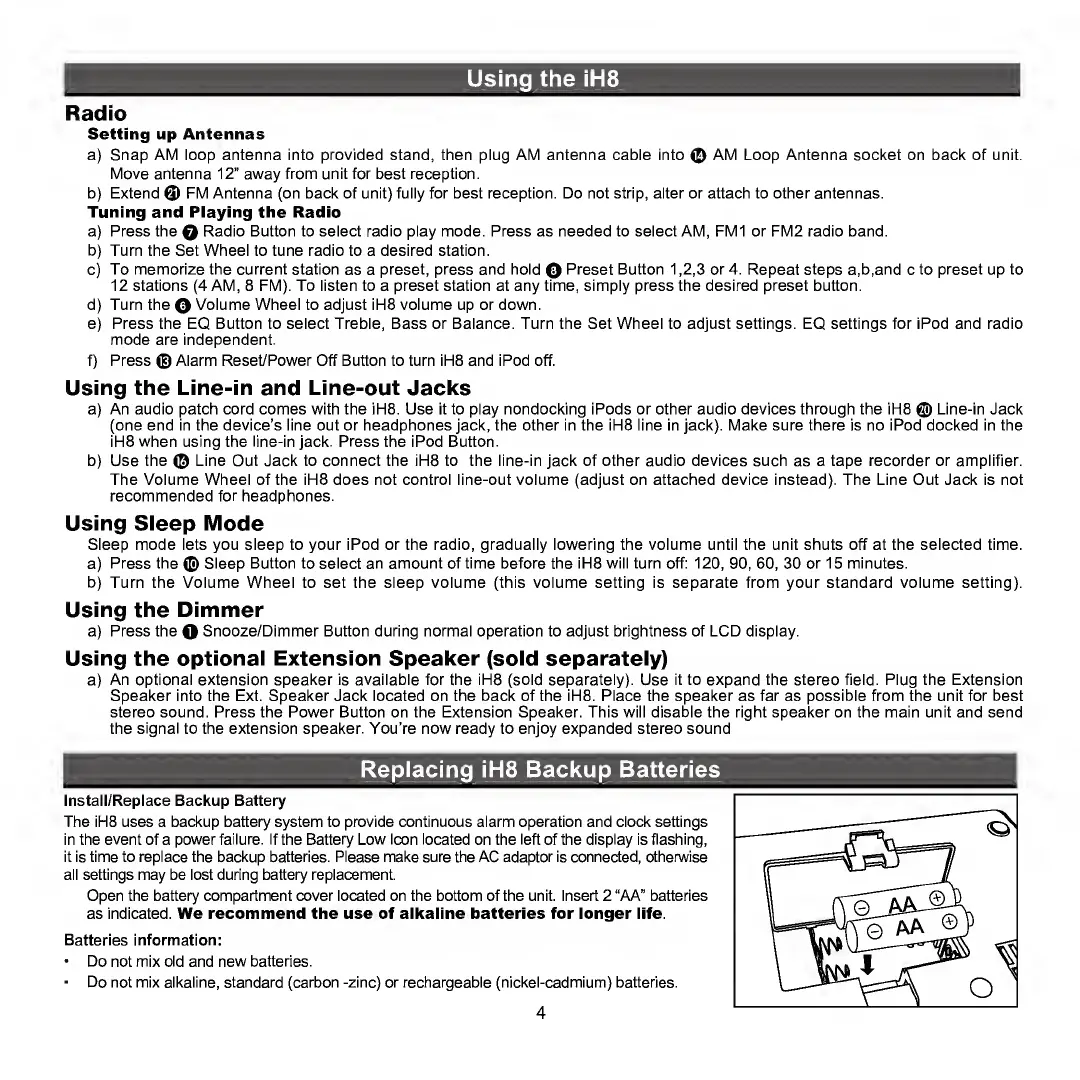
Radio
Setting
up
Antennas
a)
Snap
AM
loop
antenna
into
provided
stand,
then
plug
AM
antenna
cable
into
©
AM
Loop
Antenna
socket
on
back
of
unit.
Move
antenna
12”
away
from
unit
for
best
reception.
b)
Extend
©
FM
Antenna
(on
back
of
unit)
fully
for
best
reception.
Do
not
strip,
alter
or
attach
to
other
antennas.
Tuning
and
Playing
the
Radio
a)
Press
the
Q
Radio
Button
to
select
radio
play
mode.
Press
as
needed
to
select
AM,
FM1
or
FM2
radio
band.
b)
Turn
the
Set
Wheel
to
tune
radio
to
a
desired
station.
c)
To
memorize
the
current
station
as
a
preset,
press
and
hold
Q
Preset
Button
1,2,3
or
4.
Repeat
steps
a,b,and
c
to
preset
up
to
12
stations
(4
AM,
8
FM).
To
listen
to
a
preset
station
at
any
time,
simply
press
the
desired
preset
button.
d)
Turn
the
Q
Volume
Wheel
to
adjust
iH8
volume
up
or
down.
e)
Press
the
EQ
Button
to
select
Treble,
Bass
or
Balance.
Turn
the
Set
Wheel
to
adjust
settings.
EQ
settings
for
iPod
and
radio
mode
are
independent.
f)
Press
©
Alarm
Reset/Power
Off
Button
to
turn
iH8
and
iPod
off.
Using
the
Line-in
and
Line-out
Jacks
a)
An
audio
patch
cord
comes
with
the
iH8.
Use
it
to
play
nondocking
iPods
or
other
audio
devices
through
the
iH8
©
Line-in
Jack
(one
end
in
the
device's
line
out
or
headphones
jack,
the
other
in
the
iH8
line
in
jack).
Make
sure
there
is
no
iPod
docked
in
the
iH8
when
using
the
line-in
jack.
Press
the
iPod
Button.
b)
Use
the
©
Line
Out
Jack
to
connect
the
iH8
to
the
line-in
jack
of
other
audio
devices
such
as
a
tape
recorder
or
amplifier.
The
Volume
Wheel
of
the
iH8
does
not
control
line-out
volume
(adjust
on
attached
device
instead).
The
Line
Out
Jack
is
not
recommended
for
headphones.
Using
Sleep
Mode
Sleep
mode
lets
you
sleep
to
your
iPod
or
the
radio,
gradually
lowering
the
volume
until
the
unit
shuts
off
at
the
selected
time.
a)
Press
the
©
Sleep
Button
to
select
an
amount
of
time
before
the
iH8
will
turn
off:
120,
90,
60,
30
or
15
minutes.
b)
Turn
the
Volume
Wheel
to
set
the
sleep
volume
(this
volume
setting
is
separate
from
your
standard
volume
setting).
Using
the
Dimmer
a)
Press
the
O
Snooze/Dimmer
Button
during
normal
operation
to
adjust
brightness
of
LCD
display.
Using
the
optional
Extension
Speaker
(sold
separately)
a)
An
optional
extension
speaker
is
available
for
the
iH8
(sold
separately).
Use
it
to
expand
the
stereo
field.
Plug
the
Extension
Speaker
into
the
Ext.
Speaker
Jack
located
on
the
back
of
the
iH8.
Place
the
speaker
as
far
as
possible
from
the
unit
for
best
stereo
sound.
Press
the
Power
Button
on
the
Extension
Speaker.
This
will
disable
the
right
speaker
on
the
main
unit
and
send
the
signal
to
the
extension
speaker.
You’re
now
ready
to
enjoy
expanded
stereo
sound
Replacing
iH8
Backup
Batteries
Install/Replace
Backup
Battery
The
iH8
uses
a
backup
battery
system
to
provide
continuous
alarm
operation
and
clock
settings
in
the
event
of
a
power
failure.
If
the
Battery
Low
Icon
located
on
the
left
of
the
display
is
flashing,
it
is
time
to
replace
the
backup
batteries.
Please
make
sure
the
AC
adaptor
is
connected,
otherwise
all
settings
may
be
lost
during
battery
replacement.
Open
the
battery
compartment
cover
located
on
the
bottom
of
the
unit.
Insert
2
“AA”
batteries
as
indicated.
We
recommend
the
use
of
alkaline
batteries
for
longer
life.
Batteries
information:
Do
not
mix
old
and
new
batteries.
Do
not
mix
alkaline,
standard
(carbon
-zinc)
or
rechargeable
(nickel-cadmium)
batteries.
4

Other manuals for iHome iH8

Related product manuals