ENGLISH
BEFORE YOU OPERATE THE MONITOR 11
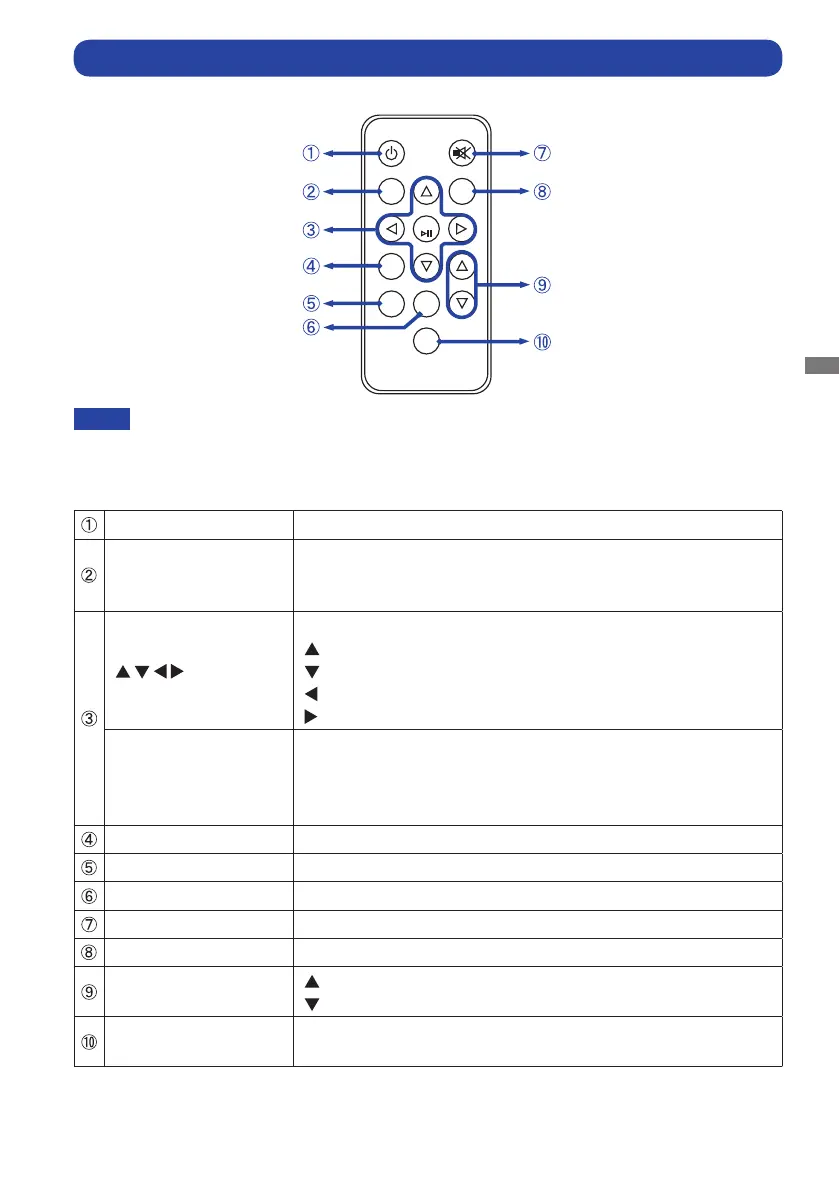
CONTROLS AND CONNECTORS : REMOTE CONTROL (For maintenance)
POWER
MUTE
MEMU
AUTO
OK
PLAY
EXIT
STOP
VOL
SELECT
POWER Turns the monitor ON and OFF.
MENU
Opens the monitor’s on-screen menu systems. When the menu
system is already open, pressing this button will select the
previous submenu.
Navigates through submenus and settings.
: Up Button
: Down Button
: Left Button
: Right Button
OK
Conrmsyourselectionorsavechanges.
Press the OK Button when the Menu is not displayed.
Displays information regarding the current input signal coming
from the graphic card in your computer.
PLAY Play Photo, Music, Movie, Text in Media player menu.
EXIT Returns to a previous menu or closes the OSD Menu.
STOP Stop Photo, Music, Movie, Text in Media player menu.
MUTE TurnsonorotheMutefunction.
AUTO Adjust H. / V. Position, Clock and Phase automatically.
VOL
: Increases the sound volume.
: Decreases the sound volume.
SELECT
Selects the source.
(PC-RGB/HDMI1/HDMI2/HDMI3/DP)
To use the remote control we advise you to position it at the back of the monitor (left side) where the
remote sensor is located. It might not work if you use it standing in front of the monitor.
NOTE



 To Next Page