ENGLISH
BEFORE YOU OPERATE THE MONITOR 13
BASIC OPERATION
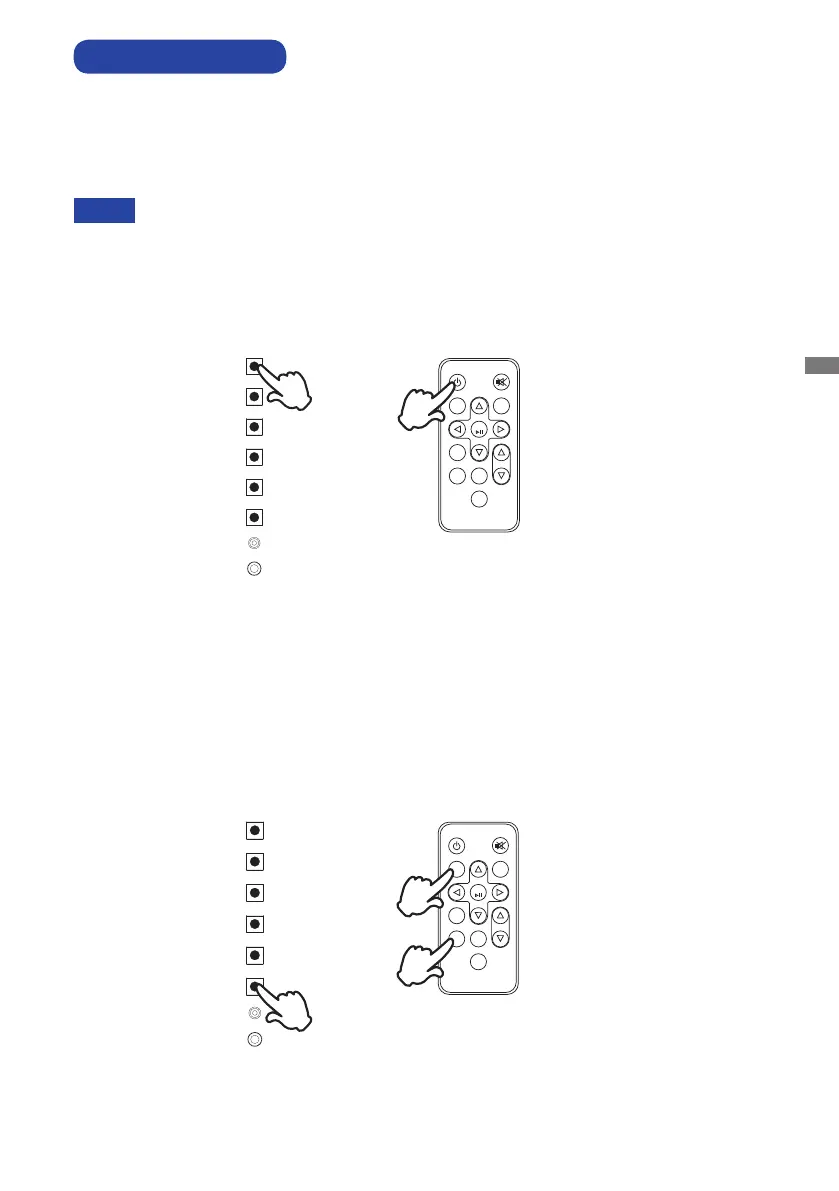
Turning the monitor ON
The monitor is on and the Power Indicator turns Green when you press the Power Button on the
monitorortheRemoteControl.ThemonitorisoandthePowerIndicatorturnsOrangewhenyou
press the Power Button on the monitor or the Remote Control. Press again to turn the monitor on.
NOTE
Even when using the power management mode or turning OFF the Power Switch, the monitor
will consume a small amount of electricity. Disconnect the Power Cable from the power supply
whenever the monitor is not in use or during the night, to avoid unnecessary power consumption.
[Remote Control]
Display the adjustment menu page
The menu page appears on the screen when you press the MENU Button on the monitor or the
Remote Control.
The menu page disappears when you press the EXIT Button on the Remote Control.
POWER
MUTE
MEMU
AUTO
OK
PLAY
EXIT
STOP
VOL
SELECT
POWER
UP
DOWN
LEFT/AUTO
RIGHT/SELECT
MENU
LED
IR
[Monitor]
[Remote Control][Monitor]
POWER
MUTE
MEMU
AUTO
OK
PLAY
EXIT
STOP
VOL
SELECT
POWER
UP
DOWN
LEFT/AUTO
RIGHT/SELECT
MENU
LED
IR



 To Next Page