ENGLISH
12 BEFORE YOU OPERATE THE MONITOR
To use the remote control, insert the button battery.
PREPARING THE REMOTE CONTROL
CAUTION
DonotuseanyotherbatteriesotherthanthosespeciedinthismanualfortheRemoteControl.
Burstbatteriesortheelectrolytefromthesebatteriesmaycausestains,reorinjury.
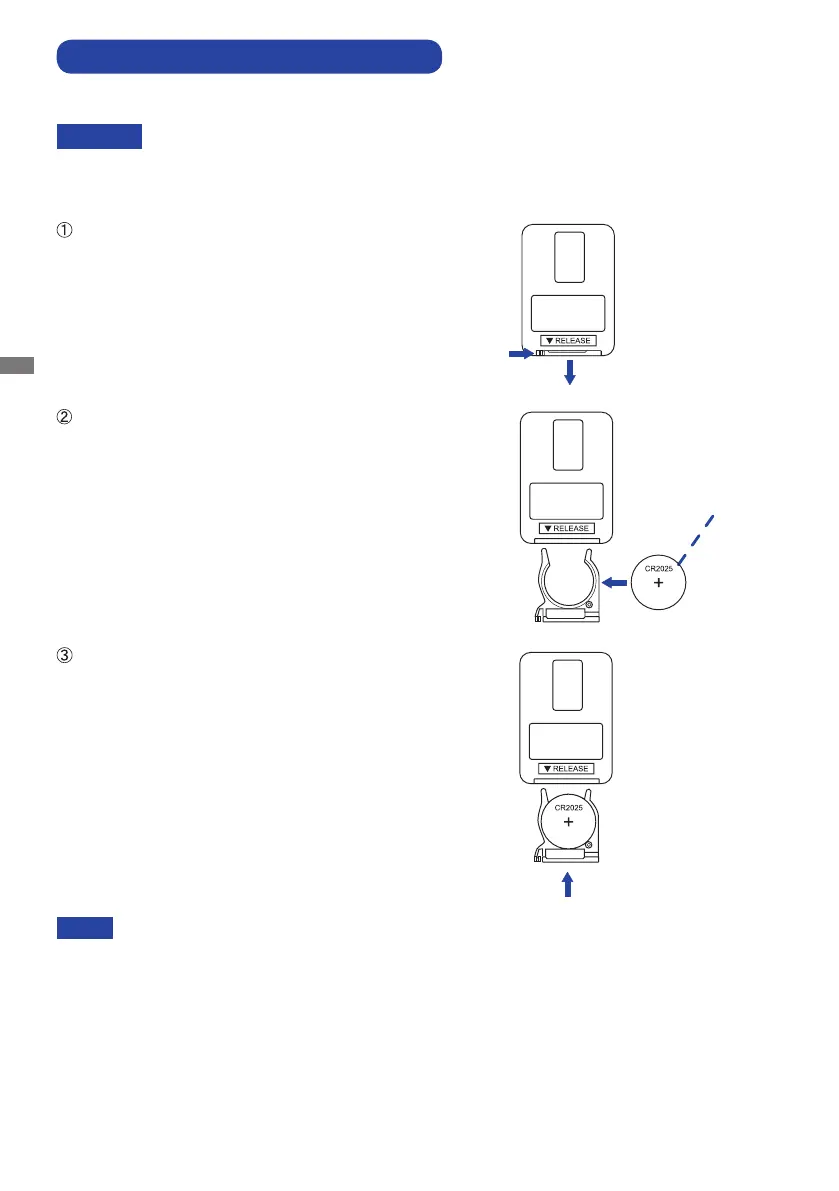
Push Lock to right and remove the battery case in the
direction of the arrow.
Put it in face up the + side of the button battery (CR2025).
Replace the battery case in the direction of the arrow.
NOTE
Replace with new batteries when the Remote Control does not work close to the
monitor. Use the button battery (CR2025).
Operate the Remote Control by pointing it toward the Remote Sensor on the monitor.
Other manufacturers remote control will not work with this monitor. Use the provided
Remote Control ONLY.
Used batteries needed to follow the local rules to be discarded. (Suggestion: to dispose
of used batteries please follow correct policy as per your local regulations.)
Button Battery



 To Next Page