ENGLISH
16 BEFORE YOU OPERATE THE MONITOR
CONNECTING YOUR MONITOR
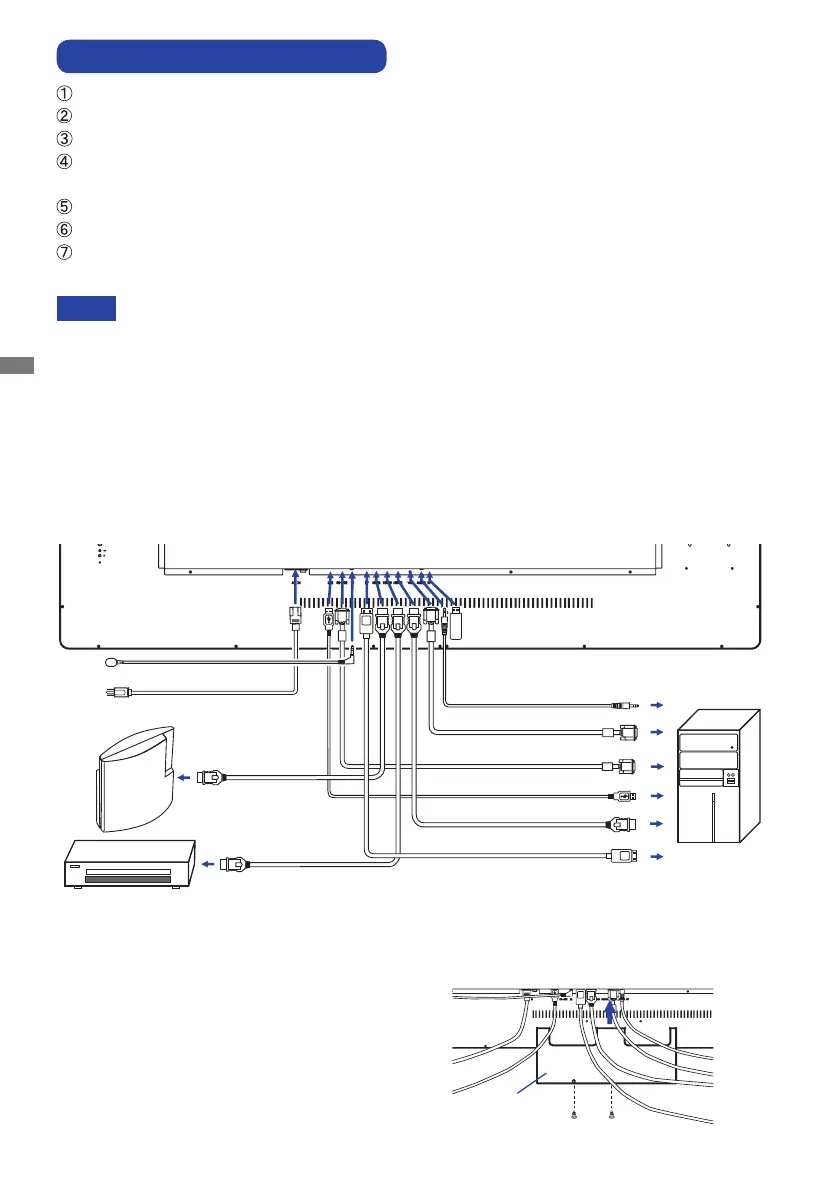
Ensurethatboththecomputerandthemonitorareswitchedo.
Connect the computer to the monitor with the signal cable.
Connect the computer to the monitor with the USB Cable.
ConnecttheIRExtenderCabletothemonitor,peelothedouble-sidedtapeinthebackofthe
IR Receiver and stick it to your preferred location.
ConnectthePowerCabletothemonitorrstandthentothepowersupply.
Turn on your monitor (Main Power Switch and Power Switch) and computer.
When the power is turned on, press the SELECT button and the input signal menu will be
displayed. Then select the input signal.
The signal cables used for connecting the computer and monitor may vary with the
type of computer used. An incorrect connection may cause serious damage to both
the monitor and the computer. The cable supplied with the monitor is for a standard
connector. If a special cable is required please contact your local iiyama dealer or
regionaliiyamaoce.
MakesureyoutightenthengerscrewsateachendoftheSignalCable.
When USB cable connected than wait for 5 seconds and the touch function is ready to
go.Itcanbeactivatedbypen,ngeroranyotherpointer.
[Example of Connection]
<Back>
NOTE
[ Cable Cover ]
Placethecablecoverandxitrmlyusingtwo
screws that are included.
Cable Cover
included screws
Cable Cover
Computer
AV Equipment
HDMI Cable (Accessory)
Power Cable (Accessory)
USB Cable (Accessory)
IR Extender Cable (Accessory)
DisplayPort Cable (Accessory)
RS-232C Cable (Not included)
GAME
Equipment
etc.
HDMI Cable
(Not included)
HDMI Cable
(Not included)
Audio Cable (Not included)
VGA Cable (Not included)*
USB (Not included)
* VGA cable is not supplied with the monitor. If you use low quality VGA cable, it may cause a result
of electro-magnetic interference. Please contact the iiyama Support Centre in your country if you
wish to connect the monitor via the VGA input.



 To Next Page