ENGLISH
18 OPERATING THE MONITOR
OPERATING THE MONITOR
To create the best picture, your iiyama LCD monitor has been preset at the factory with the COMPLIANT
TIMING shown on page 38. You are also able to adjust the picture by following the button operation
shown below. For more detailed adjustments, see page 30 for SCREEN ADJUSTMENTS.
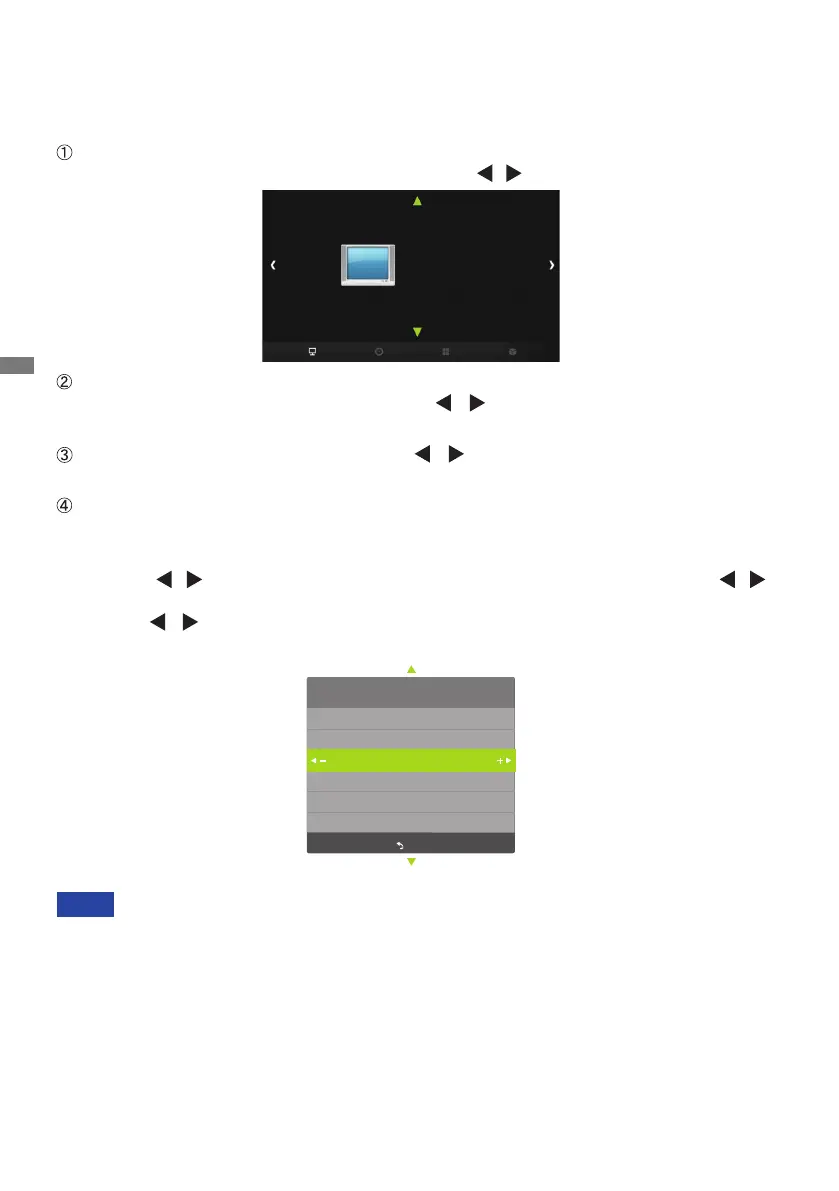
Press the MENU Button to start the On Screen Display feature. There are additional
Menu items which can be switched by using the
/ Buttons.
Select the Menu item of the adjustment you want to make. Press the OK Button
and enter the menu page. Then, use the
/ Buttons to highlight the desired
adjustment item.
Press the OK Button again. Use the
/ Buttons to make the appropriate
adjustment or setting.
Press the EXIT Button to leave the menu, and the settings you just made would be
automatically saved.
When button operations are aborted during adjustment, On-Screen Display disappears when the
time set for the Menu time has passed.
The MENU Button can be used to return previous menu item.
Any changes are automatically saved in the memory when the On Screen Display
disappears.
TurningothepowershouldbeavoidedwhileusingtheMenu.
Adjustments for Horizontal / Vertical Pos., Size and Phase are saved for each signal timing.
Except for these adjustments, all other adjustments have only one setting which applies to all
signal timings.
NOTE
For example, to correct for vertical position, select Menu item of "PICTURE". Select "PC" by
using the
/ Buttons. Press the OK Button. Then select "Vertical Pos." by using the /
Buttons. Press the OK Button.
Use the
/ Buttons to change the vertical position settings. The vertical position of the
overall display should be changing accordingly while you are doing this.
PICTURE
Picture Mode
Color Temperature
Aspect Ratio
PC
Gamma
Backlight
PC
Auto Adjust
Horizontal Pos. 50
Vertical Pos. 50
Size 50
Phase 13
MENU



 To Next Page