ENGLISH
26 OPERATING THE MONITOR
Viewing Photo les
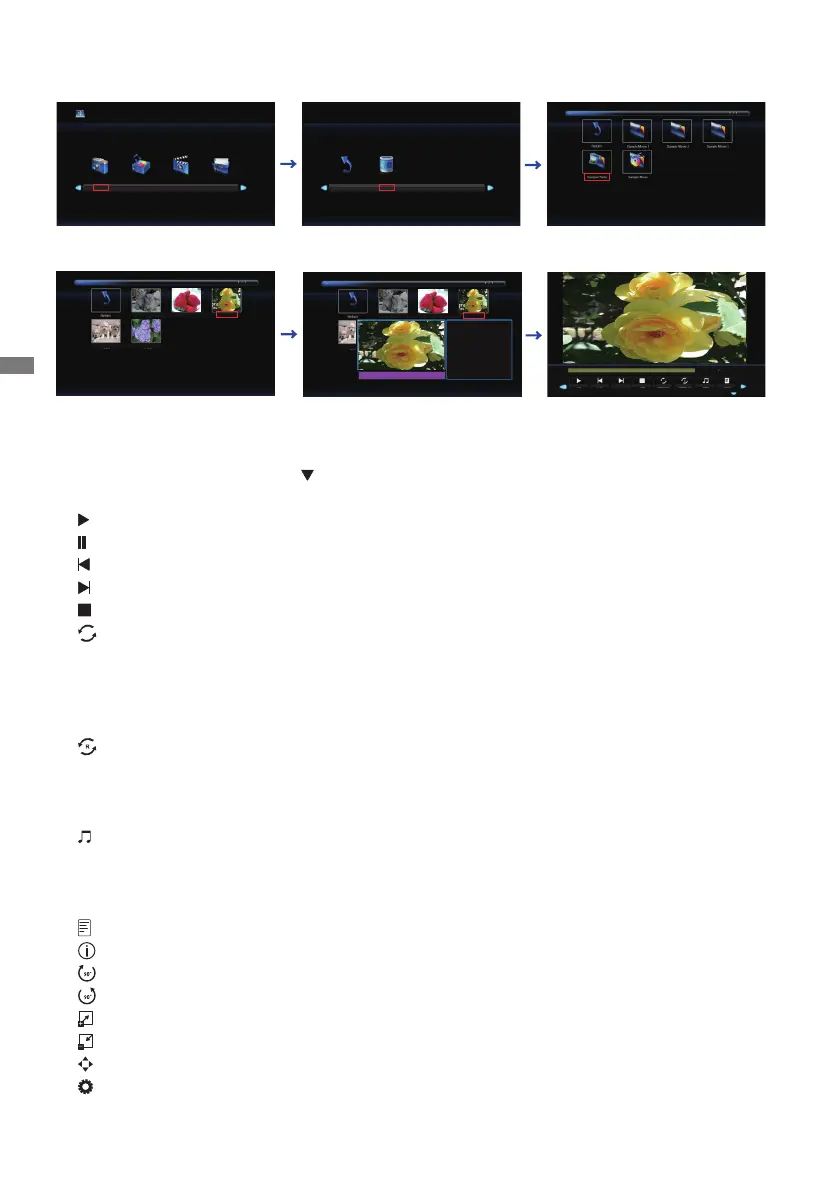
1.Select "Photo" and press the OK button, then select "C" and press the OK button.
2.SelectthePhotoleandpresstheOKbutton.
<Operation Menu>
• Menu Display : Press the OK button on the remote control.
• Menu non-Display : Press the
/ EXIT button on the remote control.
• Return : Previous screen
•
Play : Plays Slideshow (All photo or Choice photo)
•
Pause : Pauses Slideshow
•
Prev. : Previous Photo
•
Next : Next Photo
•
Stop : Stops Slideshow
•
Repeat : Set number of times to repeat Slideshow (Repeat is switched as following by
pressing the OK Button successively.)
Repeat All : Repeat the whole section continuously
Repeat None : Do not repeat
Repeat 1 : Repeat entire section 1 time
•
Random : Set the Random Photo (Random is switched as following by pressing the OK
Button successively.)
Random o : Proceed in order
Random on : Progress randomly
•
Music:MusicOn/O(MusicOn/OisswitchedbypressingtheOKButtonsuccessively.
Ifthereisamusicleinthesamedevice,musicwillbeplayedifitissettoOn.All
music will be played, but if there is music selected by MUSIC (from the Player menu) ,
it plays with priority.)
•
Playlist : Displays the Photo list
•
Info:Displaysthecurrentlestatusinformation.
•
Rotate(clockwise) : Rotates the image 90° clockwise.
•
Rotate(counter clockwise) : Rotates the image 90° counterclockwise.
•
Zoom In : Zoom in the image.
•
Zoom Out : Zoom out the image.
•
Move View : Move focus in Zoom In state
•
Slide Show : Normal : Squential Slideshow
Random : Slideshow by Random
Photo
Music
Movie
TEXT
C
Return
Cat.jpg
Strawberry.jpg
Flower1.jpg
Flower2.jpg
Dog.jpg
Cat.jpg
Strawberry.jpg
Flower1.jpg
Flower2.jpg
Dog.jpg
Flower1.jpg
Resolution :
Size :
Date :
Time :
1024 x 768
859 Kbytes
2017 / 05 / 24
13 : 59 : 26
Play Prev.
Next
Stop
RepeatNone
Random Off
Music Playlist











 To Next Page