18 19
///
Menu navigation
›
Enter the menu by pressing ”Menu” button (E).
›
Press the plus (+) button (G) or minus (-) button (F) to change the menu options.
›
Press “OK / Temp“ button (H) to enter the select menu option.
›
Press the plus (+) button (G) or minus (-) button (F) to change the menu value settings.
›
Confirm the menu settings by pressing the “OK / Temp“ button (H).
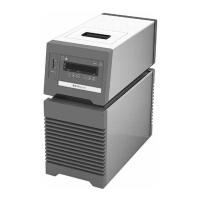
Menu navigation and structure
The type of temperature
PID control arithmetic (A)
Menu
/// Menu structure
Default settings
AUTO 1
Minimum temperature (L)
MODE (M) A
C
B
Fluid type (F)
AUTO 0
Activated
Activated
Maximum temperature (H) 40 °C
-10 °C
8
-
-
-
Kp 1(P) 40
Ti 1 (i) 10.0
Td 1 (d) 3.0
Reset to factory settings (r)
0
3
2
Calibration (C) 0 Activated
-
-
Alarm and key tone (b) 0
1 Activated
-
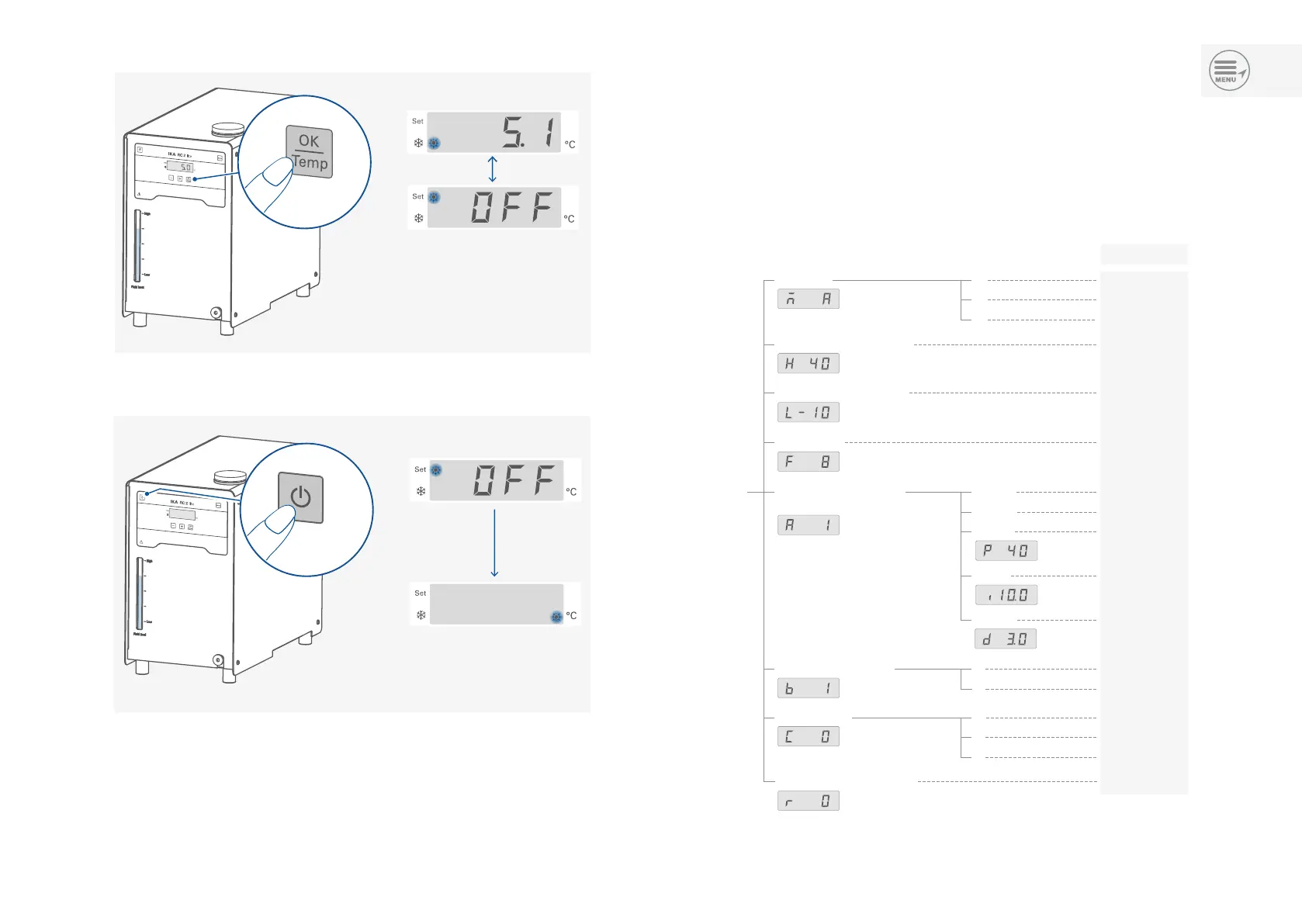
/// Switching off
/// Stopping tempering function


 To Next Page