28 29
Error codes
Any malfunctions during operation will be identified by an error message on the display.
Proceed as follows in such cases:
› Turn off the device by using the power switch.
› Carry out corrective measures.
› Restart the device.
Causes
›
Safety shutdown of the compressor.
Effect
› Pump off
› Tempering function off
Solutions
› Check operating conditions according to the "Technical data".
› Wait until over-temperatures / -pressures are equilibrated.
› Restart the device.
E 15
Causes
› Compressor suction temperature fault.
Effect
› Pump off
› Tempering function off
Solutions
› Check operating conditions according to the "Technical data".
› Wait until over-temperatures / -pressures are equilibrated.
› Restart the device.
E 16
Causes
› Compressor discharge temperature fault.
Effect
› Pump off
› Tempering function off
Solutions
› Check operating conditions according to the "Technical data".
› Wait until over-temperatures / -pressures are equilibrated.
› Clean the filter.
E 17
Causes
›
Fluid temperature too high.
Effect
› Pump off
› Tempering function off
Solutions
› Check operating conditions according to the "Technical data".
› Wait until over-temperatures / -pressures are equilibrated.
› Switch the device off and let the fluid cool down.
E 19
/// Repairs
Please send in device for repair only after it has been cleaned and is free from any
materials which may constitute a health hazard.
For repair, please request the “Decontamination Certificate” from IKA, or download printout of
it from the IKA website www.ika.com.
If you require servicing, return the device in its original packaging. Storage packaging is not
sucient. Please also use suitable transport packaging.
Maintenance and cleaning
To avoid contamination, it is essential to change the bath fluid regularly.
If water is used for bath fluid, we recommend to add Water bath protective media. The protective
media stops the growth of algae, bacteria and other microorganisms.
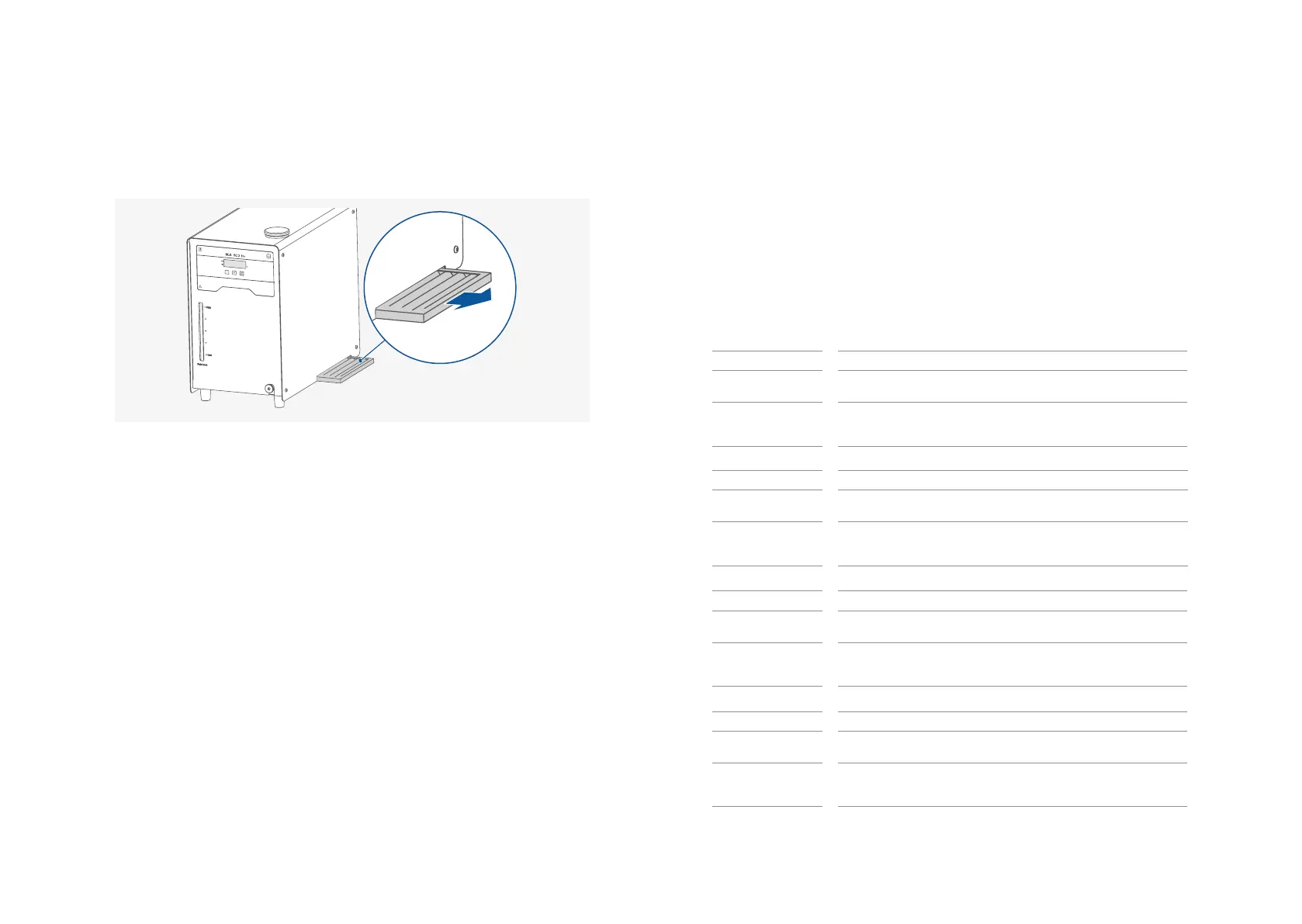
To keep the full cooling performance, the dust filter of the cooler must be checked regularly and
cleaned if necessary.
› Switch off the device and disconnect power cable.
› Take out the dust filter.
/// Ordering spare parts
When ordering spare parts, please indicate:
› Device type.
› Serial number, see type plate.
› Item and designation of the spare part, see: www.ika.com, spare parts diagram and spare
parts list.
› Software version (briefly visible in the display when the device is switched on).
/// Cleaning
For cleaning disconnect the mains plug!
Use only cleaning agents which have been approved by IKA to clean the devices:
Water containing surfactant / isopropyl alcohol.
› Wear protective gloves during cleaning the devices.
› Electrical devices may not be placed in the cleansing agent for the purpose of cleaning.
› Do not allow moisture to get into the device when cleaning.
›
Before using another than the recommended method for cleaning or decontamination, the
user must ascertain with that this method does not destroy the device.
› Clean condenser dust protection sheet with a vacuum cleaner or wash the sheet in the water and
dry the sheet before assembly.
Note: Don’t touch the condenser surface with hard parts.


 To Next Page