4. CONNECTION
4-1 External connection
6
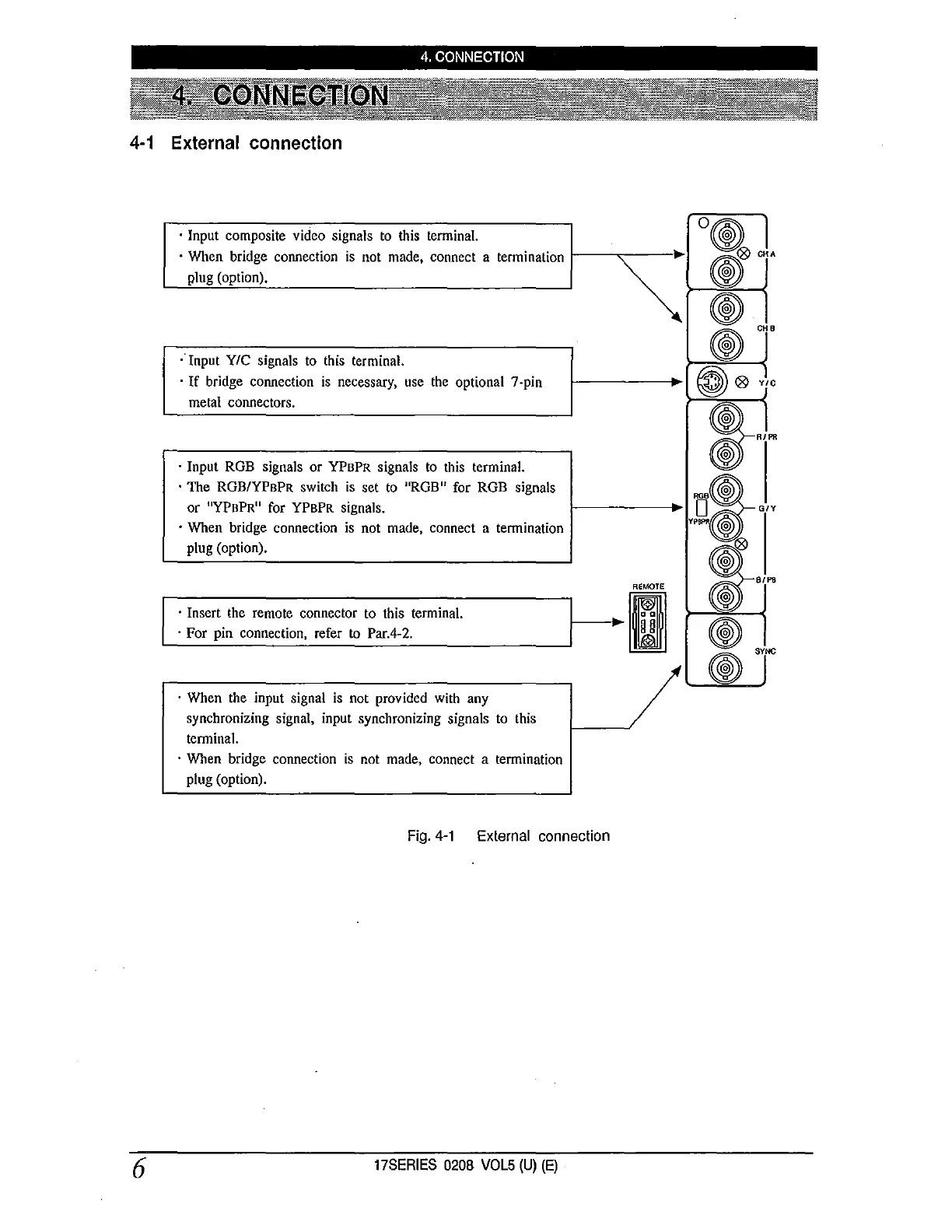
· Input composite video signals to this terminal.
· When bridge connection is not made, connect a termination
plug (option).
; Input YIC signals to this terminal.
· If bridge connection is necessary, use the optional 7-pin
metal connectors.
· Input ROB signals or YPBPR signals to this terminal.
· The ROB/YPBPR switch is set to "ROB" for ROB signals
or "YPBPR" for YPBPR signals.
· When bridge connection is not made, connect a termination
plug (option).
REMOTE
L
_· _In_s_e..:rt-th_e_re_m_o_t_e_c_o_n_ne_c_t_or-to-th_i_s_t_e_rm_in_a_l. ______
;--,
►
1~~~1
· For pin connection, refer to Par.4-2. 1M)
· When the input signal is not provided with any
synchronizing signal, input synchronizing signals to this
terminal.
· When bridge connection is not made, connect a termination
plug (option).
Fig. 4-1 External connection
17SERIES 0208 VOL5 (U) (E)
®
CHB
®
~Q9 YIC
i ...
GIY
~
.,,,,
@
SYNC
@


 To Next Page
 Loading...





