5. ROUTINE ADJUSTMENT & 6. OPTION
<For NTSC>
(3) Brightness adjustment
It is necessary to set the black level
according to surrounding condition
(ambient brightness).
I I I
11
It\
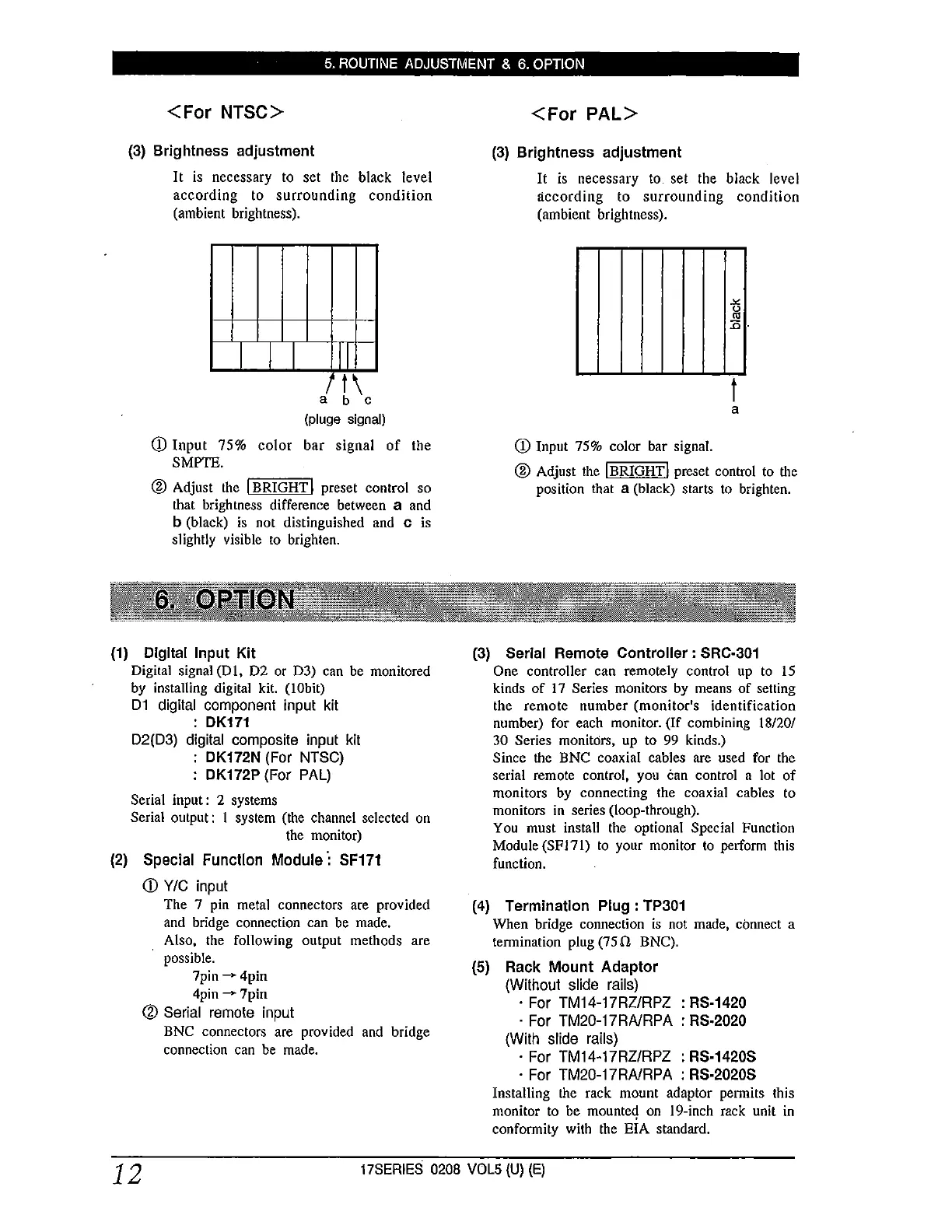
a b c
(pluge signal)
CD Input 75% color bar signal of the
SMPTE.
® Adjust the I BRIGHT I preset control so
that brightness difference between a and
b (black) is not distinguished and c is
slightly visible to brighten.
(1) Dlgltal Input Kit
Digital signal (DI, D2 or D3) can be monitored
by installing digital kit. (I Obit)
D1 digital component input kit
: DK171
D2(03) digital composite input kit
: DK172N (For NTSC)
: DK172P (For PAL)
Serial input: 2 systems
Serial output: I system (the channel selected on
the monitor)
(2) Special Function Module·: SF171
CD Y/C input
The 7 pin metal connectors are provided
and bridge connection can be made.
Also, the following output methods are
possible.
7pin -4pin
4pin -7pin
® Serial remote input
BNC connectors are provided and bridge
connection can be made.
<For PAL>
(3) Brightness adjustment
It is necessary to set the black level
according to surrounding condition
(ambient brightness).
-"'
0
"'
:0-
t
a
CD Input 75% color bar signal.
® Adjust the !BRIGHT! preset control to the
position that a (black) starts to brighten.
(3) Serial Remote Controller : SRC-301
One controller can remotely control up to 15
kinds of 17 Series monitors by means of setting
the remote number (monitor's identification
number) for each monitor. (If combining 18/20/
30 Series monitors, up to 99 kinds.)
Since the BNC coaxial cables are used for the
serial remote control, you can control a lot of
monitors by connecting the coaxial cables to
monitors in series (loop-through).
You must install the optional Special Function
Module (SFJ71) to your monitor to perform this
function.
(4) Termination Plug : TP301
When bridge connection is not made, connect a
termination plug (75 fl BNC).
(5) Rack Mount Adaptor
{Without slide rails)
· For TM14-17RZ/RPZ : RS-1420
· For TM20-17RNRPA : RS-2020
{With slide rails)
· For TM14-17RZ/RPZ : RS-1420S
· For TM20-17RNRPA : RS-2020S
Installing the rack mount adaptor permits this
monitor to be mounteq on I 9-inch rack unit in
conformity with the EIA standard.
12
17SERIES 0208 VOL5 {U) {E)



 To Next Page
 Loading...




