8. Replacing the knob
If necessary, use the following instructions to replace the knob.
Parts needed:
• AX50.G.KT - TorQ Knob Without Cap
• AX50.G.KT.A.1 - Black Flat Cap for TorQ Knob
• AX50.G.KT.3 - Cap removal tool
• AX50.G.KT.2 - Knob removal tool
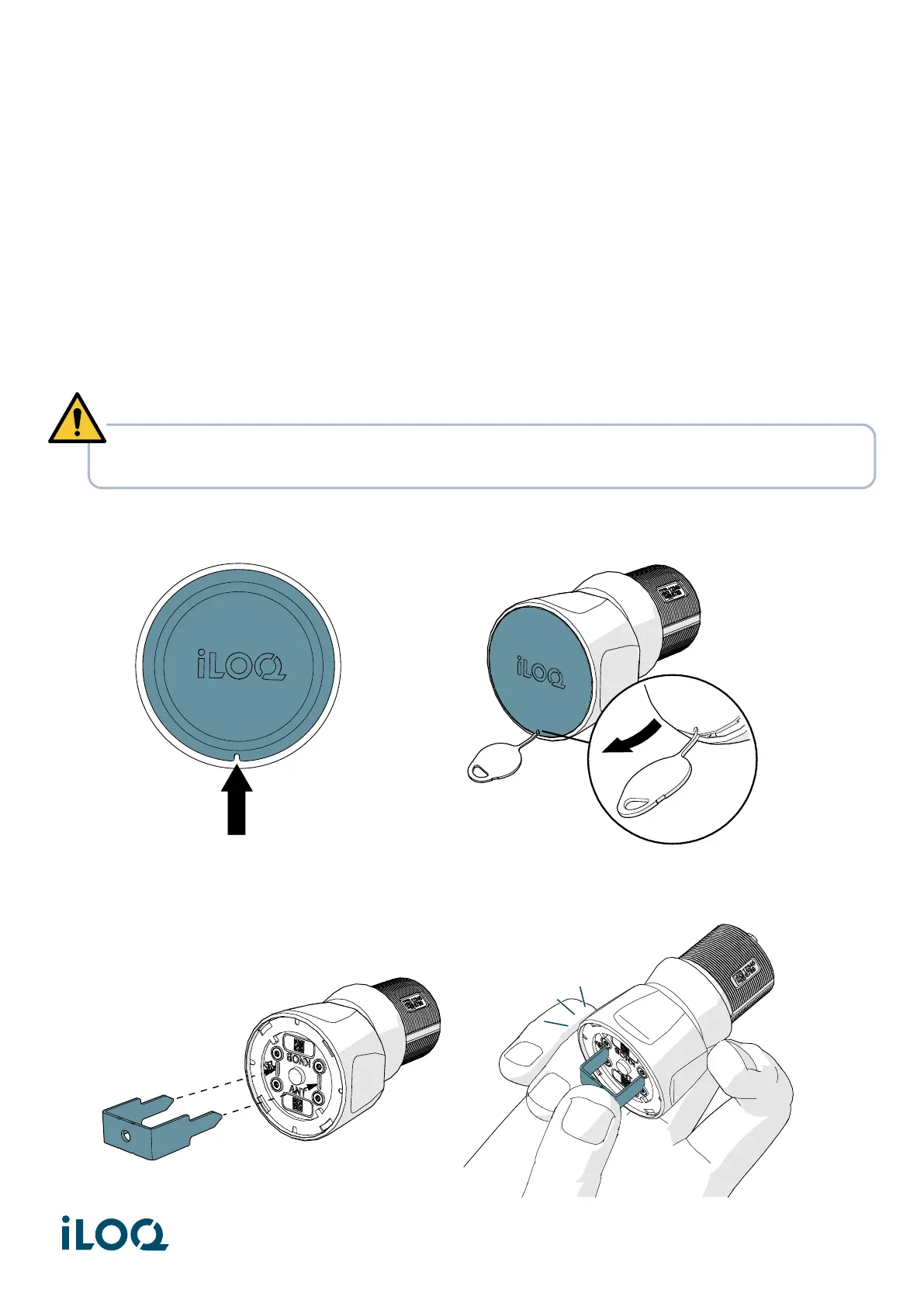
1. Insert the cap removal tool into the hole of the cap to remove the front cap from the knob.
2. Insert the knob removal tool into the front of the knob. While holding the back of the knob, press
firmly on the tool until it clicks.
WARNING! Risk of injury. Do not leave the knob removal tool inside the knob. Hold the knob
securely during installation and removal to prevent the tool from accidentally popping off.
21
Document ID - 304931
iLOQ S50 (X50S)


 To Next Page