✔ NOTES
The SuperDisk drive DOES NOT function on a sound card IDE
channel.
We don’t recommend setting a CD-ROM drive as a Slave to the hard
drive.
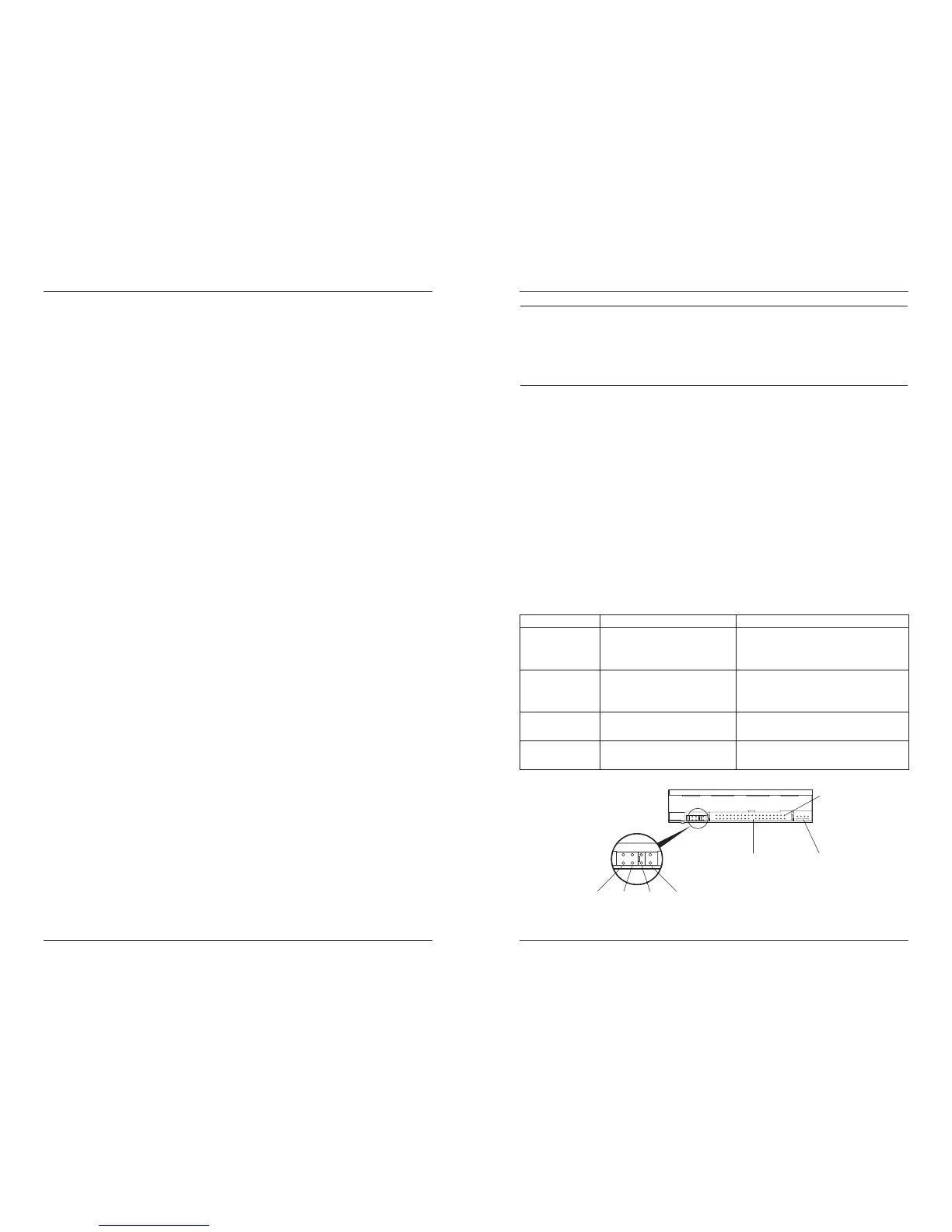
8) Set the jumpers located on your SuperDisk drive, hard drive,
and/or CD-ROM by pulling them off with tweezers, pliers, or your
thumbnail. Reposition them according to your system
configuration. If you have two drives on a single IDE cable, make
sure you set one of them as Master and the other as Slave. See
the following table.
Jumpers are located on the rear of drives. They are usually
defaulted to Master, although some hard drives have their
jumpers set to "cable-select." (See your system owner’s manual
to find out how your hard drive jumpers are set. Also, examine
the front of the drive, where computer manufacturers often print
jumper settings.)
Hardware Installation Procedure
8
MDO CS SL MA
Jumper Settings
IDE
Connector
Power
Connector
Pin 1
SuperDisk Drive Jumper Settings
Abbreviation Jumper Name What it does
MA Master Configures the SuperDisk drive as
the Master drive on the secondary
IDE channel.
SL Slave Configures the SuperDisk drive as
the Slave drive on either the
primary or secondary IDE channel.
CS Cable Select This setting is only for computers
that use cable-select cable.
MDO Factory Setting For factory use ONLY. Do not use
this setting.
Troubleshooting
Troubleshooting
Installation
You cannot boot from a DOS 6.22,Windows 95, or 95A boot
diskette.
Solution 1
Only Windows 98, 95, OSR/2, and NT 4.0 allow you to
boot from either a 1.44MB or 120MB diskette.
Solution 2:
Obtain a current version of BIOS from your computer
vendor. If none are available, call 800-800-BIOS
(Unicore). Also, check the following web sites:
http://ping4.ping.be/bios/index.shtml
http://ping4.ping.be/bios/numbersami.shtml
http://www.unicore.com
After you install the SuperDisk drive, your CD-ROM or other IDE
device does not work.
Solution 1:
Check your jumper settings. Change which drive is
Master and which is Slave.
Solution 2:
Make sure your CD-ROM or other device is compatible.
Solution 3:
Move the SuperDisk drive to a different IDE channel or
its own IDE channel.
Solution 4:
Check your cable connections.
After you install the device driver, your computer can no longer play
music CDs.
Solution:
Make sure the CD-ROM driver you are using is the
newest available from the vendor. Make sure it is a
protected mode driver.
19



 To Next Page