3-16
3.6 Monitoring the Running Status--"Drive monitoring"
Menu #3 "Drive monitoring" is used to check the running status during maintenance and test running.
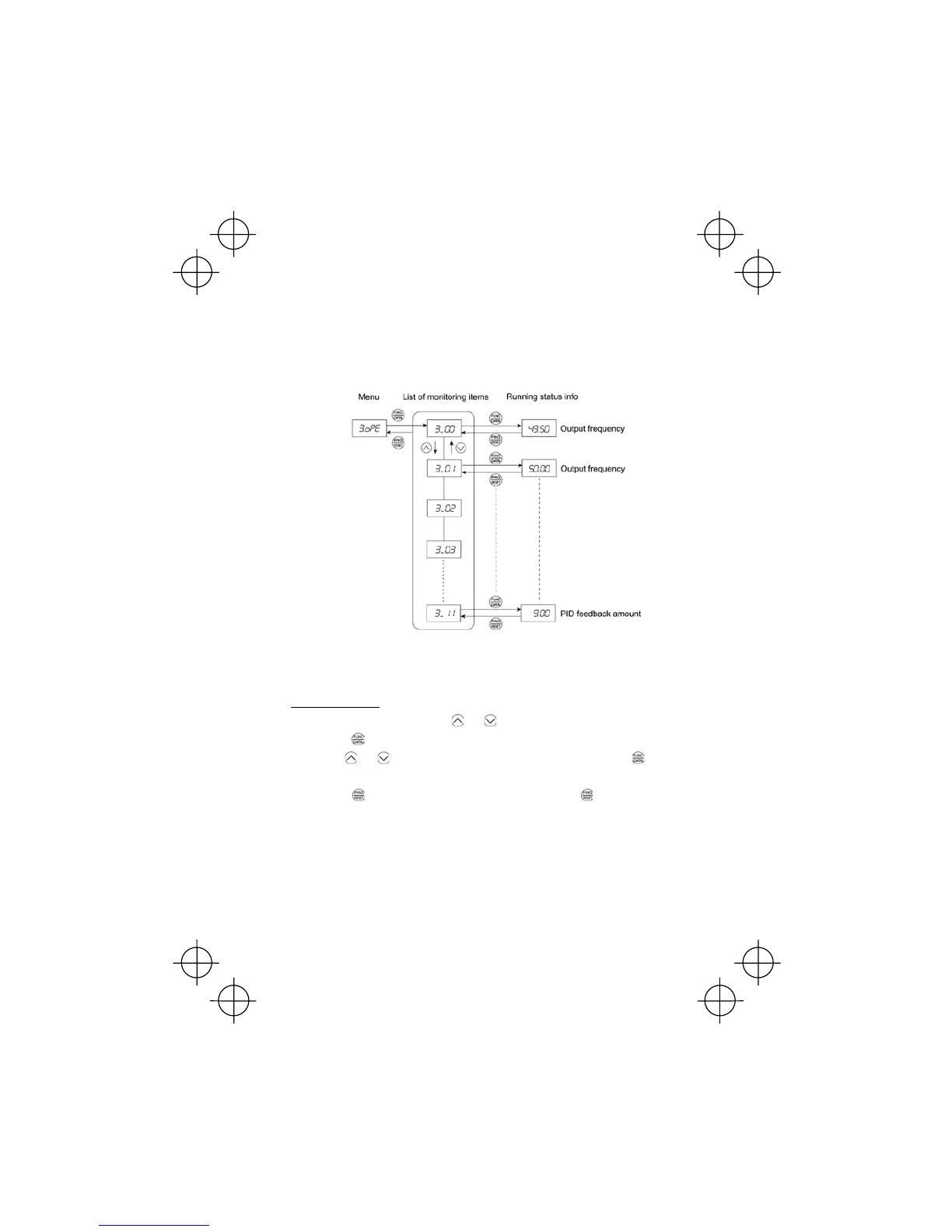
The display items for "Drive monitoring" are listed in Table 3.6. Using keys, you may check those
items in succession. Figure 3.7 shows the status transition diagram for "Drive monitoring."
If you cannot switch the menu to any other one, set function code E52 data to 2 (Full-menu mode).
Figure 3.7 "Drive Monitoring" Status Transition
Basic key operation
(1) With the menu displayed, use the and keys to select "Drive monitoring" (3.oPE).
(2) Press the
key to display the desired code in the monitoring items list (e.g. 3_00).
(3) Use the
and keys to select the desired monitoring item, then press the key.
The running status information for the selected item will appear.
(4) Press the
key to return to the monitoring items list. Press the key again to return to the
menu.



 To Next Page