3-20
3.7 Checking I/O Signal Status--"I/O checking"
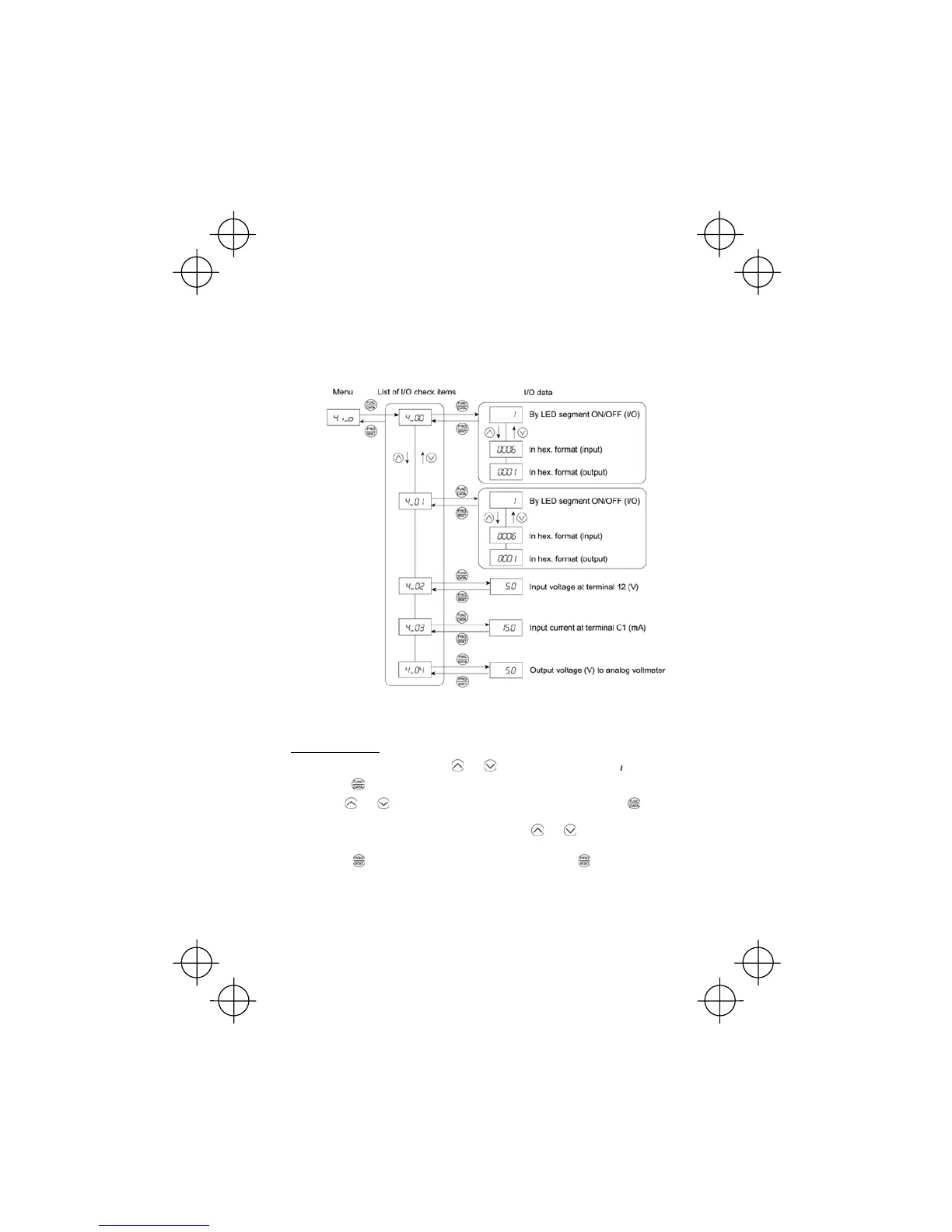
With Menu #4 "I/O checking," you may display the I/O status of external signals without using a
measuring instrument. External signals that can be displayed include digital I/O signals and
analogueue I/O signals. Table 3.10 lists check items available. The status transition for I/O checking
is shown in Figure 3.8.
If you cannot switch the menu to any other one, set function code E52 data to 2 (Full-menu mode).
Figure 3.8 "I/O Checking" Status Transition
Basic key operation
(1) With the menu displayed, use the and keys to select "I/O check"(4. _o).
(2) Press the
key to display the codes for the I/O check item list. (e.g. 4_00)
(3) Use the
and keys to select the desired I/O check item, then press the key.
The corresponding I/O check data will appear. For control I/O signal terminal and control circuit
terminal input under communication control, use the
and keys to select one of the two
different display methods.
(4) Press the
key to return to the I/O check item list. Press the key again to return to the
menu.



 To Next Page