CONTR OLLER
CONTROL PANEL
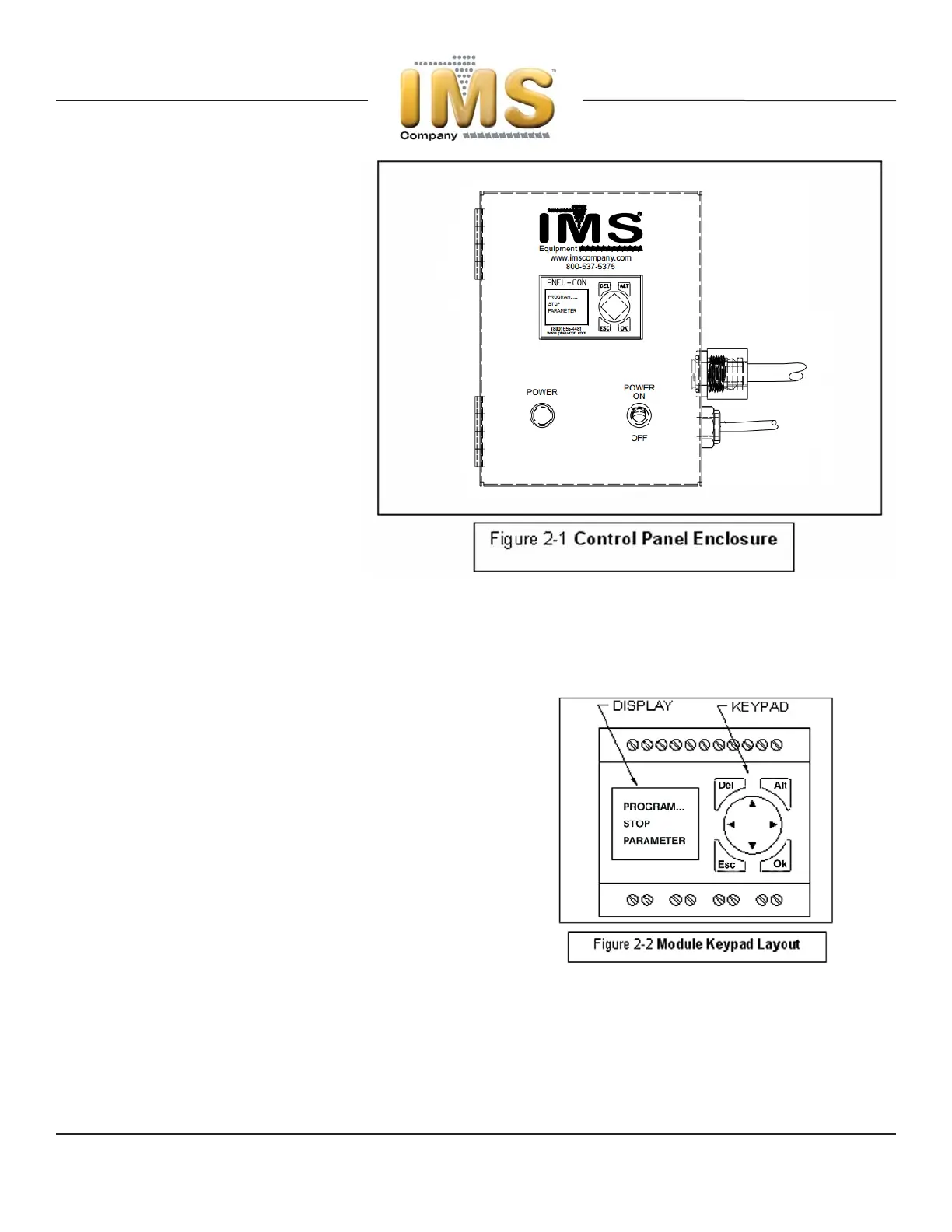
The Control Panel’s Enclosure (Fig. 2-1)
includes a combination ON/OFF/Circuit-
Breaker Switch, Status-Indicator Lights,
Control Cord and Power Cord. Depending
upon your particular Loader’s functions, the
Panel may have a different arrangement of
Door-mounted controls and indicator lights
than shown.
Control Panels on WL1250 & WL1250VP
Whisper® Loaders are mounted directly to
the Loader’s mounting flange. Control
Panels on WL1250PLVP, PL1250 & all other
models are remotely-connected to the
loader by the Control Cord. See Model-spe-
cific drawings (provided with this manual)
for applicable wiring diagrams.
The Control Panel is housed in a NEMA
1-rated enclosure with hinged access door
and configured for 120VAC/Ø1/60Hz standard, 240VAC/Ø1 and other electrical power options are available. Use caution
when plugging unit into receptacle – know your set-up beforehand.
PLC CONTROLLER
Factory Settings
Settings may be adjusted in the field to suit material conveying
and/or operating conditions not covered in this manual.
Consult factory to review special circumstances prior to making
any changes.
Quick-Start
Keypad Terminal: Initial Screen at Power-On will display
System, Stop/Run or other Loader-function status. See Figure
2-2 for PLC Module’s Keypad layout.
Pressing “Ok” brings up the Menu Selection Screen. Press the
Center Pad “DOWN” Arrow until “Parameter” function is flash-
ing. Press “Ok” to access the Timer-functions Screen.
Press UP or DOWN Arrow until desired Timer is selected then press “Ok” for next screen. From here set time desired by
pressing “Ok” while first-digit is flashing. Press Right Arrow (Center Pad) until the next digit to be changed flashes, and
then UP or DOWN arrow until desired value is displayed. Repeat until entire time value is entered. Press “Ok” to save
and then “Esc” to return to the previous menu. Press UP or DOWN arrow to access another Timer or “Esc” to save and
return to previous menu.
Press “Esc” once again to return to the RUN Screen.
© Copyright 2007 IMS Company. All rights reserved. An ISO 9001:2000 Registered Quality Company
12



 To Next Page