Using Keyrah V3
3.4 Buttons
3.4.1 Power Switch
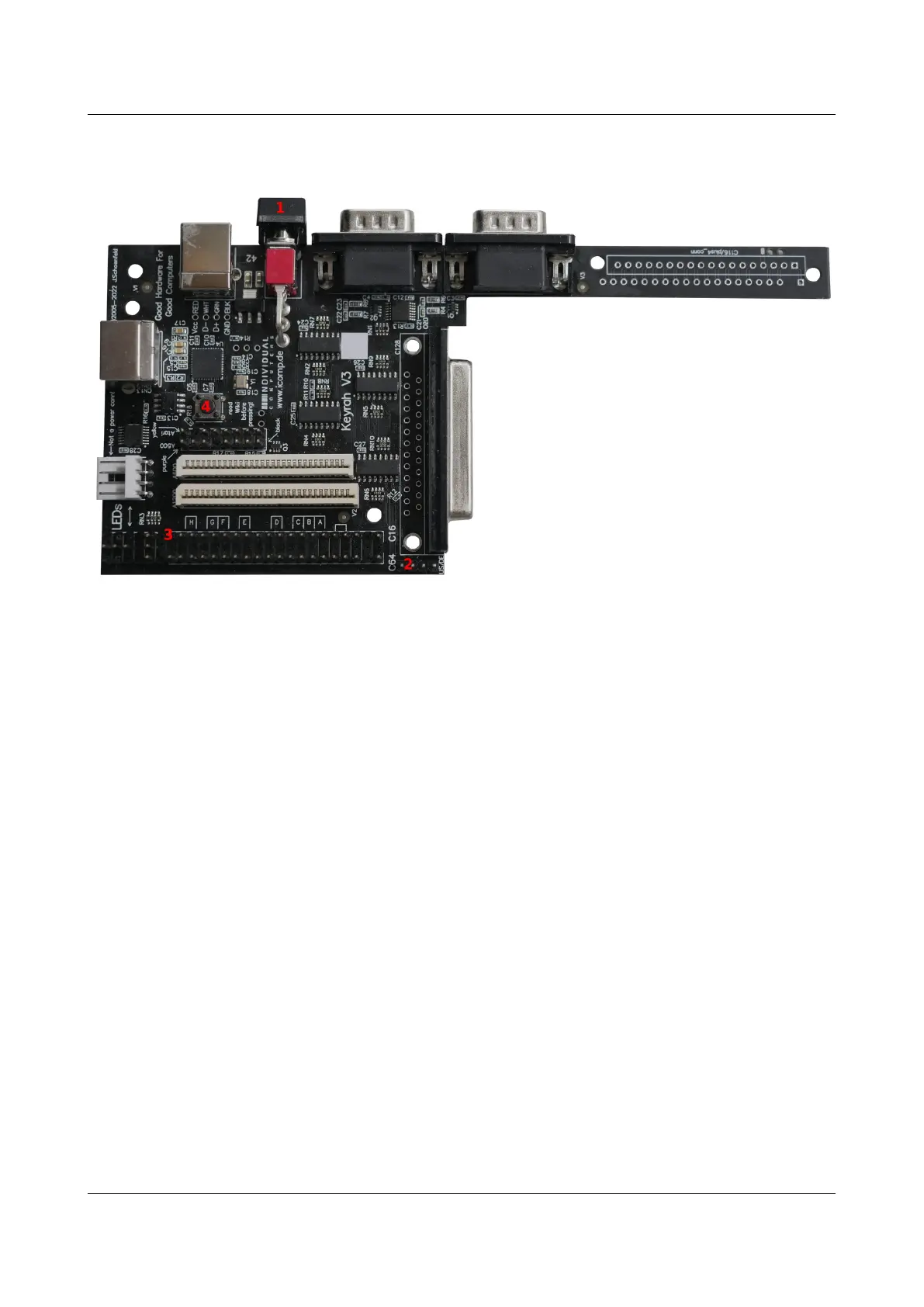
(1) The Power switch has three functions:
1. Bottom („off“) and middle („on“) position toggles between alternative keymaps (see 3.6
Keyboard Mapping
2. Press and release top momentary switch to trigger a keypress (by default mapped to the key
that brings up the menu and/or disables input capturing in the respective supported
emulator).
3. Press and hold top momentary switch (for approx 2 seconds) to put the host into sleep mode.
Keyrah is programmed to wake the computer up on any keystroke if it was switched off using the
ACPI key. This can of course only work if the USB port is supplied with power while the PC is in
standby mode, and your BIOS is properly configured.
3.4.2 Extra Buttons
• (2) One extra Button/Key can be connected to the Menu_btn keypad on the board. This
button is by default mapped to the key that brings up the menu and/or disables input
capturing in the respective supported emulator.
• (3) Another extra Button/Key can be connected between Pin 20 of the C16 connector and
GND (eg Pin 4 of the C16 connector). This button can not be used with a C16 or Amiga
keyboard. By default this is mapped to the Escape key.
10


 To Next Page