USB connected devices such as phone or storage
devices.
Bluetooth devices such as a phone tablet.
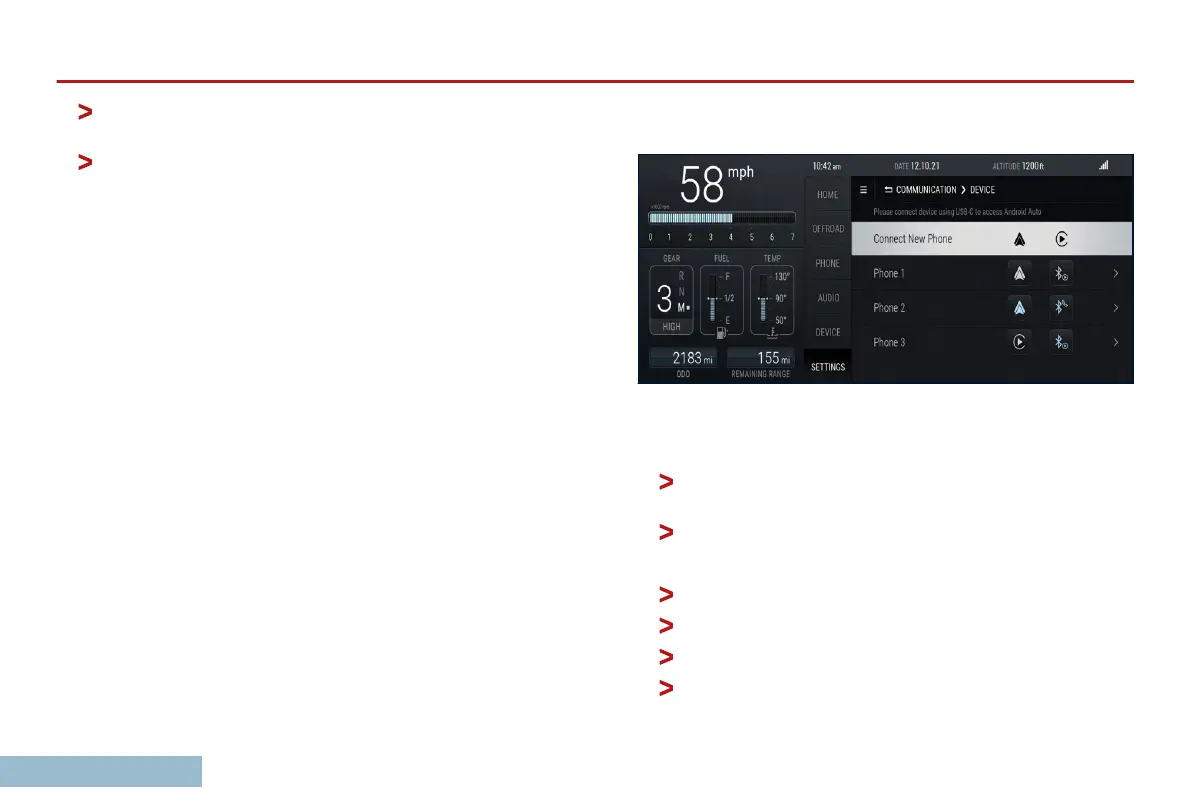
Device
The Device
Tab shows phones that have been connected. The
device tab will rename to Apple Carplay or Android Auto if your
phone is connected and supports it.
Settings
The Settings tab displays settings for various functions, including
your Grenadier’s Advanced Driver Assistance Systems (ADAS).
Those are discussed in the ADAS subsection of the Driving On
Road section that follows.
You can connect new phones using the Device tab.
Connecting your phone or tablet
To connect a phone or tablet with Bluetooth:
If no devices are currently connected,
Click on the DEVICE tab to go directly to the settings
page.
Select ‘Connect New Phone’.
Otherwise,
Select the SETTINGS tab.
Select the COMMUNICATION menu.
Select DEVICE.
Select ‘Connect New Phone’.
OVERVIEW
26



 To Next Page