12
Auto Programs
Taking Control
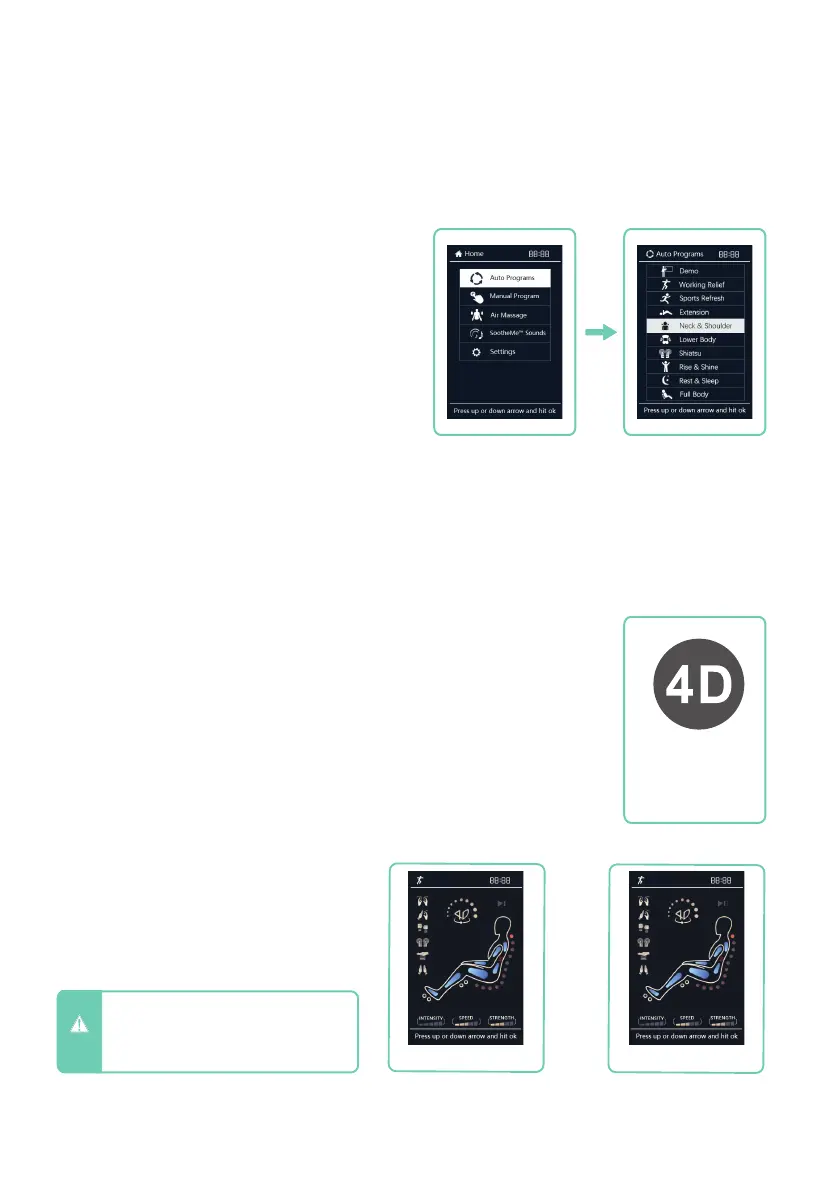
When the massage chair is operating, press
the
HOME
button on the remote control to
enter the main menu display. Use the Up and
Down directional arrows to navigate to Auto
Programs. Press OK to select.
Choose from Demo, Working Relief, Sports
Refresh, Extension, Neck & Shoulder, Lower
Body, Shiatsu, Rise & Shine, Rest & Sleep,
and Full Body programs.
Press OK to select the program you desire.
Selected program will show on the in-use
screen. If you de-select the program running
in this screen it will turn the program off.
While the in-use screen is showing, use the 4D button on your
remote control to increase or decrease the maximum 4D intensity of
the back mechanism. Intensity dial shows on in-use display area.
4D Intensity Control
Remote Control In-Use Screen
When running an Auto Program or
Manual mode, the remote control
screen will return to the in-use screen
(as shown below) after 10 seconds of
being idle.
Manual in-use screen
Auto Program in-use screen
CAUTION
- Do not spill liquids on remote control
and avoid placing heavy objects on
remote control or power cord to
avoid damage or malfunction.
4D Intensity
Button
DemoManual











 To Next Page