14
Taking Control
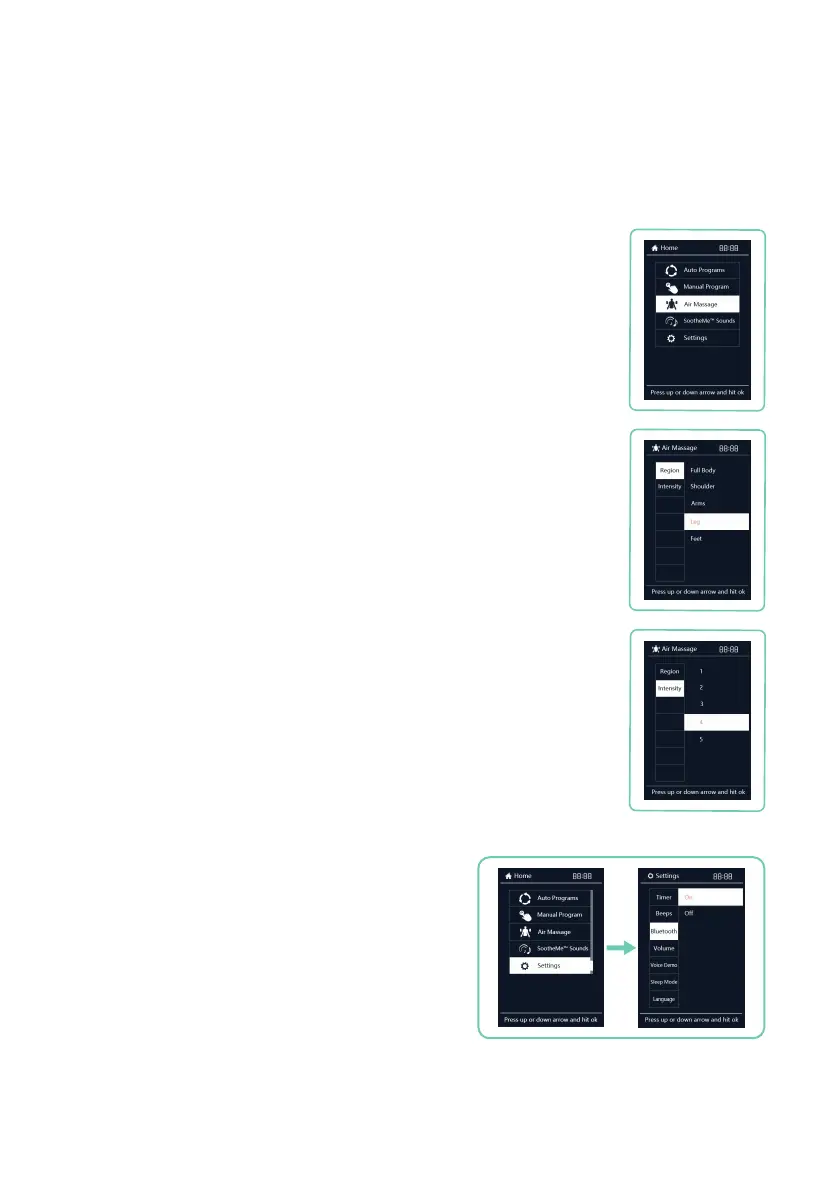
Your massage chair includes Bluetooth
®
compatibility
so you can play and enjoy your favorite music. To
enable Bluetooth connectivity, Select Settings from
Menu display, then use the up or down button to
navigate to Bluetooth, press right button, then
use the up or down button to select your desired
Bluetooth setting: On or Off. Press OK button to
select Bluetooth
®
setting.
To connect your Bluetooth
®
enabled audio device, go
into your audio device settings, navigate to Bluetooth
settings and pair with the device named Riage 4D.
The chair will beep when a connection is made.
Bluetooth
®
Audio
Press HOME button on remote control. Select Air Massage from Menu
display, then use the up or down button to
navigate among: Region
and Intensity.
Navigate to Region. Press right button, then use up or down button to
select your desired airbag region: Full Body, Shoulder, Arms, Leg, and
Feet. Press OK button to select the region. To turn a particular airbag
region off, de-select the activated region. Selecting Full Body will over
ride any selections and ALL airbags become active.
Navigate to Intensity, press right button, then use the up or down
button to select your desired airbag intensity: 1, 2, 3, 4, 5. Press OK
button to select the airbag intensity.
Air Massage
Air Region
Air Intensity











 To Next Page