16
Build Your Own
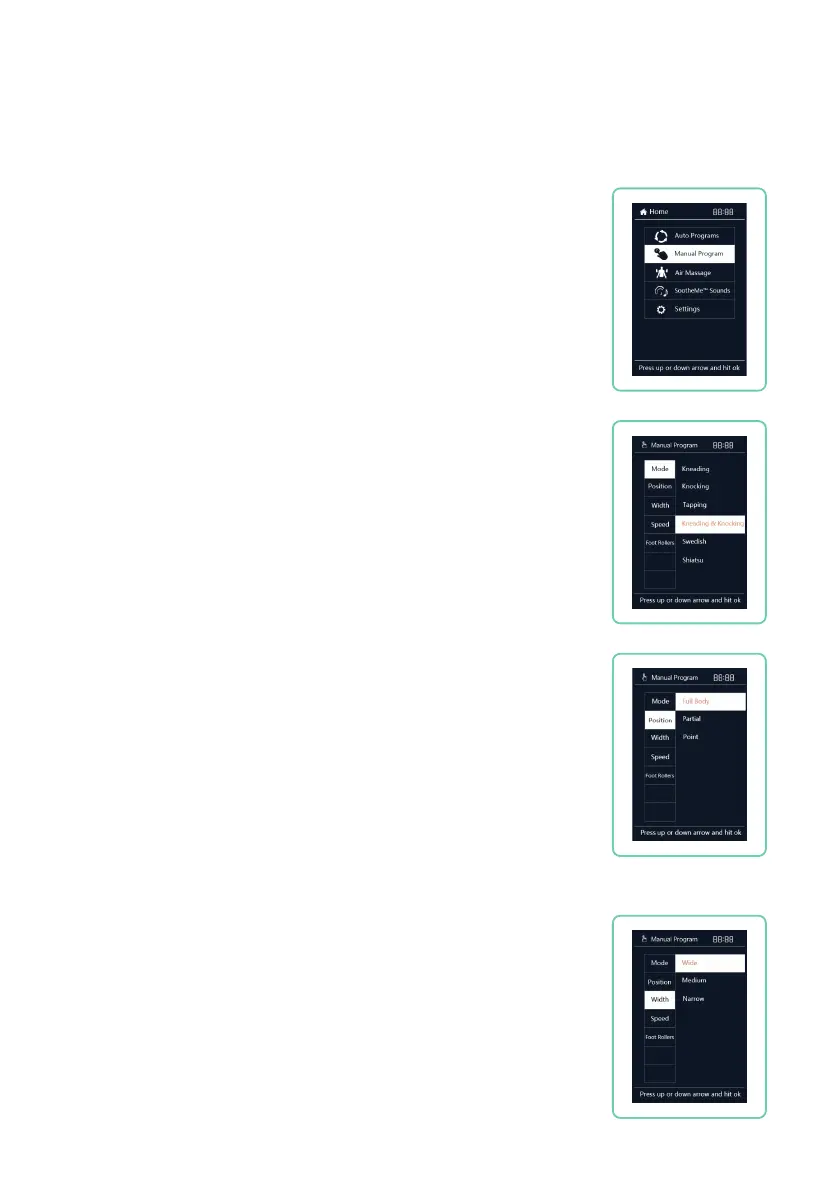
Press
HOME
button on remote control. Select Manual Program
from Menu display, then use up or down buttons to navigate
among: Mode, Position, Width, Speed and Foot Rollers.
Manual Programs
Back Massage Mode
Navigate to Mode, press right button, then use the up or down
button to select your desired mode: Kneading, Knocking, Tapping,
Kneading & Knocking, Swedish, or Shiatsu. Press OK button to
select mode.
Massage Position
Navigate to Position, press right button, then use the up or down
button to select your desired massage position: Full Back, Partial,
or Point. Press OK button to select position.
Full Body travels the entire length of the massage track.
Partial travels a few inches above and below current position.
Point stops the massage mechanism in current position.
Partial and Point location can be fine tuned using the arrow up or
arrow down buttons.
Back Node Width
Navigate to Width, press right button, then use the up or down
button to select your desired roller width: Wide, Medium, or
Narrow. Press OK button to select width. (Massage Width only
works in Tapping, Knocking, and Shiatsu techniques).











 To Next Page