Need help?
Do you have a question about the InFocus IN114BBST and is the answer not in the manual?
Details precautions for safe operation and installation of the projector.
Step-by-step guide for powering the projector on and off.
Instructions for inserting AAA batteries into the remote control.
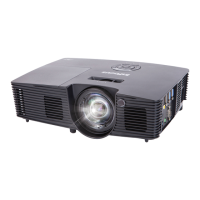
Identifies and describes projector parts visible from the front, back, and bottom.
Guides users through built-in help topics for resolving common projector issues.
Provides phone numbers and operating hours for InFocus technical support.
 General
| Resolution | SVGA (800 x 600) |
|---|---|
| Contrast Ratio | 20000:1 |
| Weight | 2.6 kg |
| Display Technology | DLP |
| Zoom Ratio | 1.1x |
| Projection Size | 30 - 300 inches |
| Lamp Life | 10000 hours (Eco Mode) |
| Inputs | HDMI, VGA, USB, Composite Video, Audio |
| Aspect Ratio | 4:3, 16:9 |


 To Next Page