7
Connecting a computer source
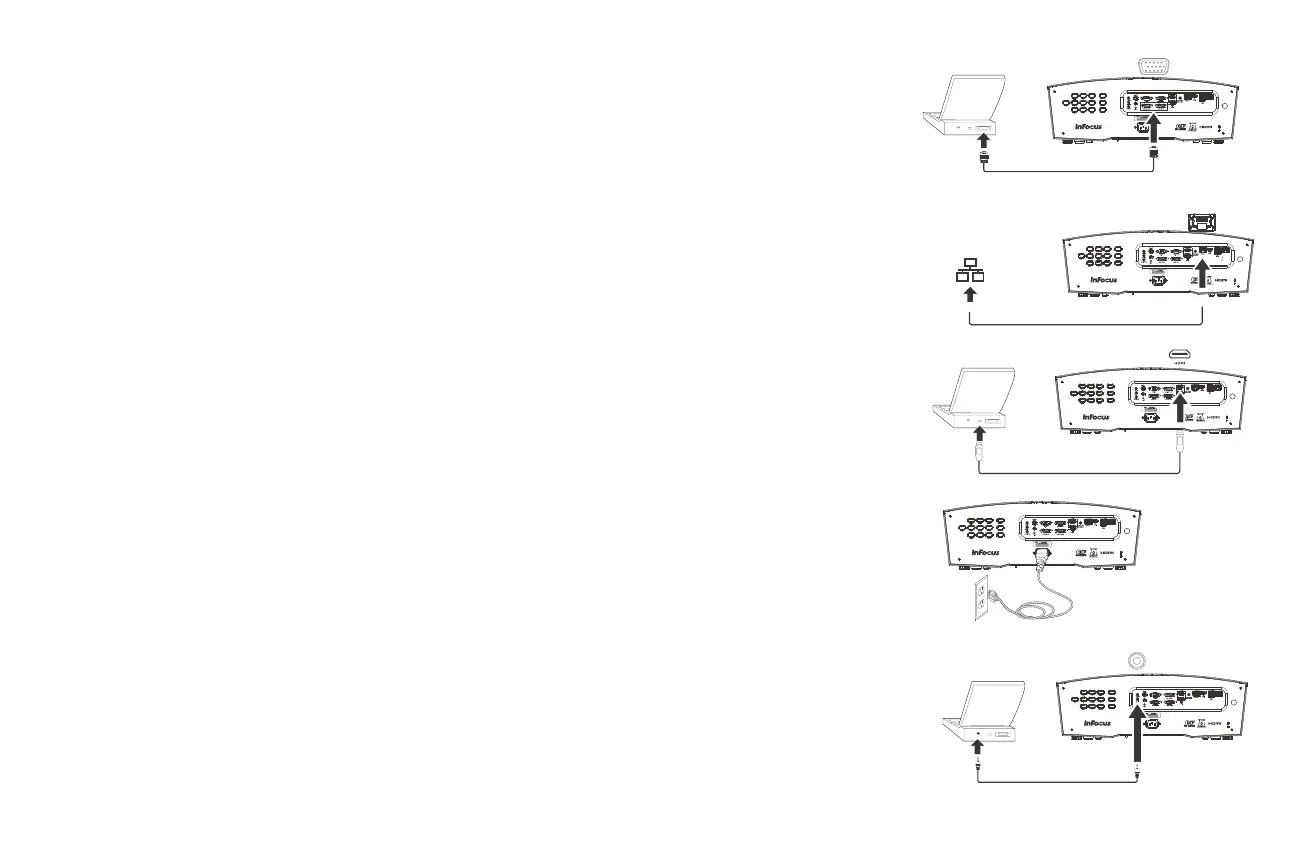
VGA connection
Connect one end of the provided computer cable to the Computer 1/Computer 2
connector on the projector and the other to the VGA connector on your
computer. If you are using a desktop computer, you will need to disconnect the
monitor cable from the computer’s video port first.
Ethernet connection
Ethernet connection for projector status and control.
HDMI connection
HDMI is a standard, uncompressed, all-digital audio/video interface. HDMI
provides an interface between sources, such as set-top boxes, DVD players, and
receivers and your projector. Plug an HDMI cable into the video-out connector on
the video device and into the HDMI connector on the projector.
Connecting power
Connect the black power cord to the Power connector on the rear of the
projector and to your electrical outlet. If the Power Saving Mode feature is either
set to Off or High, the Power LED on the Status Indicator Panel (page 11) blinks
green. If the Power Saving Mode feature is On, the Power LED is steady amber. By
default, this feature is off. You can change the setting, see
page 30. NOTE: Always
use the power cord that shipped with the projector.
Optional computer connections
To get sound from the projector, connect an audio cable (optional cable, not
included) to your computer and to the Audio 1/Audio 2 connector on the
projector. You may also need an adapter.
If you are using a desktop computer and want to see the image on your computer
screen as well as on the projection screen, connect to the desktop’s computer
cable to Computer 1 and the desktop’s monitor cable to the Monitor Out
connector on the projector.
FOCUS
ZOOM
SHIFT
Lightcast
LAN



 To Next Page