Engineering Information
5
Mounting
Installation
Before installing the Informa, power down the
control panel to which it is to be connected, by
removing both mains and battery power.
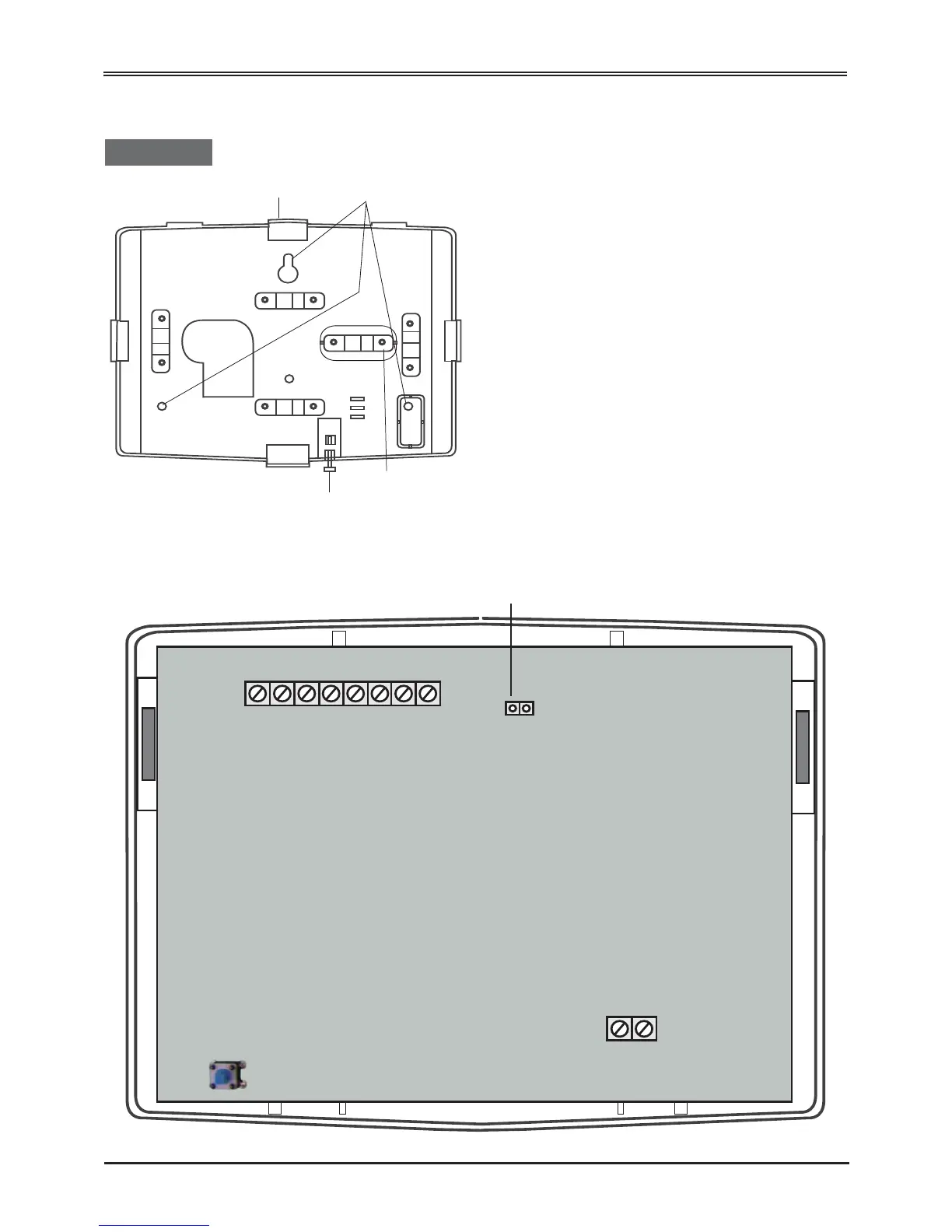
Break out the cable clamp strap from the back plate.
Fasten the Informa’s backplate securely to the
required position on a wall, using fixing points A, B
and C, and breaking out whichever cable entry is to
be used.
B: Ensure that wall fixing point C is fixed securely,
as this ensures tamper activation if the unit is forcibly
removed from the wall.
The cutouts are designed to take mini-trunking
directly. Run the cable from the alarm panel to the
Informa back plate as required.
Run the cable from the position of the telephone
master socket to the Informa back plate. Secure both
of these cables to the nearest cable clamp using the
cable clamp strap removed earlier. Use the two small
self-tapping screws to fasten the clamp strap across
the two cables.


 To Next Page