Launch Guide IS2216 / IS2220 / IS2220D
35
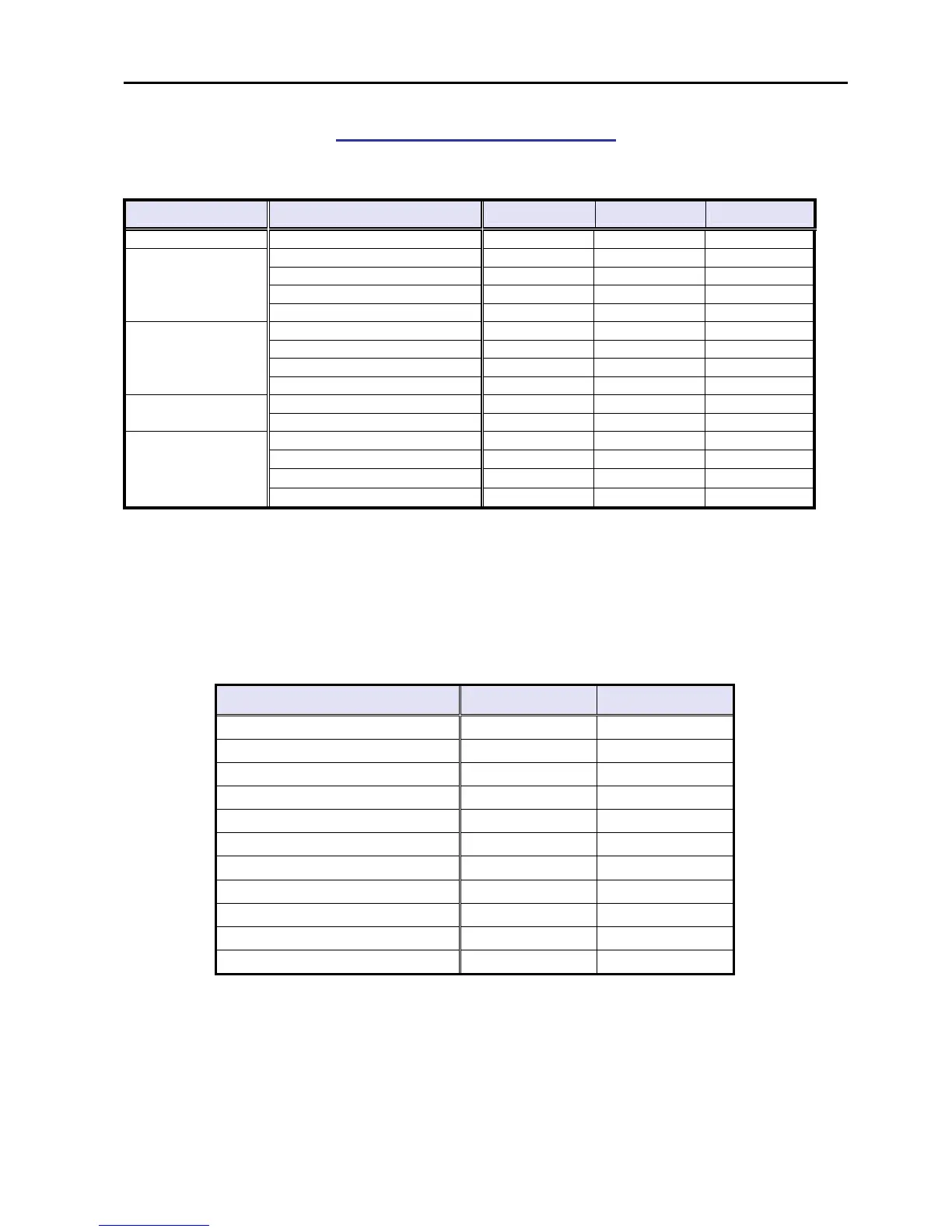
Supported Environments
Windows OS
OS Type PCL5e/6 RPCS PostScript3
Windows 9x/Me -
Y Y Y
WorkStation 4.0
Y *1 Y *1 Y *2
Server 4.0
Y *1 Y *1 Y *2
Server 4.0 TSE (*6)
Y *2 Y *2 Y *2
Windows NT
Server 4.0 Enterprise Edition
N N N
Professional
Y Y Y *3
Server (*6)
Y Y Y *3
Advanced Server (*6)
Y *4 Y *4 Y *3*4
Windows 2000
Datacenter Server
N N N
Professional
Y Y *5 Y *3
Windows XP
Home Edition
Y Y*5 Y*3
Standard
Y Y*7 Y
Enterprise
Y *4 Y*4*7 Y *3*4
Datacenter Edition
N N N
Windows Server
2003
Web Edition
N N N
*1…Service Pack 4 or later is required.
*2…Service Pack 6 or later is required.
*3…Adobe has not released a PS driver for Windows 2000 and XP. Only MS-PostScript driver is available and
PPD file for MS-PS is included in the Driver CD.
*4…Cluster Server configuration is not supported.
*5…RPCS driver does not support the “Fast User Switching” functions of Windows XP.
*6…See “Point & Print” and “Terminal Service & Citrix MetaFrame”
*7…In system environments with Windows Server 2003, the following printer driver functions have limitations.
RPCS Driver Function Administrator User
Custom Settings Icon
A B
Add/Change Custom Settings
A B
Manage Icons
A B
Printer Configuration
A B
Job Type
N/A N/A
Overlay
N/A N/A
Watermarks
A B
Save/Restore Settings
N/A N/A
User Settings
A B
Custom Paper Size
A B
Chaptering
N/A N/A
A: Authorized for changing and registering
B: Access to use only


 To Next Page