
 Need help?
Do you have a question about the Infrasonic QUARTET and is the answer not in the manual?
Details the advanced technological features and design principles of the QUARTET audio interface.
Lists the primary specifications and capabilities of the QUARTET audio interface.
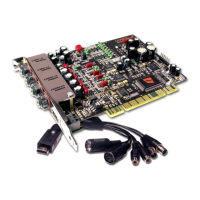
Details the physical layout and connectors of the QUARTET PCI audio interface card.
Describes the external I/O cable connections for Word Clock, S/PDIF, and MIDI.
Outlines the essential hardware and software prerequisites for installing the QUARTET.
Provides crucial steps for safely preparing the computer and handling the PCI card before installation.
Guides users through the physical process of installing the QUARTET PCI card into a motherboard slot.
Explains the features and controls within the Control Mixer section of the QUARTET software.
Details various settings and options available in the QUARTET's configuration panel.
Illustrates the matrix interface for routing signals between sources and destinations in the FREE Mixer.
Provides instructions on creating connections, adjusting levels, and using mute/solo functions in the FREE Mixer.
Demonstrates practical routing scenarios and configurations within the FREE Mixer.
Illustrates real-world scenarios for using the FREE Mixer to achieve specific audio routing setups.
Explains how balanced I/O settings interact with the FREE Mixer routing capabilities.
Details the configuration steps for using QUARTET with Cubase SX and Nuendo audio software.
Guides users on setting up the QUARTET as an ASIO device within Samplitude software.
Provides instructions for configuring QUARTET with SONAR using WDM/KS and ASIO modes.
Explains how to set up the QUARTET for use with the TRAKTOR 3 LE DJ software.
Details the installation process for Samplitude SE No. 9, including compatibility adjustments.
The INFRASONIC QUARTET is a multi-purpose pro audio interface card designed for home studio use, offering high-quality sound editing capabilities at a competitive price. It utilizes stable PCI bus technology, which is generally faster and more stable than Hot-plug systems like USB and FireWire. The QUARTET supports a 192 kHz ADC sample-rate with full 24-bit recording and features high-quality AD/DA converters with a 115dB S/N ratio. Its analog circuit components are designed to improve dynamic range by 10dB.
Key features of the QUARTET include a MIC preamp, direct instrument input, MIDI I/O, coaxial I/O, word clock I/O, and dual headphone amplifiers, aiming to provide professional-grade features, performance, and convenience to its users.
The QUARTET incorporates "US-PSB class I" (Ultra Stable Power Supply Block) OP-AMP based discrete circuits, which are designed to reduce output noise and power noise by over 10dB compared to general regulator type ICs. This technology ensures a very stable power flow. Mass storage capacitors and protection circuits are included to effectively manage electronic shock and noise, with detailed monitoring available through the drivers and OP-AMP circuitry.
A "Slow slope ON" function is also integrated, which slowly raises the voltage when the PC is turned on. This feature protects monitor speakers and headphones from "pop-noise" damage.
The IS (InfraSonic) Microphone Preamplifier is a low-noise transistor buffer with a high-quality microphone preamplifier (E.I.N: Equivalent input noise -127dBu). It boasts an E.I.N value 20dB lower than similar products and superior CMRR and frequency response, delivering professional recording studio-grade audio quality. PAD/GAIN jumpers allow compatibility with various microphone types, from condenser to low-level dynamic microphones. Like professional MIC preamplifiers, the QUARTET supports a Low-cut function and +48V phantom power.
A Noise Guard Bracket is included to protect the QUARTET from high-frequency digital noise commonly found inside computers, especially when multiple PCI cards are in close proximity.
The IS (InfraSonic) Line / Headphone Drivers in the analog output circuit eliminate the need to differentiate between line output and headphone output. The output jacks automatically detect whether stereo headphones or line outputs to speakers/mixers are connected. A noise shaping filter and high-grade film-capacitors in the output ports effectively block "Quantization noise" from the DACs (Digital Audio Converters), providing sound playback as close to reality as possible with a wide frequency response.
The QUARTET is equipped with 4x4 physical channels and supports virtual extended 4x4 channels, which can be easily mapped using the FREE (Flexible Routing Enhanced Engine) mixer. The FREE mixer allows connection between all parts of the hardware inputs/outputs, WDM, and ASIO drivers, enabling flexible mixing and routing. Depending on the setup, it can function as an input monitor, sub mixer, or a connection between drivers.
The V-Balanced I/O feature allows the QUARTET to be used as a balanced 2 In / 2 Out interface instead of an unbalanced 4 In / 4 Out. The I/O type can be selected with a simple click on the "VB IN" and/or "VB OUT" buttons in the driver's control panel. This driver offers not only an alternative I/O type but also provides easy control and flexibility over the number of I/O channels. Users can configure it for various setups, such as 4 unbalanced inputs x 2 balanced outputs, 2 balanced inputs x 4 unbalanced outputs, or 2 balanced inputs and outputs.
Before installing the QUARTET PCI card, users should ensure they meet the minimum system requirements: Intel Pentium 4 / AMD Athlon or equivalent CPU, a motherboard supporting Intel Pentium 4/AMD Athlon chipset, 1GB of RAM, one available PCI slot, and Microsoft Windows® XP, VISTA, or Windows 7 (32/64bit).
Preparation for hardware installation involves caution against electrical shock. The QUARTET PCI card is shipped in an anti-static plastic pouch and should not be opened until installation. Users should turn off the computer, remove the power cable, and open the computer cover. It is crucial to discharge static electricity by touching the computer case or a grounded object, or by using an anti-static wristband. When handling the card, only touch the guide or the edge, not the board or connector.
To install the PCI card, locate an empty PCI slot on the motherboard (typically white). If a faceplate or cover is present, remove it. Carefully pull the card from its package, grasp the edge, and firmly push it into the PCI slot until it is securely seated. Replace and tighten the screw. Finally, tighten the four screws and isolators of the I/O ports in a clockwise direction and close the computer case.
After hardware installation, the driver software must be installed. Users should have their original Windows installation disc ready, as it may be needed. It is also recommended to install recent chipset drivers and patches from the main-board manufacturer.
Upon turning on the computer, Windows will automatically detect the new device, and the "Found New Hardware Wizard" window will appear. Users should insert the provided CD or download the latest driver from www.infra-sonic.com. Open the driver folder and run the setup file (ISQUARTET_v.***.exe), following the on-screen instructions. Once the installation is complete, confirm that the INFRASONIC icon is visible in the system tray.
The control panel comprises two main sections: the Control Mixer window and the Free Mixer window. Users can switch between these windows by clicking the respective buttons on the lower right side of the control panel.
The FREE Mixer, or Flexible Routing Enhanced Engine Mixer, provides a graphical user interface for connecting hardware inputs/outputs, WDM, and ASIO drivers to each other. It can be used as an input monitor, sub mixer, or for connecting drivers.
The manual provides basic configuration examples for popular software applications.
Cubase and Nuendo: After launching Cubase SX, navigate to Device → Device Setup → VST Multitrack. Select "ASIO 2.2 – QUARTET" as the ASIO device. Apply and OK the settings.
Samplitude Device Setup: From the Samplitude Menu, go to Options → System → Audio System → Driver System → ASIO Device. Select "ASIO 2.2 – QUARTET" and click "OK".
SONAR: For SONAR, which supports both WDM and ASIO APIs, go to Options → Audio tab after launching. Match input and output drivers and restart SONAR.
TRAKTOR 3 LE: QUARTET is bundled with TRAKTOR 3 LE. After launching TRAKTOR 3 LE, go to preferences → Audio setup → Soundcard → Audio Device and select "ASIO 2.2 – QUARTET".
Samplitude SE No. 9 on Windows 7: Requires a specific installation method. Insert the CD, right-click the CD-Drive name in "My computer," and click "open" to prevent "Auto Run." Right-click "start.exe," select "Troubleshoot compatibility," then "Try recommended settings," and "Start the program." Finally, click "Next" to begin the regular program setup.
INFRASONIC and QUARTET are registered trademarks of SIMS Corp. Windows is a trademark of Microsoft Corporation. SIMS Corp. warrants this product to be free of defects in materials and workmanship for one year from the date of purchase, provided the product is owned by the original purchaser with proof of purchase from an authorized SIMS Corp. dealer. This warranty excludes power supplies and included cables that may become defective due to normal wear and tear.
For warranty service, the original purchaser or authorized dealer must fill out the support contact form at www.usbband.com. If repair is needed, shipment costs to and from SIMS Corp. and handling charges are borne by the purchaser. Returns without prepaid shipments are not accepted. A Return Authorization Number must be obtained from SIMS Corp. before shipping the unit back to SIMS Corp. headquarters in Seoul, Korea, in a protective package with a problem description and the RA number clearly written on the package.
If SIMS Corp. determines that repair is needed due to user misuse or regular wear, a fair repair or replacement fee will be assessed. The customer can choose to pay the fee and have the unit repaired or decline and have the unit returned un-repaired.
SIMS Corp. is not liable for consequential, special, indirect, or similar damages, including loss of profit or other commercial damage. SIMS Corp.'s liability for any damages will not exceed the price paid for the product. SIMS Corp. specifically disclaims all other expressed or implied warranties, including fitness for any particular purpose.
This device complies with Part 15 of the FCC Rules, meaning it may not cause harmful interference and must accept any interference received. Modifications not expressly approved by the party responsible for compliance could void the user's authority to operate the equipment. This equipment has been tested and found to comply with Class A digital device limits, designed to provide reasonable protection against harmful interference in a commercial environment. If operated in a residential area, it may cause harmful interference, requiring the user to correct it at their own expense. Consult an experienced radio/television technician for additional suggestions.
 General
| Channels | 4 |
|---|---|
| Mic Preamps | 4 |
| Bit Depth | 24-bit |
| Connectivity | USB 2.0 |
| Frequency Response | 20 Hz - 20 kHz |
| THD+N | 0.001% |
| Type | Audio Interface |
| Output Impedance | 100 Ω |
| Connectors | XLR, TRS |

 To Next Page