6.2. How to use FREE Mixer
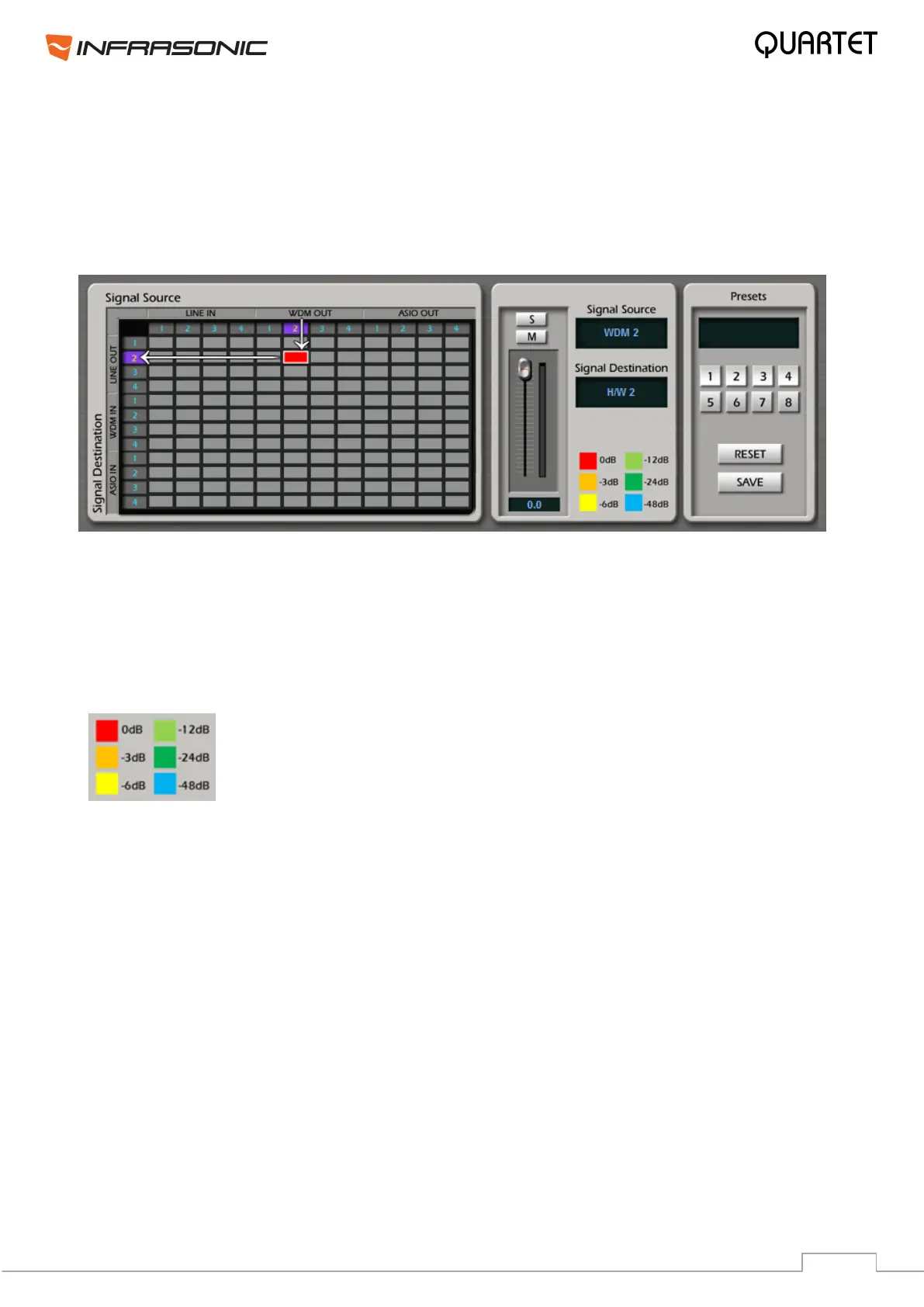
FREE Mixer creates connection between the sources and their destinations as in the patch
table of a digital mixer. You can adjust the levels, mute and solo signals in this window.
• Select the source signal from Signal Source row and the destination in Signal Destination
column. Odd numbers represent Left channels, while even numbers mean Right channels.
• Left click a grey square and a connection will be created as seen above. In this example
the right WDM output has been routed to the right channel of the analog output 1/2.
• Left click on an existing routing point removes the selected connection.
• Right click on an existing routing point enables solo and mute functions, also level
adjustment is possible, which is separated from the Master I/O sliders settings.
The color of the routing point changes upon adjusting the signal level
from red (0dB) to orange (-3dB), yellow (-6dB), light green (-12dB),
green (-24dB) and blue (-64dB).
• M: This button mutes the corresponding signal.
• S: This button mutes every signal except of the selected one.
• SAVE: After finishing all settings, click the SAVE button and select a preset number. After
clicking the selected preset number, your settings are stored in that preset and you can
recall them anytime.
• RESET: It resets the control panel routing to factory default settings.


 To Next Page