6. FREE Mixer
Flexible Routing Enhanced Engine Mixer is abbreviated to FREE Mixer. It allows connecting
every part of the Hardware in/outputs, WDM, ASIO drivers to each other and themselves. It
provides complete flexibility in an easy to use graphical user interface. According to setup, it
can be used as input monitor, sub mixer, connection between drivers or any purpose you
want.
6.1. Matrix Window
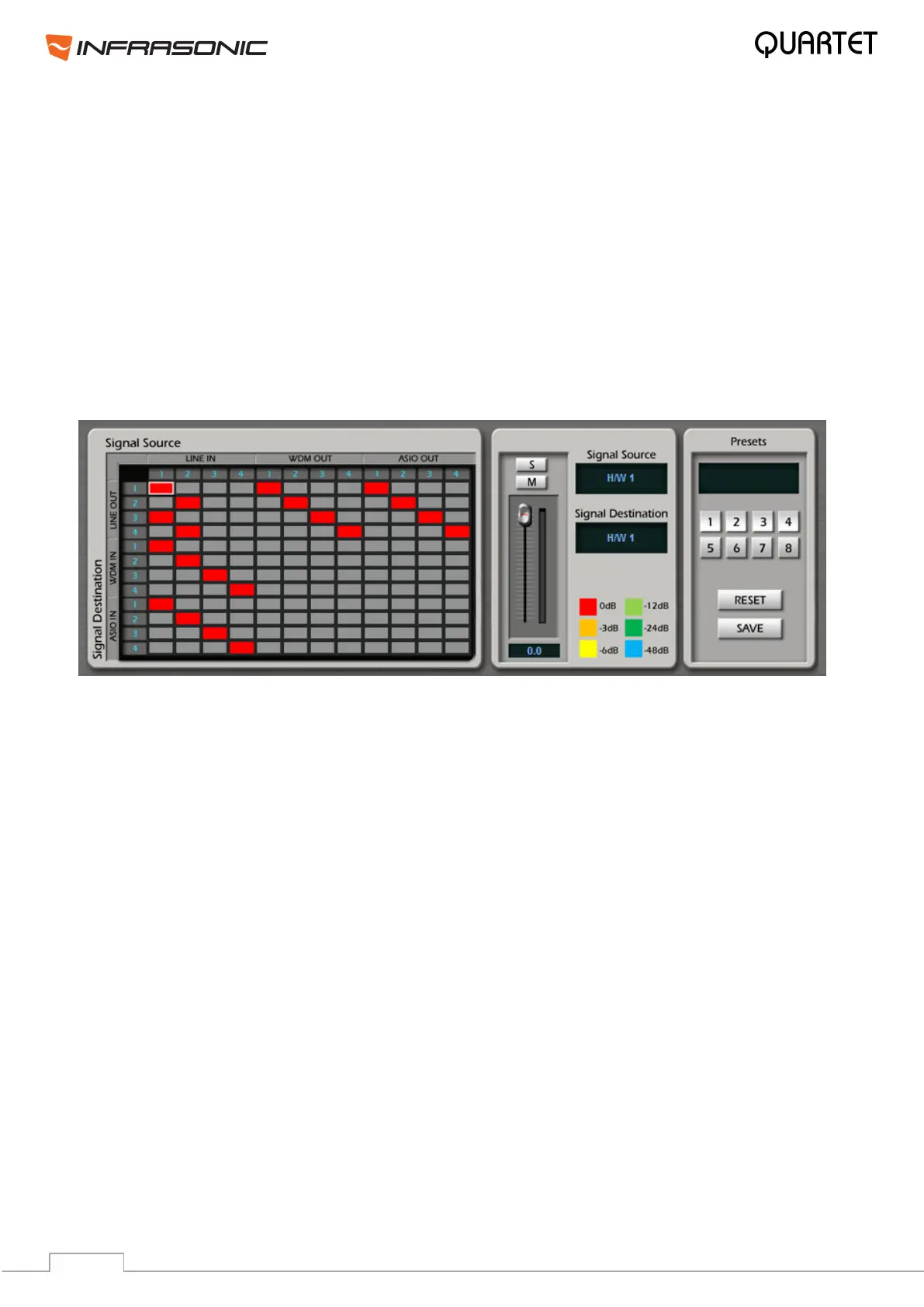
The Matrix window shows the connection between source drivers and destination drivers.
Two drivers can be connected by clicking the crossing point between the horizontal line and
the vertical line. In other words, they can be connected when you click the blank square
where two drivers meet together.
• Signal Source:
This part represents signal sources which are routed to different applications.
LINE IN: It stands for Quartet’s hardware inputs.
WDM OUT: It stands for WDM, MME or Direct Sound applications’ output such as Winamp
or Windows® Media player. Quartet provides two virtual channels besides of 2 real output
channels, hence it can send four output channels in total.
ASIO OUT: It stands for ASIO application’s outputs such as Cubase or Sonar. Quartet
allows 4 ASIO output channels in total.
• Signal Destination:
This part represents the destination of the routed signal sources.
LINE OUT: It stands for Quartet’s hardware outputs.
WDM IN: It stands for WDM, MME or Direct Sound applications’ input such as Sound
Forge or Vegas. Like WDM output, it provides two virtual input channels beside of 2 real
inputs.
ASIO IN: It stands for ASIO application’s inputs such as Cubase or Sonar. Quartet allows
4 ASIO input channels in total.
• Routing point: This is the colored square which is generated by clicking a meeting point
between Source and Destination. The color indicates the adjusted level of connection which
can be decreased down to -64dB.


 To Next Page