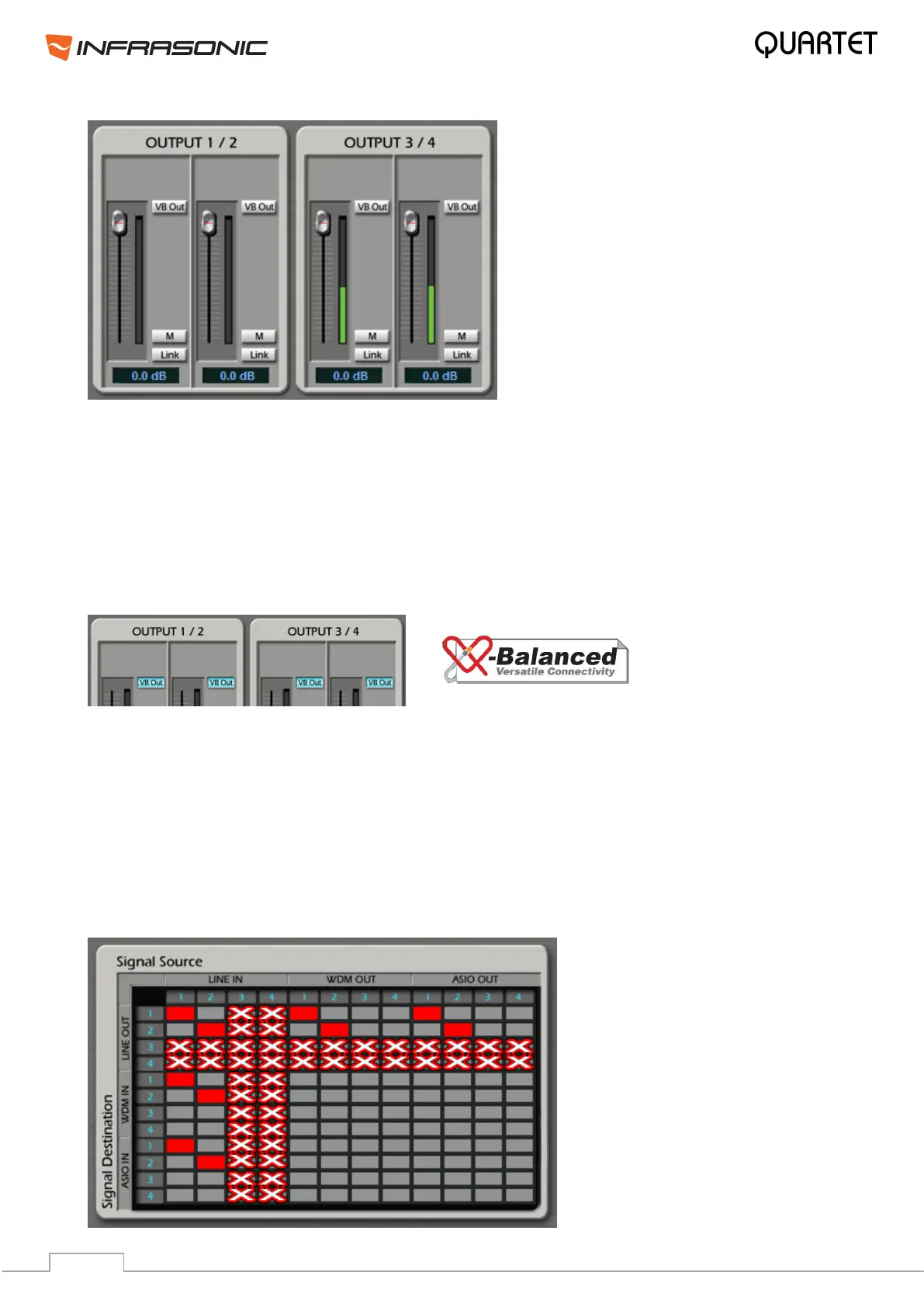
• Output Master faders: Display and change the output level for each source. The level
can be set using the mouse, mouse wheel, or cursor keys.
• M (mute): Select this button to mute individual output channels. Red, when selected.
• Link: Connects the output faders by twos and allows controlling them together. Purple,
when selected.
• VB Out: Enables Balanced Output for outputs 1/2 & 3/4.
• VB In/Out (Balanced Link):
By clicking the button, you can set your Quartet to a balanced 2-in/2-out interface from an
unbalanced 4-in/4-out interface. Depending on your working environment, you can freely
change the setting. This function is available from driver update (v.1.18.4 or later).
Please note, if you are using VB In or Out, only signals routed to Line In/Out 1/2 are
enabled, anything routed to Line In/Out channels 3/4 are disabled. For instance, if VB Out is
enabled, Output 1/2 becomes the balanced left channel and Output 3/4 becomes the
balanced right channel. Also in case of virtual balanced input, only line level signals are
allowed. Read more about this in chapter 6.5.


 To Next Page