Using the Scan Tool
ERASING DIAGNOSTIC TROUBLE CODES (DTCs)
3040c 51
1. If not connected already, connect the
Scan Tool to the vehicle's DLC. (If the
Scan Tool is already connected and
linked to the vehicle's computer,
proceed directly to step 3. If not,
continue to step 2.)
2. Perform the Code Retrieval procedure
as described on page 31.
To erase OBD2 DTCs: Wait until
the codes are displayed on the Scan
Tool’s LCD and then proceed to
step 3.
To erase OEM enhanced or ABS DTCs: Perform the Code
Retrieval procedure for OEM enhanced DTCs as described on
page 38 or for ABS DTCs as described on page 48. Wait until
the codes are displayed on the diagnostic tool’s LCD and then
proceed to step 3.
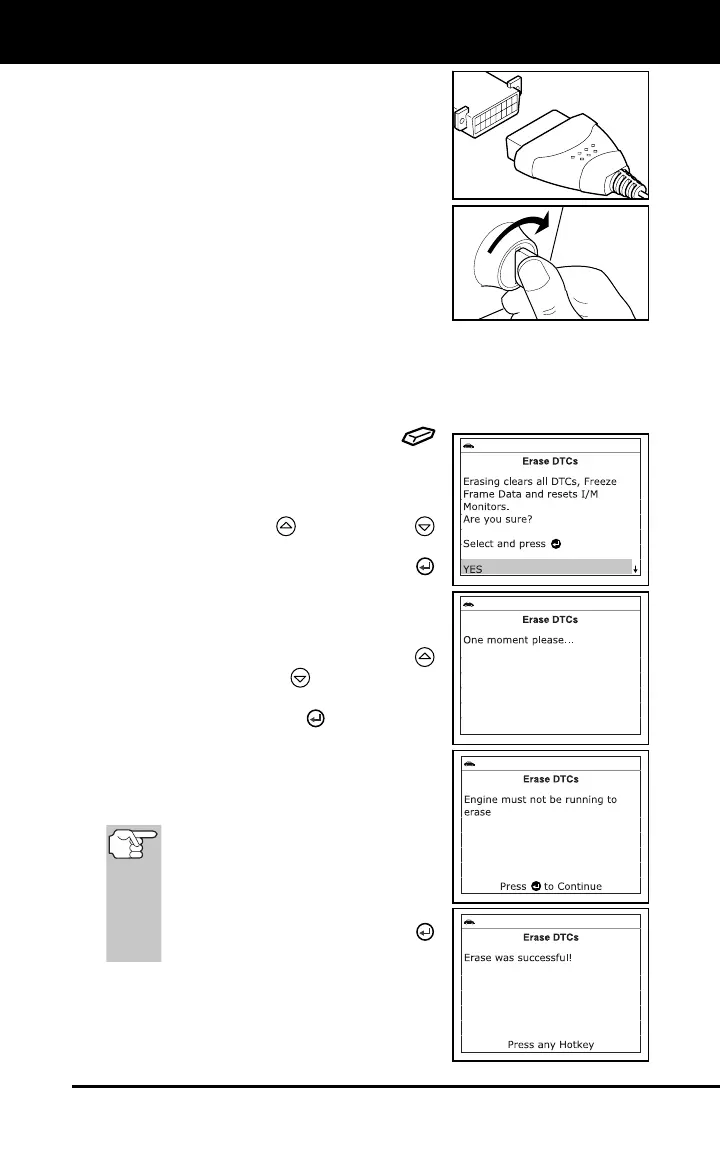
3. Press and release the ERASE
button. A confirmation message shows
on the display.
If you are sure you want to proceed,
use the UP
and DOWN
buttons, as necessary, to highlight
YES, then press the ENTER
button to erase DTCs from the
vehicle’s computer.
If you do not want to continue with
the erase process, use the UP
and DOWN
buttons, as
necessary, to highlight NO, then
press the ENTER
button to exit
the erase mode.
4. If you chose to erase DTCs, a “One
moment please…” message displays
while the erase function is in progress.
If the vehicle’s engine is running, an
advisory message shows on the
diagnostic tool’s display. Turn the
engine OFF, then turn the ignition
back to ON. DO NOT start the
engine. Press the ENTER
button to continue.
If the erase was successful, a
confirmation message shows on the
display. Press the M button to return
to the Main Menu.



 To Next Page